r/SteamDeckTricks • u/iamnokxi • Aug 30 '26
Setup Showoff Perfect setup for playing coop with my girlfriend 🎮
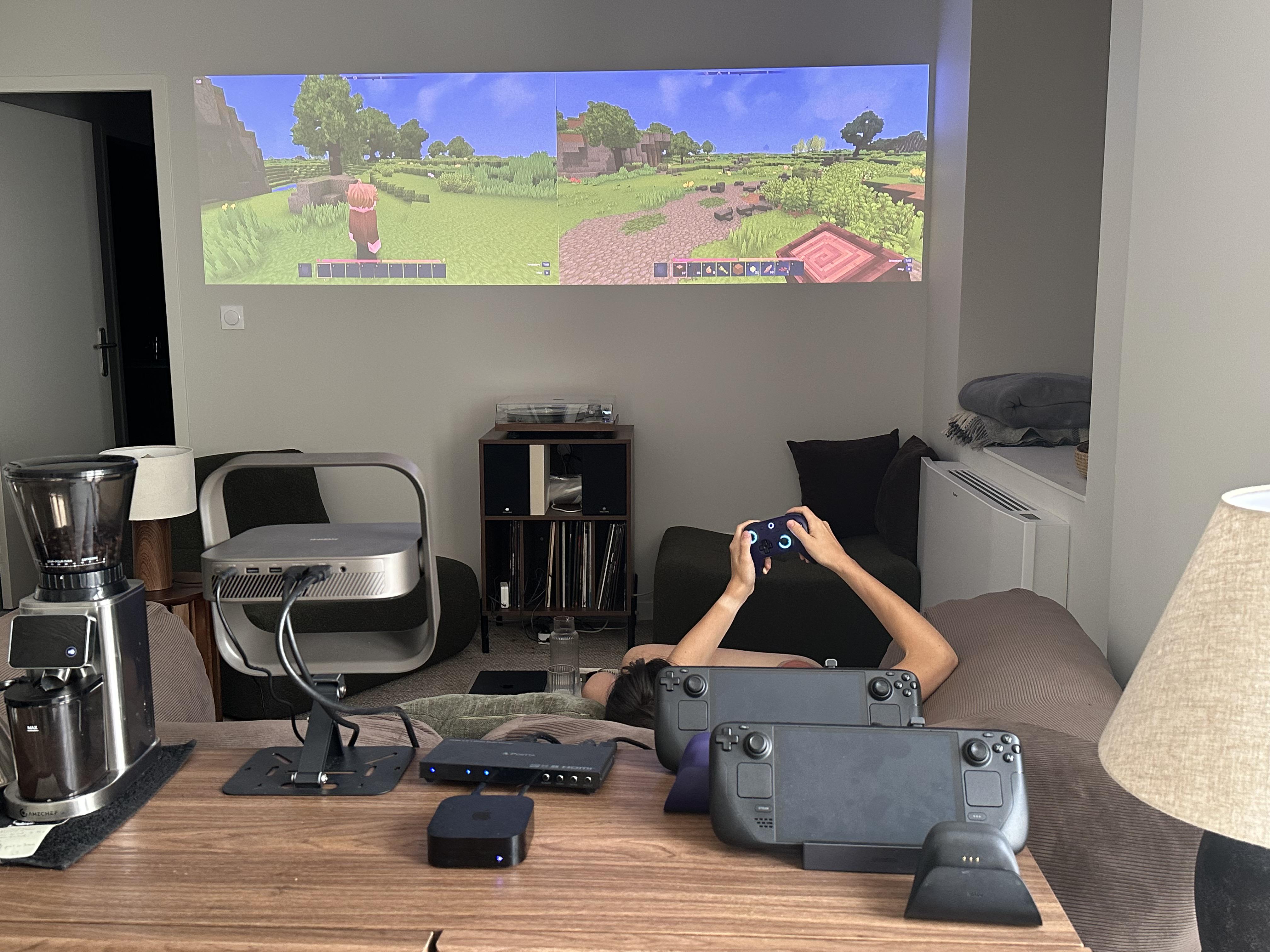
2.4k
Upvotes
I discovered an HDMI multi viewer to display two steamdecks simultaneously on the same screen
r/SteamDeckTricks • u/iamnokxi • Aug 30 '26
I discovered an HDMI multi viewer to display two steamdecks simultaneously on the same screen
r/SteamDeckTricks • u/kingspoken • May 05 '26
Enable HLS to view with audio, or disable this notification
Hey r/SteamDeckTricks!
I've been working on something I think this
community will appreciate — a fully automated
installer that sets up a complete offline WoW
private server on your Steam Deck using
AzerothCore and Docker.
Here's the trick part:
🎮 GAMING MODE SETUP
Added as a Non-Steam game via Konsole.
Launches the server, waits for world to
initialize, tells you when it's ready, then
AUTO-SHUTS DOWN the server the moment you
close WoW. Zero Desktop Mode after initial
setup.
⚙️ ONE COMMAND INSTALL
chmod +x install.sh && ./install.sh
That's it. The script handles everything:
✅ Detects SteamOS automatically
✅ Installs Docker via pacman
✅ Clones AzerothCore
✅ Installs AI bot and progression modules
✅ Creates your account
✅ Builds the Gaming Mode launcher
🔧 WHAT YOU GET
✅ Full WotLK 3.3.5a server — offline forever
✅ 500 AI bots for dungeons and raids
✅ Individual progression Vanilla → WotLK
✅ Living Auction House economy
✅ 60fps in Gaming Mode
✅ Launches in under 1 minute
Full install guide showing every step:
▶️ https://youtu.be/GVUVnngY93I
Free installer on GitHub:
📦 github.com/DadsMmoLab/dads-mmo-lab
Happy to answer any technical questions —
this community has already helped make the
installer dramatically better through bug
reports in the past 48 hours.
More games coming — same approach, same
one command install. Monster Hunter Frontier
is next. 🐉
r/SteamDeckTricks • u/CovertJam • Aug 23 '26
Fed up of placing my Steam Deck on the floor or balancing it on a crowded bedside table. Couldn’t find anything that provided a good secure hold without being ugly, so I designed my own.
Find it here, if you want.
Edit: Guys, before raising concerns, asking questions, or pointing out the glaring design flaw you’ve just discovered, please have a quick look through the photos and MakerWorld description first.
There’s a reasonable chance I also noticed it while designing the thing.
r/SteamDeckTricks • u/Normal_Accountant_40 • May 15 '25
Just got back from PAX East where I ran a 4-station booth — 2 laptops and 2 Steam Decks (one OLED, one LCD) — and honestly didn’t expect this, but the Decks completely outperformed the laptops when it came to pulling people in and getting them to play.
Here’s what I learned from running both Decks for 9+ hours a day across 4 days while hundreds of strangers played them:
I didn’t expect the Steam Decks to be the MVPs of the booth, but they absolutely were. They ran solid for 4 days straight, constantly drew people in, and helped me catch bugs and friction points I never would’ve seen otherwise.
If you’re demoing publicly or running long sessions, bring at least one Deck. Even just observing how people naturally use it will give you insight into your game’s real user experience.
Happy to answer anything about how I set it up or what I’d improve. Anyone else here ever run public demos with Decks?
r/SteamDeckTricks • u/joelnodxd • Apr 05 '22
This post will be updated constantly as new tips and/or tricks are found. Please read through before posting and use the appropriate flair if you do post. Bold links are deemed essential to new users, so you may want to check those out first.
Official Deck parts from iFixit (Fan, Joysticks, SSD, etc)
M.2 SSD models that should work (can be purchased from anywhere):
Follow this guide by u/CyrexArtwork or the official iFixit guide to install your new SSD correctly. Always remember to take your SD card out before opening your Deck!
These may not be completely up to date but give a good idea of what you can play before you get your Deck
Not necessarily 100% related to the Deck, but still cool/helpful enough to be featured here.
As of this update, Valve have made it considerably easier to change your boot animation. All you need to do is download one of these videos below and place it in:
~/.steam/root/config/uioverrides/movies/
Additionally, Boot Videos (now officially called Startup Movies) are now available in the Points Shop!
S means either Steam button or the Quick Access Menu (Three dots button). Either one can be used for the shortcut.
For more detailed information and even more tools that may not be listed here, visit r/SteamDeck's Steam Deck Enhanced FAQ.
r/SteamDeckTricks • u/cliophate • Aug 29 '22
r/SteamDeckTricks • u/subworx • Sep 25 '22
All of this happens in Desktop mode, of course.
For a handful of games, there are Linux native tools, like Scarab for Hollow Knight, hephaestus/modmanager (run hephaestus first) for Hades. They should work properly without additional setup.
Generally, adhere to the instructions coming with the mod, like file locations or other usage hints.
When unpacking the files on the Deck directly using "Ark", click the "Extract" button, then make sure "Preserve paths when extracting" is seletected in the options on the right, before clicking OK.
Manage, Browse local files.
/home/deck/.local/share/Steam/steamapps/common (or /run/media/mmcblk0p1/steamapps/common for MicroSD) and find the game directory there.Some mods patch the executable and many mod loaders only need to run once to setup everything if you found your final mod configuration. Here's how to run them.
Bottles from Discover store turned out to be the easiest way for me to launch the mod loader/tool. Launch Bottles and open the bottle for the game you want to mod.
/run/media/mmcblk0p1.Run Executable..., navigate to the mod loader or patcher and click Run. The tool should now run as usual.
Depending on the game's modding mechanism, the next step may be required in addition.
Several games initiate mod loading by adding a DLL (usually dinput8, d3dsomething) into the game directory, basing on the fact that Windows first loads DLLs in the same directory as the executable, then the ones in the system. Wine does not do this by default. Instead we have to tell Wine/Proton to override the builtin DLL with the "native" one we provide.
Easier way, thanks to majinavelli: Add a launch option to the game
WINEDLLOVERRIDES="dinput8.dll=n,b" %command%, replace dinput8.dll with the DLL(s) you want to load. For multiple DLLs, separate them with , like this "dinput8.dll,d3d9.dll=n,b". Also note capitalization is important.
I first tried this with Protontricks, but always received some cabextract error, so I chose this route instead which worked perfectly for Yakuza: Like A Dragon: Copy all mods and the loader to the game directory, Run Executable to run the mod loader/compiler, and add the included DLL to the overrides.
Additions, tips and whatever that I can add are welcome, just like someone posting the command to run an executable via wine in the correct prefix to add a shortcut/Non-Steam Game to the mod loader/manager before I have the time to search for this ;)
r/SteamDeckTricks • u/superzenki • Mar 31 '24
r/SteamDeckTricks • u/JaLanimal • Apr 07 '24
r/SteamDeckTricks • u/Toxiclinx01 • Nov 07 '22
r/SteamDeckTricks • u/jack-of-some • Mar 13 '24
r/SteamDeckTricks • u/[deleted] • Aug 01 '25
r/SteamDeckTricks • u/DeckWiz • Jan 27 '25
r/SteamDeckTricks • u/TiSoBr • Aug 01 '22
r/SteamDeckTricks • u/TiSoBr • Sep 20 '22
r/SteamDeckTricks • u/BusterRoughneck • Apr 02 '25
r/SteamDeckTricks • u/Some-Research-3099 • Feb 16 '25
r/SteamDeckTricks • u/joelnodxd • Apr 07 '22
r/SteamDeckTricks • u/jack-of-some • Mar 08 '24
Enable HLS to view with audio, or disable this notification
r/SteamDeckTricks • u/kingkulesza88 • Feb 22 '24
r/SteamDeckTricks • u/steve228uk • Oct 24 '22
r/SteamDeckTricks • u/hl3reconfirmed • Oct 10 '25
Hey y'all. After my weird crash out about my post getting deleted from r/Steam deck yesterday, there seemed to be a lot of interest in the game so here's a guide to getting it set up.
You may have to run the game once before following.
https://veniceunleashed.net/project-rome
Home/local/.share/steam/steamapps/common/Battlefield Bad Company 2
WINEDLLOVERRIDES="dinput8=n,b" %COMMAND%
That should be it. Run the game, log in and go to the server browser (matchmaking does not work). Remember to click search to populate the server browser.
If you don't have BC2 on steam, project Rome will work with the game from any source as long as it's fully updated. Your install location will be different and you'll have to force compatibility.
BC2 is abandonware at this point so, again, ANY source for the game will work.
r/SteamDeckTricks • u/ichhalt159753 • Jun 27 '25
Enable HLS to view with audio, or disable this notification
I love using not just games on the deck and adjusting desktop layout was a gamechanger. This has been said before, but for anyone who didn't know, this was BIG for me.
I just wish the on screen keyboard wouldn't be so slow, anyone got an tricks? I surely could type as fast as on my phone with double trackpads, but it's laggy and just can't keep up.
Anyways. Mouse and shift/tab/ctrl etc. Are 90% of what I need most of the time.
r/SteamDeckTricks • u/Khaotic_Kernel • Feb 21 '23
Useful Tools and Resources for getting your Steam Deck setup.
Table of Contents
r/SteamDeckTricks • u/Ironmonkey2020 • Mar 18 '24
Enable HLS to view with audio, or disable this notification


