r/linux • u/DesiOtaku • Mar 17 '26
Fluff An Update on Starting a Dental Practice using Linux (and why transitioning to Wayland will cost me $3000+)
Hi everyone, some people requested I post an update from my previous two posts:
Progress report: Starting a new (non-technology) company using only Linux
[Update] Starting a new (non-technology) company using only Linux
A number of things has happened since the last post to create a "perfect storm" of issues happening all at the same time. I apologize for this being a very long post but it will make much more sense if I first explain the context of what is going on.
First, I want to go over an important philosophy in my dental practice: keyboard and mouse should not be used chairside. I believe this for a large number of reasons including the fact that:
- You can't effectively do infection control with a keyboard or mouse. You can try to put a plastic cover over either one but it would make it either inoperable or extremely difficult to use
- It basically requires you to stop what you are doing, look away from the patient, do what you need to do on the computer, and then you forget what you were just doing with the patient.
- Things like charting (tooth, perio, etc.) requires an extra dental assistant. If you don't have one, you have to switch gloves every time you use the computer which not only costs money, but takes a fair amount of time each time you need to look up another x-ray.
The problem with "regular" touchscreens is that they tend to be capacitive touchscreens which generally don't work with gloves on. On top of that, we use a very corrosive chemical between patients that tend to destroy any electronic device that it touches.
My solution to this was to use a resistive touch screen. The nice thing about a resistive touch screen is that you can cover it with a clear plastic sheet, wear gloves, and it will still work. All you have to do is just replace the plastic sheet between each patient and you are good to go!
But then there is one other problem: I have three screens for each PC in the operatory. The way that X11 works, it sees the touchscreen input device as just an independent input and it maps it to the whole virtual screen. Therefore, what you touch on the actual touchscreen gets mapped to the two other screens (in my case, the y-axis gets multiplied by 3 for each kind of touch input). But there is a solution to this: xinput map-to-output. What it does is allows you to tell X11 to map a specific input to a specific screen / monitor. Therefore, as a startup script, it would run that command and now the inputs properly map out. Yay! (fun side note: if you try to actually run it via a startup script, it will give an error and you have to actually run env DISPLAY=:0 xinput map-to-output).
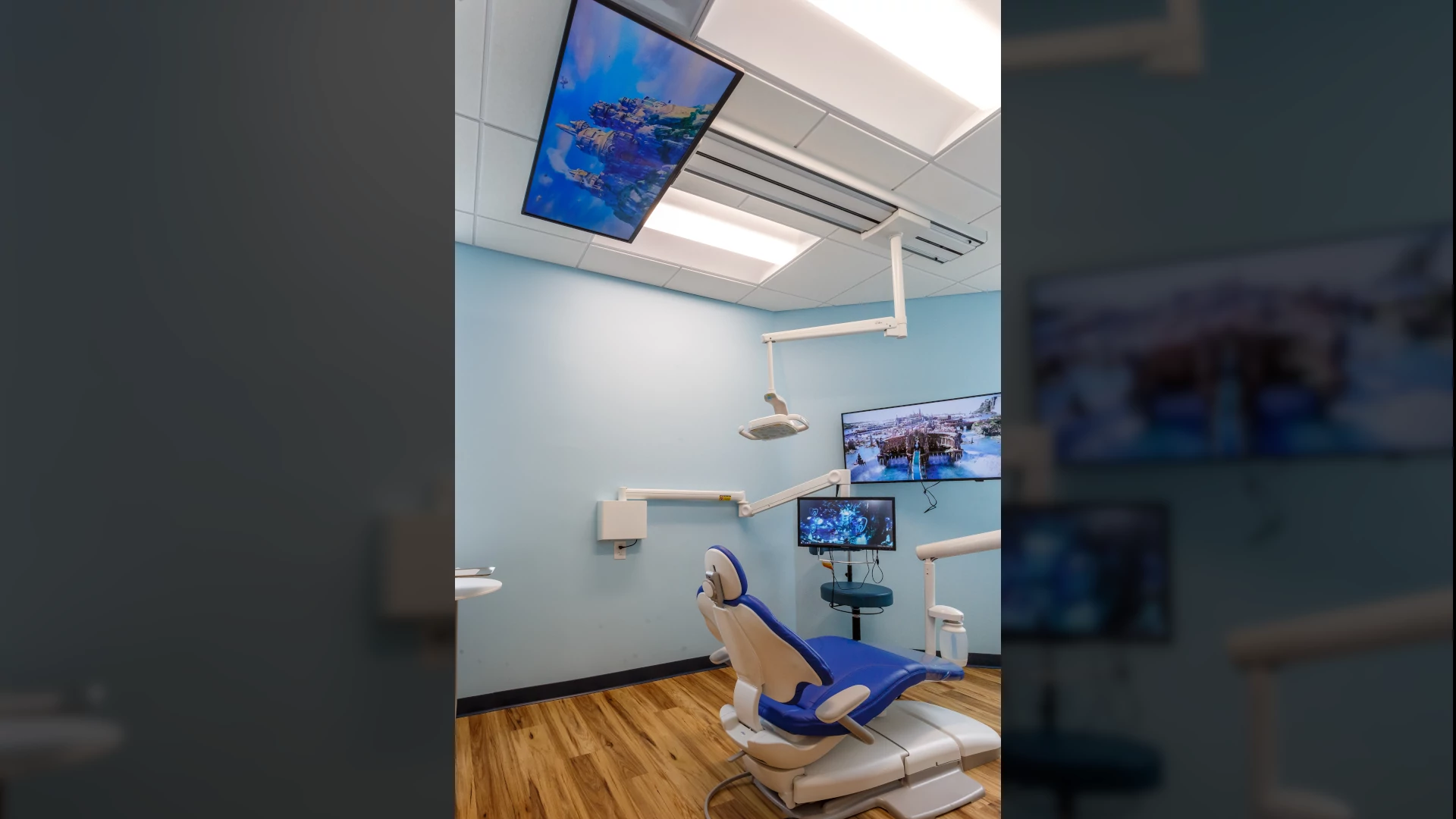
Also, for the actual EHR/PMS system I made, it uses Qt C++ and QML for everything. This made it easy for me to design a touch friendly UI/UX (since everything chairside is touchbased). So really, the "technology stack" is: Kubunu Linux, X11, Qt, QML and qmake. And for a while, this has worked out for me pretty well. Although I have added many features to the software, it still works in the same fundamental way; from 2021 to the present.
But things have changed from mid-2025. First of all, Qt 5 has EoL back in May 2025. Distros like Kubuntu, Fedora and even Debian have all moved from Qt / Plasma 5 to Qt / Plasma 6. At first, I thought I just have to port it all to Qt6 and be done. But then the KWin team announced that they will no longer support X11 sessions after 6.8. No big deal right? Qt will take care of that.... right? Well, yes.... and no.
First of all, you have to remember that xinput map-to-output is an X11 command. It does not work in Wayland. It is up to the Wayland compositor to figure out this mapping. No big deal right because Plasma / KWin already has something built-in to map touch input to the correct screen; no need for a startup script anymore. Except, it wasn't working with my touchscreens. I reported the "bug" to the KWin team who couldn't figure out why it wasn't mapping. I then had to do some research as how input is being handled in Wayland (hence the reason why I made this meme ). I submitted a bug report only to find out my ViewSonic resistive touch screens are dirty liars: it reports itself as a mouse rather than a touchscreen! (special thanks to Mr. Hutterer for his help in debugging this issue) Therefore, I had to look at a different vendor that will "tell the truth" when it reports itself.
After much searching, I did find one vendor that seemed to be the right match. Before I bought one, I actually talked to their technical staff who were rather insistent that their new "projective" capacitive touch screen not only works with gloves on, it can also survive thousands of sterilization wipes. The only catch: they are $1000 each! The previous ViewSonic ones were just $320 each and I already purchased them for all the operatories. So for at least 3 operatories, I will have to purchase at least 3 (if not 4) of them. The silver lining in all of this is that I wouldn't have to worry about a startup script (which was kind of a hack anyway), I don't have to use a plastic barrier (which sometimes made it hard to see), and these screens are much brighter than the ViewSonic ones. I already bought 1 of them just to make sure it works and yes, it does everything it says.
So I pretty much have two choices here: either buy a bunch of new monitors that will work more-or-less out of the box with Plasma/Kwin/Wayland, or spend a lot of time learning how udev-hid-bpf works to write a new touchscreen driver. I am going with the former option.
Sadly, the story doesn't really end there; but this post is already long enough as it is. But the other issues that I am working on are related to moving from Qt 5 -> Qt 6 and my crazy decision to also move to KDE Kirigami which is requiring a much bigger re-write than expected. I don't know if I should post that there or in the KDE or programming subreddit.
I don't want to make this post sound like a "Wayland sucks!" kind of post, but I did make this just to point out that moving to X11 -> Wayland isn't trivial for some people and does require some time and/or money.
2
u/YT__ Mar 18 '26
What about just having a dental assistant there to interface with the computer for you?