r/steamgrid • u/swagrabbit69 • Oct 25 '19
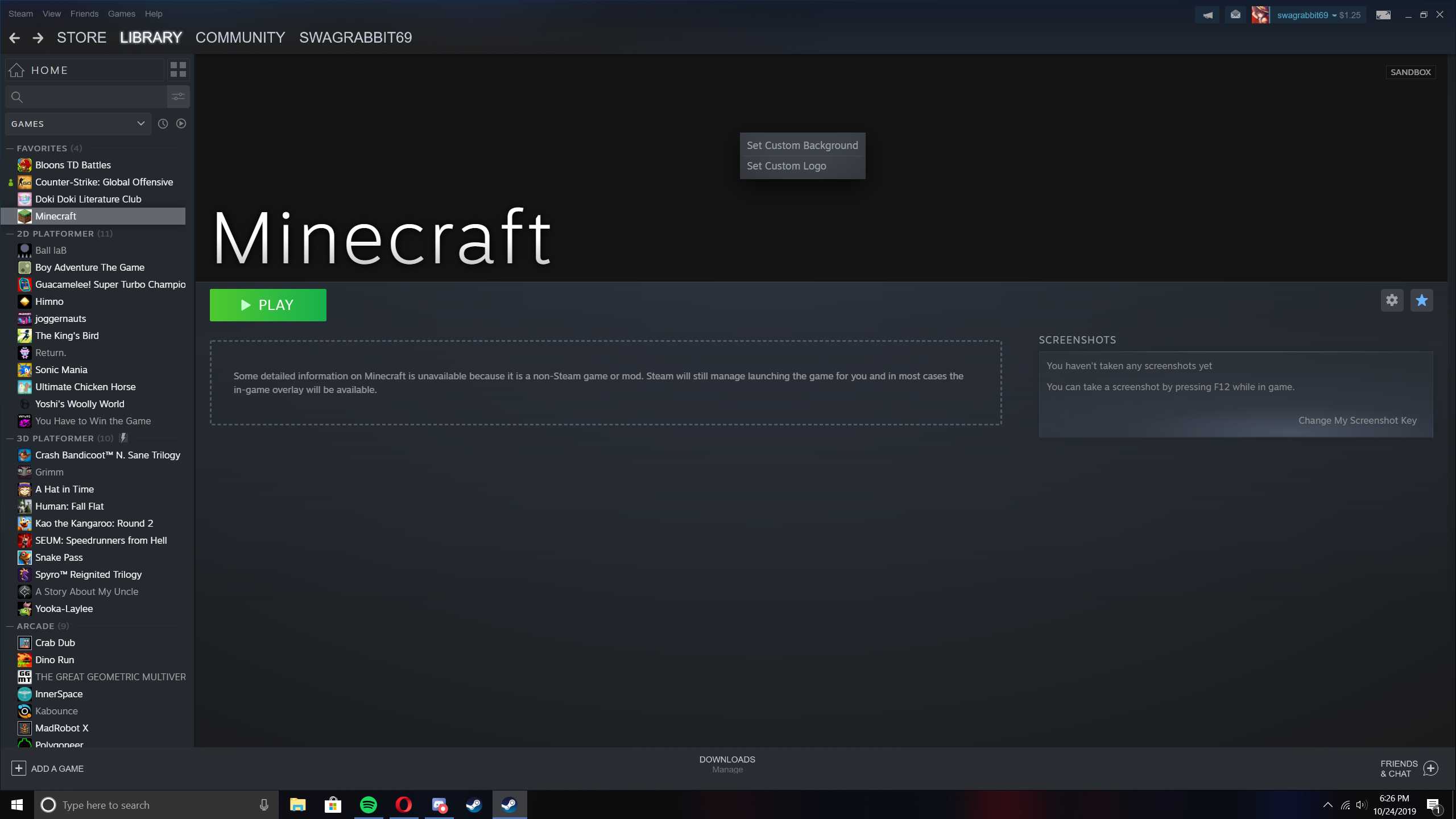
You can customize headers in the new steam update now.
8
u/Scout339 Oct 25 '19
What's the actual resolution for this banner? If I'm going to start making them I want them to be standardized.
Edit: Banner and logo standard resolution. Unless the logo doesn't have one?
9
Oct 25 '19 edited Dec 04 '19
[deleted]
1
u/Scout339 Oct 25 '19
MAD thanks my friend.
2
u/the_evilman Jan 25 '22
Wait what was?
2
u/Scout339 Jan 26 '22 edited Jan 26 '22
1920x960, I just remembered it.
Can also find that resolution on https://www.steamgriddb.com
2
2
u/joelnodxd Oct 25 '19
Have a look at www.steamgriddb.com, you're gonna have a fun time.
1
u/Scout339 Oct 25 '19 edited Oct 30 '19
This does not answer my question. I use SteamgridDB all the time.
1
u/joelnodxd Oct 25 '19
They do have banners on steamgriddb, have you checked?
1
7
8
7
u/PatrickJr Oct 25 '19
I can finally change the SFM one now!
2
u/swagrabbit69 Oct 25 '19
Yes, I plan on changing the gmod one, as it's too much blue for my tastes.
15
u/symbiotics Oct 25 '19
Here's a great place to find png logos for games, also some cool images for banners, Launchbox app has an online database where you can download logos and images from the games, since you can also show them in the app https://gamesdb.launchbox-app.com/
2
u/RaumEnde Oct 25 '19
Is the naming similar to the cover format?
I can't set them through steam itelf but placing <appid>p.png in $STEAM/userdata/<id>/config/grid works for me.
2
3
3
u/Nacery Oct 25 '19
You can also move the original logo if you put custom logo first then edit it's position and then delete it. This is useful for games that already have steam logo and banner but didn't positioned it well (like the Yakuza 0 one)
2
u/Luc4_Blight Oct 25 '19
You don't need to put a custom logo and delete it to adjust the original logo positions.
1
14
u/Decadence04 Oct 25 '19
This library update is probably the best one yet. We've got profile customization, it's good to see we're able to personalize our libraries now too.
4
Oct 25 '19
I've been waiting for ages to have a nice looking centralized library, and now with proton on linux I've added pretty much all of my installed games to the steam library.
21
u/jaxspider Oct 25 '19
/r/SteamBanner will love this.
12
u/lefti4life Oct 25 '19
/r/steambanners should just be combined with /r/steamgrid
2
u/jaxspider Oct 25 '19
/u/Jinx_01 & /u/doZennn the only two active mods here in /r/steamgrid, have remained silent / have not expressed any opinion on merging / integrating the two subreddits.
1
u/Lemm Mod Oct 25 '19
How mergable are subreddits? Like what could happen with everything submitted?
2
u/jaxspider Oct 25 '19
submitted?
We'd just shut that one down, and allow [b] banners to be posted here. That's it.
2
16
13
14
u/Lopoi Oct 25 '19
This is amazing, can the be animated too?
17
3
34
3
Oct 25 '19
How did you do it?
6
u/WaterBlad64 Oct 25 '19
It's a feature added to the latest beta client update.
2
u/slarkymalarkey Oct 25 '19 edited Oct 25 '19
Is it only for non steam games? My client update changelog mentioned it but I'm still not able to right click the headers.
Edit: Got it after another update
1
Oct 25 '19
How do I know if I have the latest beta client update
2
u/WaterBlad64 Oct 25 '19
Go to the menu bar (it's on the top left corner of the window), click "Steam" and click "Check for Steam Client Updates" in the drop down menu.
2
22
u/swagrabbit69 Oct 25 '19
After I added a custom banner for this game: https://i.imgur.com/qvDu75k.png

5
u/megablackk1d Oct 25 '19
Awesome do you know the correct resolution by any chance?
16
u/swagrabbit69 Oct 25 '19
Yes, it is 1920x620.
6
u/UnshavenBox94 Oct 25 '19
Isn't there 2 resolutions?
I remember Valve saying something about 1 res would be good enough for now since most people have at least 1080p but in the future more and more people will have 4K and stuff like that so the 1929x620 banners will not look as good on those. Or something like that
8
u/doZennn Mod Oct 25 '19
You're correct, 1920x620 & 3840x1240.
Quote from the from the Steamworks docs: https://partner.steamgames.com/doc/store/libraryassets#2Size: 1920px x 620px PNG, or 3840px x 1240px (the higher res version will be required in the future)5
u/UnderscoreDasher Oct 25 '19
To be fair all the "4k resolution assets" is something not even devs who did update their game art are doing yet. Even their vertical covers aren't in 600x900, for example.
2
u/UnshavenBox94 Oct 25 '19
I'm guessing going forward that it's something that they are going to do? Especially because in some case I doubt they have the original assets to make stuff like that?
5
u/BetterTax Oct 25 '19
someone knows where the steam images are pulled from? I want to pull the steam header + logo for my Uplay Asassin's Creed games.
Maybe there's a way to trick the server to download them?
4
u/spaceman619 Oct 25 '19
You can get them from steamdb.info
Search for the game, then they're at the bottom of the "Information Section" called logo.jpg and hero. jpg
5
u/swagrabbit69 Oct 25 '19
they're in Steam\appcache\librarycache and are labelled with their game id's
2
1
2
u/TheLoneController Nov 13 '19
It sucks that it cuts off part of the banner though. Like if you go into the folder where poster/banner/logo art is stored, and look at a banner in full, then compare it to the one viewed in steam, most of it is cut off.