r/nbn • u/Pommster • 10h ago
Upload over-provisioning

18
Upvotes
Oh look, over-provisioning of upload has started.
Please provide some key information when asking a question.
1) What technology are you on (FTTP, FTTN, FTTC, FTTB, HFC, FW)
2) What is your service class (1 to 34). Check here https://www.aussiebroadband.com.au/network/connection-insights/
3) How are you connected to your modem / router? WiFi or Ethernet. You should test with your device on Ethernet. If your connection is poor on WiFi but good on Ethernet, then it's a WiFi issue, not an NBN issue.
4) Who is your provider (e.g. Telstra, Optus, TPG, Aussie Broadband, etc)
5) What brand and model is your modem / router? If you're not sure, take a picture of it and upload it to imgur or similar (don't upload it as part of your post)
6) Describe your problem, and what steps you have tried.
If you're NOT on FTTP, you may be eligible for an upgrade to the far superior FTTP.
https://www.nbnco.com.au/connect-home-or-business/check-your-address
See what NBN types are available in your suburb, and when there might be upgrades. https://nbn.lukeprior.com/
Aussie Broadband provide a great tool to determine your service class and technology type, and what that means:
You almost certainly don't need the fastest internet plan. Generally start with a slower plan, and if you are happy, then all good. If you are finding it slow you can always upgrade. You should also check if it's your internet (NBN) or internal network (e.g. WiFi) that is slow. A faster plan might not help if you internal network is the problem.
Beware of plans with very slow (5 or 10mbit) upload speeds. These are legacy plans left over from the old HFC/Cable days. If you do have one of these legacy plans, you should think about upgrading.
WiFi is subject to interference from all kinds of sources. It slows down through walls, congestion from neighbours, etc will slow it down, and can cause issues. It's also a shared medium, which means that all your devices share the bandwidth, so lots of devices operating at once means slower speeds for devices.
Where practical use Ethernet to connect devices. Ethernet is more reliable and lower latency. While some WiFi claims to be faster than Ethernet, that is the cumulative total, not the rate to a single device. Even the latest WiFi6 is only approaching Ethernet speed, and that is only when there is no other traffic on the wireless spectrum - including Bluetooth and your Microwave!
There are some cases where WiFi is better (e.g. TV's with 100Mbps ports that you want to stream very high bit rate to from local sources), but almost always Ethernet is better if available. The down side is it's not always possible to run Ethernet (e.g. rentals), and not every devices has Ethernet ports (e.g. phones, tablets).
If your WiFi isn't fast enough, consider getting a mesh network. This provides multiple access points (typically 3) so you can get better coverage. If practical connect each mesh point via Ethernet (wired backhaul). Ethernet backhaul has the same advantages as connected devices by ethernet.
WiFi can be on 2.4GHz, 5GHz or 6GHz. Most devices work on 2.4GHz. Lots also work on 5GHz as well. The newest ones use 6GHz in addition to 2.4 and 5GHz.
2.4GHz has the best range, but lowest speed, and the most congested.
5GHz is shorter range, and has a higher speed because there's less congestion due to the shorter range
6GHz is extremely short range (it does not penetrate walls well) but it is designed to work in parallel with the 5GHz signal to provide the fastest speeds possible.
When buying a new wireless device, you should look for one branded 'WiFi 6'(802.11ax) or the newest standard, 'WiFi 7'(802.11be). The previous standard was called '802.11ac' or WiFi 5. These are usually cheaper, but in most situations are perfectly capable.
I keep seeing a bunch of posts about people churning to save money. Here's the wholesale ex-tax price that your ISP is paying to connect to the NBN network. This is NOT including IP traffic, APNIC fees, backhaul, staff, support, infrastructure like routers and switches, and space in a Data centre.
Link to full pricelist: https://www.nbnco.com.au/content/dam/nbn/documents/sell/sau/FY27-Tariff-List-v1.0%E2%80%93010526.pdf.coredownload.pdf
Here's the planned price increases, too: (Updated 2026-09-20)
If you look at that, you'll see that you're paying, on average, $20 for your ISP to provide everything APART from the connection to your place. Support, Internet, Routing, Redundancy, infrastructure, etc.
Don't churn to an ISP that is losing money. You'll never end up happy, or you'll just be churning again in a few months time.
Yes, I am a NBN provider. No I'm not telling you which one.
r/nbn • u/Pommster • 10h ago
Oh look, over-provisioning of upload has started.
r/nbn • u/Ferdimage • 12h ago
We are just about to move into our first home and I just wanted confirm that NBN is also available to the other wall socket even if it doesnt have an NBN sticker on it.
Thanks
r/nbn • u/Damosgreat123 • 9h ago
In what world can a company increase my budgeted monthly bill without notice!? This is absurd. #TPG

Hello everyone,
I'm trying to help a family member set up their internet. The internet provider has confirmed the connection is on. I assumed the NBN box would have something to plug the CAT5e cable into but I haven't seen it, so I've plugged it into the wall. The internet still isn't working.
I have the distinct sense I'm being an idiot and missing something obvious. Any advice?
r/nbn • u/CypherAus • 21h ago
Looking at a WiFi 7 router, here is the spec
https://docs.gl-inet.com/router/en/4/user_guide/gl-be14000/
Seems good value and reasonably featured, it has an AU model.
Thanks for any advise/experience.
r/nbn • u/HonesDon • 19h ago
Just received a promo off from Optus to earn 34,000 points1 when you sign up to an Optus Home internet Promo Plan.
Has anyone done this? I sign up to new plans every 6 months so if it isn’t great, I’m going to be changing anyways.
Details below from the email:
From streaming and gaming to working from home and everyday browsing, Optus has a home internet plan that helps keep your household connected.
Access fast internet speeds for $69/month for 6 months (then $109/month or as notified) with Optus Promo nbn® Plans.
Wait, there’s more. The plan also comes with:
34,000 points when you stay connected for at least 3 months1 – That’s points worth $170 Flybuys Dollars^.
$10/month streaming credit to use on favourite subscriptions through SubHub.3
500/43Mbps (FTTP/HFC) for Promo Plus plan or 100/18Mbps (FTTN/B/C) for Promo plan, typical busy period speeds (7pm-11pm). Refer to Optus’ nbn fact sheets for details.
Unlimited data.
BYO modem or high-performance modem option available.
Month-to-month plans.
Sign up by Thu 12 Nov 2026 and remember to provide your Flybuys member number at sign up.
Min cost $375 with modem or $69 BYO modem. New services ordered via Flybuys x Optus portal only. The service must stay connected for at least 3 months to get the points offer.1 Promo plans available until Thu 12 Nov 2026. Flybuys points available until withdrawn. Approved customers only. Modem and other factors may impact speed. Optus Fair Go Policy applies. Terms and eligible criteria apply.
Want a WiFi modem too?
Ultra WiFi Modem
Sign up to Optus Promo nbn® plans with the modem option and enjoy fast internet speeds for $69/month for 6 months (then $109/month or as notified).
The plan also provides month-to-month flexibility.
Get all the same inclusions and points you love plus an Ultra WiFi Modem (Gen 2) for $0 when you stay for 24 months, packed with the features below:
WiFi 6 technology.
Built for high-speed internet.
Connect up to 128 devices.
More reliable with 4G backup.4
Free delivery in 1-5 days from dispatch.
Sign up now
Min cost $375 if you cancel after your first month. New services ordered via Flybuys x Optus portal only. The service must stay connected for at least 3 months to get the points offer.1 Promo plans available until Thu 12 Nov 2026. Flybuys points available until withdrawn. Approved customers only. Modem and other factors may impact speed. Optus Fair Go Policy applies. Terms and eligible criteria apply.
Flybuys card and wallet
How to earn points
To be eligible to receive your points, enter your Flybuys number 6008 XXXX XXXX 7019 when you sign up.
You can also find it on the back of your Flybuys card, in the Flybuys app, or under Account Details online.
1 New Service points offer
New Service Flybuys points Offer available for approved consumer and business (excl. Fleet) customers, residing in Australia, who are a current Flybuys member, who sign up via the Flybuys/Optus portal, as a new service to:
Optus nbn Internet Plans: Basic (22,000 points); Everyday (27,000 points); Fast (30,000 points); Ultrafast (36,000 points) nbn plans; or
4G Home Internet Plans: 4G Internet Unlimited M2M (18,000 points), 4G Internet Unlimited 24M (18,000 points) plan; or
5G Internet Plans: 5G Internet Everyday (20,000 points), 5G Internet Everyday Fast (22,000 points), 5G Internet Everyday Entertainer Fast (30,000 points) plan; or
Promo Plans: Available to eligible customers who join Optus between Wed 7 Oct and Thu 12 Nov 2026 and sign up to the Optus Promo nbn or Promo Plus nbn plan (34,000 points) or Optus Promo 5G Plan (26,000 points).
Must stay connected for 3 months to be eligible to receive points (otherwise points are forfeited). Points will be applied to Flybuys account 3 months from connection (for Optus nbn Internet Plans), or from activation (for all other plans). New service Flybuys points offer, not available with any other offers, unless specified. Flybuys points are subject to the Flybuys terms and conditions. Flybuys number to be provided upon plan selection.
Flybuys' privacy policy applies. Plan cancellation fees may apply. Flybuys points and Flybuys Dollars have no cash or monetary value. Offers available until withdrawn. Flybuys and Optus will provide you with reasonable notice if there are any changes to this offer.
2 Promo Plan Introductory Offer
$40 per month off Optus nbn and 5G Promo Internet Plans over 6 months: If you sign up to a new eligible Optus nbn or 5G Promo plan, you will receive $40 off your plan access fee per month, for the first 6 months, and then pay the standard in-market plan fee thereafter. This is available to consumer and business customers with a valid ABN/ACN only. Excludes recontracts and rate plan changes. The offer is not available with any other offer, unless specified. The discount is forfeited if you recontract, change, or cancel your Optus nbn or 5G Promo Internet plan. Promo plan available until Thu 12 Nov 2026.
3 $10 SubHub credit
Eligible Optus internet plans include a SubHub Discount (available via Optus SubHub platform). Eligible customers must have an active SubHub account with paid subscription costs greater than $0/month to receive ongoing SubHub credit up to $10/month maximum, depending on total of customers’ paid subscription costs (any difference between the total costs and $10 is forfeited). Credit will commence when your Eligible Optus internet service is active and continues each month you remain on your eligible plan. Credit forfeited if there are no paid subscriptions via SubHub in a particular month, if you cancel, move to an ineligible plan, or recontract your plan. Limited to 1 SubHub credit/eligible plan.
4 Optus Ultra Wi-Fi Modem and 4G backup
4G backup requires Optus 4G coverage in your address. 4G backup speeds may vary and are limited to 25/5Mbps. Optus will cover the cost of the modem ($306) if you remain connected for 24 months (Optus will cover $12.75 for each month you stay connected). If you cancel before 24 months, you'll need to pay out any remaining cost of the modem, e.g. if you cancelled with 12 months remaining, you'd need to pay $153 ($12.75/month x 12 months remaining). You won’t receive a pro-rata refund for the remainder of your payment cycle when you cancel. There are no other plan cancellation fees.
Self-supplied Modem
If you take up the option to bring your own modem (self-supplied modem) you acknowledge and agree that a phone service is not supported with this option, which means you won’t have access to a landline home phone service that you can use to make or receive calls or contact emergency services like 000. It’s your responsibility to ensure your self-supplied modem is nbn compatible and can be used with the Optus nbn Internet Service. Some features such as network features and equipment like the Optus supplied Boosters may not work with your self-supplied modem. The 4G back up service that is provided with the Optus Ultra Wi-Fi modem won’t be available. If you add a Home Superfast or Ultrafast speed pack – these speed packs require equipment capable of achieving plan or speed pack speeds and Optus won’t know if your self-supplied modem is compatible or not. Optus will only be able to provide you with general support for your service. Optus won’t be able to identify or fix faults related to your self-supplied modem, you’ll need to contact the manufacturer directly. nbn co reserves the right to refuse to fix a fault where it considers a modem to be the cause or to suspend a service where it considers a modem to be unsupportable or a risk to the network. Your BYO modem must be compatible and in working order and your home setup may impact you from utilising your maximum speed of your internet plan. You are responsible for configuring your modem. Find more information on modem setup.
Modem: Customers are responsible for ensuring their modem is compatible and configured correctly. How the modem is set it up within the premises could limit utilising the maximum speed of the broadband plan.
Available in selected premises. Serviceability check required. Subject to line speed availability.
Internet Speed: Actual speeds are limited by plan speed and may vary depending on a number of factors including network, location (i.e., geography and obstructions), and other factors. Your modem and in-home set up may limit your speeds.
nbn®, NBN Co and other nbn® logos and brands are registered trade marks of NBN Co Limited and used under licence.
Loyalty Pacific Pty Ltd (ABN 82 057 931 334) (trading as Flybuys) may receive a commission from Optus.
^Flybuys points can be converted to Flybuys Dollars in multiples of 2,000 points only. Every 2,000 points equates to $10 Flybuys Dollars. Flybuys Dollars may be used in-store only at Coles Supermarkets, Reddy Express, Kmart, Liquorland, Officeworks, Target and mycar. Your physical Flybuys card must be presented at checkout. Product exclusions at retailers may apply, please check before spending your Flybuys Dollars. Flybuys points and Flybuys Dollars have no cash or monetary value. Flybuys Standard, Rewards and Dollars T&Cs apply and can be found at flybuys.com.au.
This is an automatically generated email, replies will not be answered.
Offers are sent by Flybuys on behalf of Flybuys partners and are not transferable.
This offer has been sent to you by Flybuys. Flybuys' privacy policy and standard terms and conditions apply and are available at flybuys.com.au. To protect your privacy, we recommend that you do not forward or otherwise distribute this email.
You are subscribed to Flybuys as ermelchen@web.de. If you no longer wish to receive these messages, please click to unsubscribe.
This email was sent by Loyalty Pacific Pty Ltd, trading as Flybuys, ABN 82 057 931 334, PO Box 12125 A’Beckett St, Melbourne VIC 8006.
© 2026 Loyalty Pacific Pty Ltd.
Terms & Conditions Privacy Policy
r/nbn • u/Sufficient_Dot5206 • 1d ago
Hey everyone, I’m hoping someone can help me figure out what’s going on with my internet because I’m honestly at my wit’s end with TPG customer service.
My internet has been completely down for 4 days now, and I’ve called TPG three times. Every single time, they make me do the same things: factory reset my TP-Link router, delete the table on the EWAN settings page, and re-enter all the settings. None of it works, and I keep getting nowhere.
I’ve also contacted TP-Link directly to make sure it wasn’t a modem issue. They got me to connect the blue Ethernet cable from my NBN box directly to my computer and manually set up a PPPoE connection. That didn’t work either, so they told me it was likely a TPG issue and that TPG needed to fix it.
I’ve already tried:
Factory resetting my TP-Link router multiple times.
Leaving everything disconnected for 30 minutes and reconnecting everything in sequence.
Deleting and re-entering the EWAN settings.
Connecting my computer directly to the NBN box and trying PPPoE manually.
Having someone come out to investigate. They said it was an NBN issue and that it would be fixed within 24–48 hours.
It’s now been 4 days, and my internet still doesn’t work.
I called TPG again today, and the woman I spoke to kept insisting that my internet was working and that I should have a connection, even though I clearly don’t. She was dismissive and kept repeating that I should have internet. Now they’ve escalated the issue AGAIN, and apparently someone needs to come out to my house AGAIN, even though someone has already been here.
I’m so frustrated because nobody seems to be actually investigating the problem. I’m just being told to repeat the same troubleshooting steps over and over again.
Has anyone experienced this with TPG or knows what could be causing it?
A few extra details:
ISP: TPG
Router: TP-Link
Connection: NBN
The router’s internet status shows disconnected, and the IP address, gateway and DNS fields show 0.0.0.0.
I’ve tried setting up PPPoE manually, including directly from my computer, without success.
Could this actually be an NBN line/connection issue, a TPG authentication issue, or something else? And is there anything specific I should ask TPG to check so they stop making me reset everything?
Any advice would be massively appreciated because I genuinely don’t know what else to do.
UPDATE: TPG has now escalated the issue again and is sending a technician to investigate the connection. They’ve also told me that NBN is responsible for providing the credit for the days I’ve been without internet.
I’m still confused because I’ve already had someone attend previously, and I was told the issue would be fixed within 24–48 hours. It’s now been four days with no internet.
Has anyone had experience with TPG saying NBN is responsible for the outage credit? Is that actually how it works, or should I be requesting the credit directly from TPG as my provider?
Hi guys, I've heard Superloop are problematic to leave.
I was charged $69 on the 13th of October. I know they have 30 days notice to leave. If I inform them today that I'm leaving, and then churn on the 12th of November, would I be charged for a full month?
Under the 30 day notice period, I believe it should just be for 3 days pro rata, but a few searches tell me otherwise.
Keen to get your expertise on this.
*EDIT*
Thanks everyone for your advice. I've gone back and looked at my bill, it's saying my last billing period ended 27 sep, payment date was 13 Oct, next bill 27 oct
My intent now is to churn over to someone. My reasonable expectation is that I will need to pay for the time from 28 sep until the churn date.
Step 1- tell them I'm churning Step 2 - churn Step 3 - monitor for unexpected charges and threaten TIO if they charge me for something I cannot use
Thanks again everyone.
Hi so I recently posted about high peak time (6-11pm) idle latency, with only my pc on was getting 90-200ms idle latency on speed tests, where playing high APM games this is a issue, download speeds seem to be fine, and the issue has only come about last few weeks.
My Pc doesn’t have WiFi, but I hard wired from PC to NBN modem and still same issue, off peak times the idle latency is a nice 2-10ms
Had a Vodafone tech out today who tested and said it’s fine (of course because it’s 9am on a weekday off peak), would these congestion issues i assume be ISP or fiber related, as in would moving ISP so someone who have more bandwidth make a difference? Or would all ISPs have same issue most likely
I’ve basically tried everything good has said to try, Ethernet cable is new, checked 1gbs connection etc..
Edit: Modem is just a standard Vodafone one, would trying a different modem work?
r/nbn • u/AndyCakelala • 1d ago
I got some very helpful advice on modem set up from the forum earlier this year, but am back for more advice as I haven't solved my issues.
I'm in a 2BR brick terrace inner north Melbourne. My NBN box is at one end of the house, near the TV. My work set up is front of house. In between NBN connection and WFH office is bathroom and one bedroom, including 3 brick walls. I've been having issues with weak signals.
As my first fix, I got a new Deco 2 pack mesh system. [TP-Link Deco X20(2-Pack) AX1800 Wi-Fi 6 Mesh Wi-Fi, WPA3]. One unit plugged directly into NBN box, and I have tried two spots for the second mesh extender. First I put it in my bedroom (second bedroom in middle of my house), and then I tried it in the front room near my office. In both scenarios my wifi signal is weak in my front room and is making work calls drop out.
Would I get any benefit from a third extender in my bedroom? If not, what the hell do I do? Would there be somebody I can pay to change or improve my NBN connection? Like create an outlet in the office as well?
Not sure if this is a red herring, but when I got my NBN first connected they turned up and said I was supposed to have an existing Foxtel cable they could use. I'd been in the house 5 years by this point and couldn't point them to any connection point and I don't believe they found one. They did something to connect somewhere. and I'm registered as having HFC connection but I don't know if I actually do have that.
r/nbn • u/Robo_Dork • 1d ago

My strata complex is currently in the construction phase of our FTTN > FTTP upgrade. The installations for individual units run from 20 October to 29 October. Mine is booked in for 20 October.
The generic timeline provided by Decon says up to 5 weeks between construction completion and Ready to Connect (RTC) for QA and testing.
Our strata is a 34-unit, semi-detached villa complex, all single storey. We have no central comms/utility room. They're utilising the existing telco pits and conduits (scattered throughout the common areas).
Would this type of install be 'simpler' (compared to something like an apartment building with telco infrastructure in the basement), with a quicker turnaround for RTC?
Or should I still expect the lengthy wait for RTC?
It's been a very long and tedious process to get to this stage, so I'm very grateful the upgrade is happening at all. But I hope I'm not anxiously waiting until December to switch over.
r/nbn • u/httpsEchos • 1d ago
I live in Australia, and for the last few years we were with Optus , however the person who got the wifi is not here anymore and shortly after, the wifi just stopped working , we went to Optus to try and get a fix but they basically said they can’t do anything for us since we aren’t the buyers of the wifi and there’s nothing they can do for us.
It’s been a few months and we’ve just been buying data but it’s costly, I’ve never bought a wifi plan so how do I go about it and which plans are good, I was looking at Vodafone just now and they seem to have good prices but need help
r/nbn • u/asteroidb4sunset • 2d ago
I’m in Melbourne. My neighbour’s aerial NBN lead-in runs from a pole in front of my property, across my driveway (and theirs), to their house.
I measured it with a non-conductive rod at 2.48m–3.21m above my driveway, and that was in spring, so it’ll sag lower in summer. I can touch it with a jump and delivery trucks have been unable to go down our driveway because of it.
From what I can find:
Street View shows it went up between Oct 2018 and Jul 2019. We were living here then and have no record or recollection of any notice, and we didn’t consent. My neighbour can’t help with any of this.
What I want:
Questions:
Thanks
r/nbn • u/That_Confusion2144 • 2d ago
Anyone with any positive recent experience with Vodafone Vision? I have read lot of negative reviews on Reddit from last year, wondering if the service has improved recently?
r/nbn • u/BlessedCobba • 2d ago
Anyone else with spintel still coping credit card surcharges in October?

Hey everyone.
My NBN has been reporting a “performance issue” for some time now..I am using HFC technology. The estimated restoration date keeps getting pushed back and is now just “unknown” my connection is so unstable, I’m losing so many upstream packets and often the HFC connection box just cycles as it seems to disconnect.. Optus is giving me very little information about the fault or ongoing repairs.. I was wondering if anyone else has had similar and how long it took for their service to be repaired.. ?
r/nbn • u/Minute_Owl6668 • 2d ago
im moving to a new house which is on FTTN, and landlord said that the 2 of our neighbors dont want the shared driveway dug up so we can't get fibre installed in the near future. is fttn really as bad as everyone says it is? moving with my 50/20 plan on aussie.
r/nbn • u/Jaxondevs • 3d ago
Had a lovely wake up this morning to my phone getting mass notifications from the UniFi app about network access lost in 2 locations :( TPG site didn’t load earlier this morning, now that it’s up i can see reported issues with NBN, nothing on NBN offical site, and no info when clicked. Not the first time this has happened with TPG after swapping.
r/nbn • u/Independent_Cut_2775 • 3d ago
Moving into a newly built house which has FTTP in the area. The NBN box isn’t installed yet.
If I contact NBN to do it directly, would they do it for free (I read a $300 charge or something) ? I know you can do it through them or by contacting an ISP and then they book an appointment for you.
The issue is, I left this a bit last minute and I move within a week. Although the house was only practically completed two weeks ago. I found out about a pre-installation request and submitted it anyway.
I thought NBN box installation wouldn’t take too long but sources telling me that there is a decent appointment waiting time. What is the best route to go to install Internet the quickest?
r/nbn • u/LoganInHD • 3d ago
Enable HLS to view with audio, or disable this notification
I posted "Get GoodSort" (https://getgoodsort.au) here a couple of weeks ago and got some pretty fair feedback. Particularly about my questionable colour choices. 😄
So, naturally, instead of picking better colours, I built a colour and font customiser.
You can now:
- Choose a photo and generate a colour theme from it.
- Manually tweak the colours using HSV sliders or HEX values.
- Switch between light and dark modes.
- Choose your own font..
I also took the less entertaining feedback seriously and cleaned up the comparison UI, improved the plan rows, and made things a bit easier to read on mobile.
My challenge to r/nbn:
Make the prettiest or most hideous version of GoodSort you can and post a screenshot here. Also let me know if there's a specific font that you'd think would be better and I can add it.
And seriously, thanks to everyone who gave feedback on the original post. It's been genuinely useful. I'm still building and improving this thing, so keep the criticism coming.
r/nbn • u/carolinemaybee • 3d ago
I’m with Optus and they don’t have working subreddit.
What happens if my modem stops working? Do they send another one or do I have to buy one?
r/nbn • u/wombatking37 • 4d ago
Any recommendations for home internet? Im looking for nbn 100/20 to 500/40 but cheaper, hopefully around less than $100... Something that can handle 3D modelling and large infra syncing. How about Exetel, any redflags?..
r/nbn • u/Averelleee • 4d ago
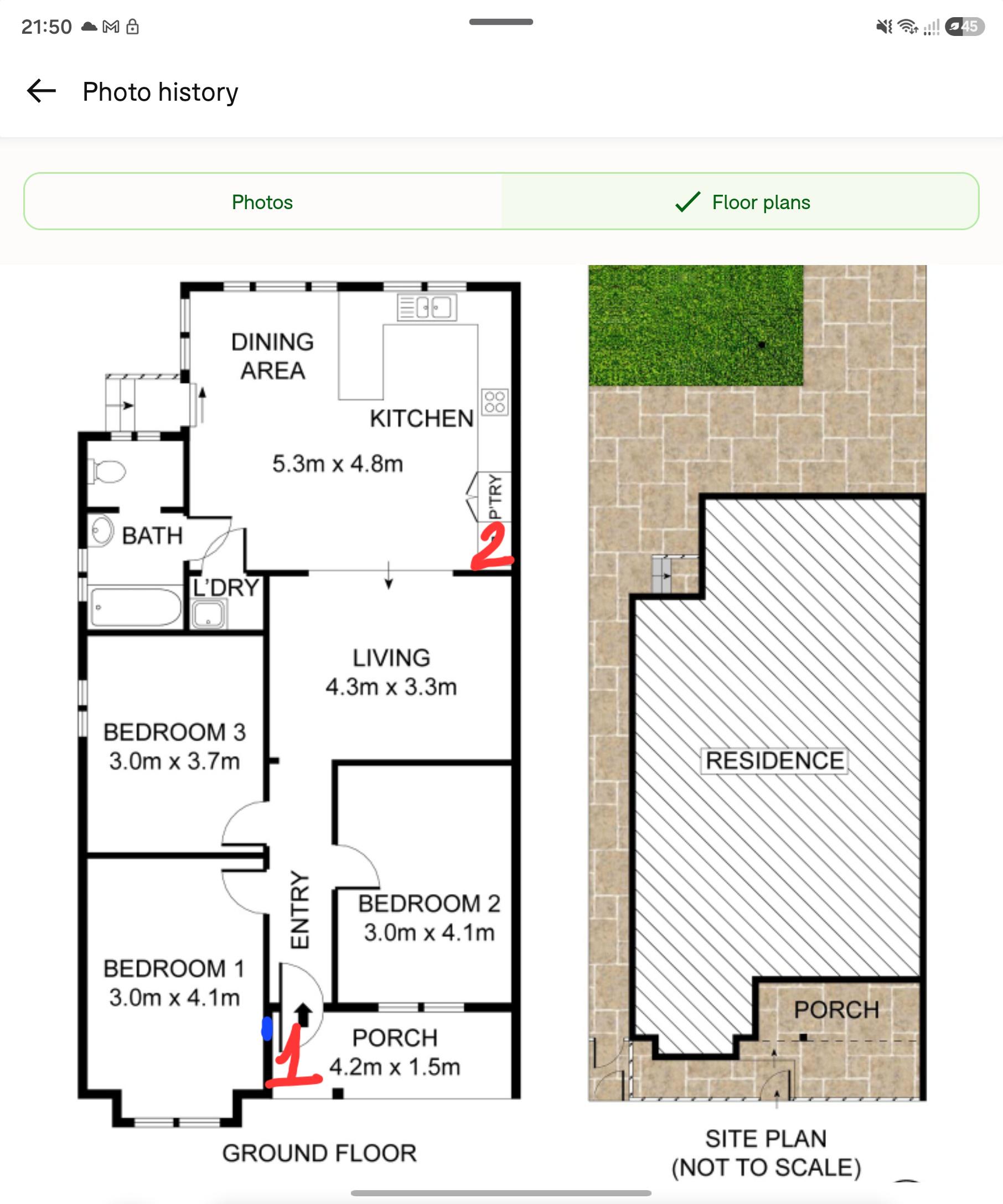
Here is the floorplan of our house. The right hand side wall is in the boundary, however I could run a conduit on the outside of that wall (there have been already some electrical conduit and gas pipe there.
The blue marked wall (#1) currently has the electrical metre box. I have an ethernet cable running from that location to the above-fridge cabinet (#2). In that cabinet I'll put the router, home server.
Can I have the NBN connection box at #1, at the same level as the electrical box, or even higher? That area is fully under the cover, no sunlight, no rain (the edge of the roof goes lower than the height of the metre box.
The next option is in the open cavity above the fridge, behind the aforementioned cabinet for the router. This is actual my most preferred location. However, it is not easy to satisfy the 100mm minimum bends requirement.
Thanks