r/WindowsHelp • u/Saucepan17 • Jul 30 '26
Windows 7 Cannot update Windows 7 sp1 32 bit
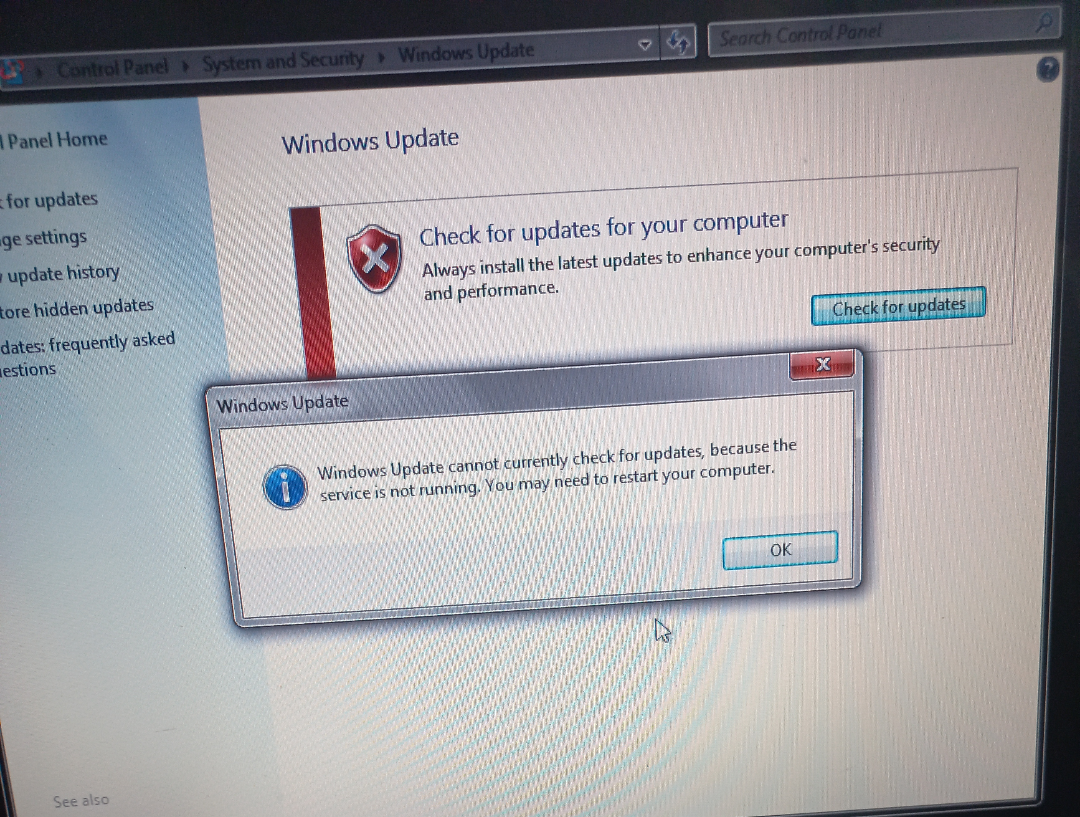
running on a hp pavilion dv6755ee Intel core 2 duo 2.4ghz processor, every single solution I tried gave the same result, either a dll is missing or the same error code 0xc8000247, I tried the manual service restart, didn't work, all solutions point to this one issue with the intel rapid storage driver but this system uses an intel matrix storage driver which I reinstalled and came back futile, then I tried the Intel driver assistant agent whatever which didn't install because it needed the visual c++ redistributable, I tried installing THAT and it also said it failed with error code 0xc8000247.
before all this I tried sfc scannow which just said it finished with a few errors, then I tried dism but it just got stuck at 65.5% for hours so I had to force restart. I also did clear out the softwaredistribution folder and all that did was just instead of showing the error message above started not even showing it and just doing nothing when clicked. please help it's driving me nuts 😭😭😭
3
2
u/True_Move_7631 Jul 30 '26
There is an offline updater, but you need to download it, and the updates first.
https://download.wsusoffline.net/
But you should also clear the update cache folders.
Open Command Prompt by Start → Run and type “cmd“
On the Command Prompt, type “net stop wuauserv“. This is done so that you will terminate the windows automatic update service to allow us to delete the cache files.
Still on the Command Prompt, type “cd \windows“
Type “rd /s SoftwareDistribution“ restart the windows automatic update service again. To do that, type “net start wuauserv“
1
u/Saucepan17 Jul 30 '26
I forgot to add I tried this exact method too, I saw it on a microsoft forum, but when I tried running the offline updater it returned with an error message telling me I'm missing a dll file. I also tried the restart thing with services.msc to no avail too
1
u/AutoModerator Jul 30 '26
Hi u/Saucepan17, thanks for posting to r/WindowsHelp! Your post has been flagged for manual review by a human moderator, please include as much of the following information as possible (in text or in a screenshot) to get your post approved:
- Your Windows and device specifications — You can find them by pressing Win + X then clicking on “System”, we need more than just your OS version! Your hardware details are often critical for resolving issues.
- Any messages and error codes encountered — They're actually not gibberish or anything catastrophic. It may even hint the solution!
- Previous troubleshooting steps — It might prevent you headaches from getting the same solution that didn't work
Posts must be tech support in nature (such as something is broken and you need help fixing), so general inquiries, software suggestions, and purchasing advice will be removed. As a reminder, we would also like to say that if someone manages to solve your issue, DON'T DELETE YOUR POST! Someone else (in the future) might have the same issue as you, and the received support may also help their case. Good luck, and I hope you have a nice day!
I am a bot, and this action was performed automatically. Please contact the moderators of this subreddit if you have any questions or concerns.
1
u/Financial_Key_1243 Jul 30 '26
Win 7 has a SP2 out. Read more here https://geekermag.com/download-windows-7-service-pack-2/
1
u/Saucepan17 Jul 30 '26
this was the first thing i tried, it won't let me download ANY windows updates even standalone individual installers it just spews out the same 0xc8000247 error code
1
u/Ok-Muffin-9519 Jul 30 '26
Legacyupdate.net
1
u/Saucepan17 Jul 30 '26
looks promising, ill give it a shot
0
u/Ok-Muffin-9519 Jul 30 '26
Das Programm taugt was nutze es selbst
1
u/Saucepan17 Jul 31 '26
catastrophic error when installing service pack 1
1
u/Ok-Muffin-9519 Jul 31 '26
Dann mußt du SP1 manuell installieren hatte das bei meiner Vista VM auch
1
u/Saucepan17 Aug 14 '26
solved by switching the ahcpi/atapi driver from Intel matrix storage to the standard microsoft driver
4
u/Raijen_ArDesh Jul 30 '26
Windows update and for windows 7 and 8 have been offline for over 5 years now.