r/iOS27 • u/fotoamazonas • 2d ago
Beta 3 Health app lost features
0
Upvotes
I no longer have readiness score or the new features I saw in the prior betas. What happened?
r/iOS27 • u/fotoamazonas • 2d ago
I no longer have readiness score or the new features I saw in the prior betas. What happened?
r/iOS27 • u/Original-Sink-9520 • 2d ago
I’ve been having a really annoying issue with my iPhone 16, since iOS 27. Several times a day, a particular button gets activated when my finger is extremely close to it but hasn’t actually touched the glass. I don't have a screen protector glass nor my screen is broken.
It’s not limited to one app. I’ve noticed it with different buttons across multiple apps, so it doesn’t seem to be an issue with a single app’s interface, but it's usually when the finger is super close to that button, but never touched it.
What I’ve noticed:
It’s incredibly frustrating because the phone sometimes does things I never intended to tap.
I’m wondering if this could be a faulty digitizer, an iOS software issue, screen protector interference, or something else.
Has anyone else experienced this on an iPhone 16?
If you’ve had the same problem, I’d love to know:
I’d appreciate any advice or firsthand experiences.
Thanks!
r/iOS27 • u/thiagozarowny • 2d ago
i got an iphone 17 and it sucks. on its best days it barely does 5h screen time with 100% battery health. i keep brightness around 40%. and that’s with basic social media, use—gaming? yeah… better not even talk about it.
r/iOS27 • u/giober98 • 2d ago
I’ve been loving playing around with photographic styles while taking pictures. And if you customise the styles in the camera app they will be remembered when you select them again a second time.
But as you know you can also change them after taking a photo, but I found that the settings I set in the camera app are not the same I found in the Photos app afterwards.
And once personalised in a photo on the Photos app and saved then if you edit another photo the styles will be reset.
Is there a way to actually save the custom styles?
Workaround: take a photo for each of the syles you like in the camera app and then copy paste the edits on other pics.
(I’m also posting this to r/iOS27 as I’m not sure if it’s just iPhone 18 pro related or if iPhone 16/17 have this too)
Since upgrading to iOS 27, headphone plugged in with the Apple usb c adapter causes volume scaling error. There’s sound and if I turn it all the way down, the sound level goes to zero. However, the volume level does not scale linearly with the actual sound output. And the minimum sound level is almost 70 dB, so it’s basically not usable. I have another genuine Apple usb c to audio adapter, so I know that it‘s not a broken adapter issue.
This only happens with certain app such as Apple TV, Amazon Prime, but things are normal with other apps such as YouTube and Apple Music.
I’ve tried anything I could think of including reinstalling the os, and was wondering if anyone has a solution.
r/iOS27 • u/Icy-Mention3151 • 2d ago
Enable HLS to view with audio, or disable this notification
I don’t know if this is normal, but it seems like the transition from one screen to another is a bit slow. I notice it especially with the white screen, as it takes a few seconds for the transition to finish and the screen to turn completely white, as shown in the video.
r/iOS27 • u/beachglassblue • 2d ago
I went from iOS 18 right to iOS 27. In iOS 18 and prior, I would ask Siri to send a message to someone and then I would speak what I want the message to say. Siri would then ask me “ok, send it?”, and at that point, I could ask Siri “what does it say?” - and Siri would repeat the message back to me so I could confirm before having it sent. In iOS 27, after Siri writes out the message and asks if I want to send, and I ask “what does it say?” , instead of reading me the message, it changes the entire message body from what I originally asked Siri to send, to a message that says “what does it say” (like it would send the person a message that says “what does it say” instead, and deletes the previously transcribed message request). How can I fix this? It’s so annoying and I really wish I hadn’t upgraded.
r/iOS27 • u/Tough-Pay1983 • 2d ago
Hey there, I am a first time iphone user and i have no clue about this phone
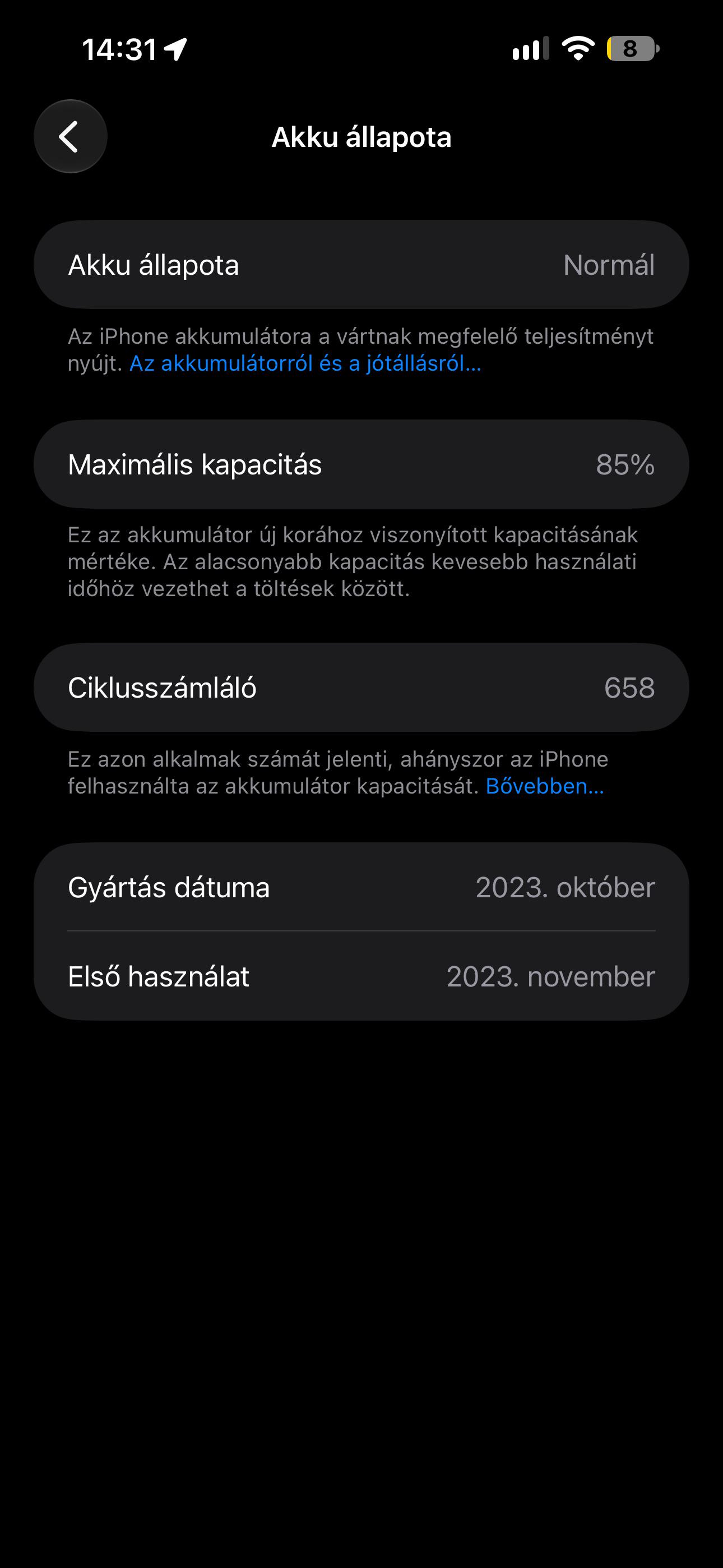
This phone has 90% bh and 551 charge cycles
I started using it about 3 days back i reset it and also updated to ios 27.0.1
The problem I am facing is i am getting about 4-4.5 hours of sot if i charge it to 100 but people on web are getting about 7-8 hours of sot
Whats the issue? Is my phone alright?
r/iOS27 • u/cutenrude • 2d ago
Ever since I updated my iPhone’s software, I keep getting a huge “Get the app to keep using Reddit” popup whenever I’m trying to read a Reddit post in my browser.
I can’t find a way to close it, and it blocks me from continuing to read the post. I wouldn’t even mind opening the post in the Reddit app, but when I tap the button, it takes me to the App Store, even though Reddit is already installed on my phone. It doesn’t open the app or take me to the post I was reading.
This started right after I updated to iOS27. It never happened before, so I assume it’s related to the iOS update and not something Reddit changed.
Is there a way to either stop the popup or get the links to open the actual post in the Reddit app instead of sending me to the App Store?
Screenshot attached.
Edit: I forgot to add that I have an iPhone 16.
r/iOS27 • u/i-shekhar • 2d ago
Ok so I need help before I throw this thing at a wall.
My iPhone 11 Pro has gotten painfully slow. Like, unusable slow.
The worst part is the keyboard. I type and the letters show up like 5 words later. Every app. Not just WhatsApp. Messages, Safari, Notes, everything.
Feels like I’m using some Android 6 or 7 phone from back in the day. Honestly my devices from 2016 run better than this rn.
Some background:
Weird thing is, when I restart it, it works kinda ok for a bit. Then slowly goes back to being a slug. Every. Single. Time.
So what’s going on here?
Is it CPU throttling?
Is the new battery bad?
Is it heat related?
Or is iOS just killing older phones on purpose lol
Anyone else with an 11 / 11 Pro dealing with this? Did anything actually fix it? Factory reset? Restore through iTunes? Something else?
Pls help. Phone is technically alive but basically dead 😩
r/iOS27 • u/No-Feed-5130 • 3d ago
Ever since I’ve been updating to ios 27 on my 15 pro, the battery seems to drain so fast plus my battery health is 80%. Then I saw someone posted that turning off conectivity assist helped to reduce the drainage. I checked my settings and I didn’t realize I had them turn on. You can access them via wifi and scroll down to connectivity assist on the bottom. Make sure you’re connected to wifi when you want to turn it off. I Immediately turned them off and charged my phone and try to test to see if it makes any difference. Now I have 7h of screen time with 26% left and this is quite surprising because 7h of screen time would already drain my battery below to 20% or even 10%. Other than that, I have morning class and obviously I’m using my phone more in the morning and I was surprised I still have some battery left now at night. Usually when I have evening class, I don’t use my phone as much as I am in the morning and the battery would drains out. Now I’m happy that this fix my battery drainage
r/iOS27 • u/CertifiedSir • 2d ago
r/iOS27 • u/dark_initiation • 2d ago
r/iOS27 • u/ShadowXGhostly • 2d ago
Enable HLS to view with audio, or disable this notification
This has happened to me before on one app, I reinstalled that app yet it still didn’t work, and now this time this issue is happening on the Shein app? I restarted my iPhone yet still nothing
r/iOS27 • u/Mission_Soup2256 • 2d ago
I have a question, i was in call for 6hours on discord and on screen time its exactly those hours but on battery usage it shows active on screen 13hours? whats happening. it says so for 2 days in a row (more hours in battery usage compared to screen time and actual call time)
r/iOS27 • u/tinygrimes12 • 3d ago
I don’t know if y’all have it or not but I have a bug in Always On Display which keeps glitching when I open and close the power button. Sometimes I have to click the open button twice to open my screen. Do y’all have a solution for this.
r/iOS27 • u/M-F-BOOM • 2d ago
r/iOS27 • u/kuroi-taiyou • 2d ago
If the brightness is below that icon, it keeps on blinking. If I increase the brightness till the lowest spot, the icon turns yellow and stops blinking
Anyone else facing the same?
r/iOS27 • u/WeakAirline3314 • 3d ago
Long-time iPhone user, trades man , and as of this week, apparently a professional psychonaut.
My shiny new £1,400 iPhone arrived. I turned it on, and within five minutes it felt like someone had slipped a bag of magic mushrooms into my brew. Icons wobbling, menus melting into the wallpaper, text floating on what looks like a puddle of washing-up liquid. I didn't know if I was setting up a phone or about to see the face of God in the Settings app.
I've got 20/20 vision but also astigmatism, and the glass effect turns every screen into a trip. Dizzy, eye strain, the room spinning. At one point I genuinely had to put the phone down and lie on the floor. Over a software update.
Things I tried, in increasing desperation:
- Reduce Transparency (Apple's version of "have you tried turning it off and on")
- Increase Contrast
- Tinted glass
- Bold Text and bigger text
- Reduce White Point
- Reduce Motion
- Default icons, light mode, plain wallpaper, colourful wallpaper
- Greyscale, so my £1,400 phone looked like a 1950s telly
Result: slightly less mushroom. Still mushroom.
But here's the best bit. To move my eSIM across, I updated my OLD iPhone too. The old one that worked perfectly. It's now running the same trippy nonsense, and there's no going back. So in one afternoon I've gone from one great phone to two phones that make me seasick. Brilliant upgrade, 10/10, would hallucinate again.
So the new one's going back, the old one's basically headed for the drawer of shame, and for the first time in years I'm in a shop poking at Androids like a confused caveman.
Apple, if anyone's listening: please, a proper solid mode for people with eye problems. Switch the glass off completely, give us solid menus and clear, high-contrast text. I don't think anyone with astigmatism was in the room when this got signed off.
Anyone else having the same trip? Has anyone found a setting that actually brings you back down to earth? Or am I joining the Android lot?