r/iosapps • • 37m ago

💎 Lifetime [iOS] [$ 29 lifetime > Lifetime FREE] BetterGrin: Coach for your whole mouth

• Upvotes

Dental insurance is nothing more than a coupon book for dental procedures. Most of us have spent thousands of dollars on several procedures. Most of this is avoidable with good habits and following a schedule for dental cleaning, timely brush head replacement.

A: Just by how common bad breath is, we see that dental hygiene is often ignored. It has long-term health and financial impact. It takes under 5 minutes daily to maintain good dental hygiene and habits. Unfortunately, it's not a part of our daily routine.

B:

Most dental apps stop at timers and reminders. BetterGrin also: - Helps you get the most out of your dental insurance - Logs symptoms so you can describe them accurately at your visit - Tracks retainer, aligner and night guard wear - Reminds you to change your brush head, book cleanings, etc. - Generates a summary report for your next dental visit

C: $ 29 annual

FREE 1 year code:

https://apps.apple.com/redeem?ctx=offercodes&id=6762456228&code=2021714

If something doesn't work, please let me know and we will fix it. If you like the app, please give us 5 ⭐ on App store. It helps others find the app and motivates us to keep improving.

(Couldn't update the title to 1 year free. The lifetime plan was not part of the approved update. It will likely be approved with the next update)


r/iosapps • • 49m ago

🎁 Freemium I got tired of recurring chores clogging Apple Reminders, so I built [What-Else]

• Upvotes

quick context: I found that classic to-do apps are great for hard deadlines, but they suck for flexible, recurring chores.

whenever I put things like "water plants", "clean bathroom", or "swap bedsheets" into Apple Reminders, two things happened:

  1. Seeing 5 red, overdue tasks every single morning broke my system. The overdue badges lost their meaning, which made me ignore my entire to-do list…including the actual high-priority stuff
  2. Also it only told me a task was late, not how late. Did I water the plant 4 days ago or 3 weeks ago? No clue..

I wanted an app that just tracks: "When was the last time I did this, and roughly when should I do it again?"

so I built What-Else. It offloads all low-friction routine stuff away from the primary task manager:

  • native iOS design (SwiftUI)
  • shows exactly how many days since you last completed a task
  • flexible cadences instead of panic deadlines
  • widgets & Siri Shortcuts

it’s free to use (optional one-time/sub tip for advanced users).

Download: https://apps.apple.com/app/what-else/id6758564643

Built this solo, so genuinely looking for fb and what features are missing.

Happy Sunday!

PS: The app is also available in German with more languages to come


r/iosapps • • 59m ago

🎁 Freemium I built an app that tracks your tennis serve speed, breaks it down and help you improve

Thumbnail
gallery
• Upvotes

Hi, I'm the solo dev and a club tennis player. I could never see what my serve actually looked like when I practiced to improve it, so I built Apexa.

A — What problem does it solve?

Most club players can't see what their serve actually looks like and the speed. A coach costs money and only sees you once a week. Filming yourself shows you that the serve feels off, but not exactly why: is the toss drifting, are you skipping the trophy position, is the back leg not kicking? Apexa takes a video of your serve, splits each serve into its phases (toss, trophy, contact, follow-through) and tells you what each phase is doing, in numbers and coaching terms to help you improve your serve quality.

B — How is it different?

- Serve only, not match stats. Some other apps are built around rallies, line calls and shot speed. Apexa looks at how you hit the serve: body angles in each phase, where the toss goes, forward lean, leg kick-back. As a serve is solely dependent on you and can be a lethal weapon in your arsenal.
- Extras from a back-view clip: served-ball speed estimation and serve type from just the phone, with no radar.
- Compare against a reference. Save a serve you like (your own best one, as a reference) and see each phase against it, not just a raw number.
- Progress by camera angle. Side and back views are scored separately, so trends stay apples-to-apples.
- Just a phone and a tripod. No sensors and no wearables.

C — Cost?

The app is free to use with options to upgrade to Pro with more premium features available.
Pricing:
Monthly: $5.99/month
Annual: $29.99/year

🎁 Redeem here for 1 month free trial:
https://apps.apple.com/redeem/?ctx=offercodes&id=6807039816&code=REDDIT2026

I'd love feedback, especially if you've used a similar app or play tennis.
AppStore


r/iosapps • • 4h ago

💎 Lifetime I wanted to make bedtime stories kids would remember, so I built Storyboat

Post image
0 Upvotes

I've been working on Storyboat, an illustrated bedtime stories app for children aged 3–8.

The idea was simple: create stories that are gentle enough for bedtime, but meaningful and memorable enough that children want to hear them again.

A - What does Storyboat do?

Storyboat is a growing collection of original, illustrated bedtime stories.

  • Thoughtfully written stories with memorable characters, gentle humor, and meaningful moments, without forced morals.
  • Beautiful illustrations that bring the characters and their little worlds to life.
  • Soothing narration with soft background music.
  • Read-along highlighting that follows every word as it's narrated.
  • Read mode for parents who prefer telling the stories themselves.
  • Sleep music with a timer to help children settle down after a story.

B - What makes it different?

Compared with storytelling apps like Readmio, Storyboat brings together original stories, illustrations, and narration in a picture-book experience.

A lot of care goes into each story. I spend time getting the pacing right, making the language sound natural when read aloud, and ensuring the illustrations capture the feeling of each moment.

The goal isn't to have the largest library. It's to build a collection of stories that children genuinely love and remember.

C - Pricing

There are free stories to enjoy, with no account required.

Premium unlocks the full collection:

  • $4.99/month
  • $29.99/year
  • $69.99 lifetime

There's also a 3-day free trial for eligible new monthly and yearly subscribers.

App Store: https://apps.apple.com/app/id6796559765

Website: https://storyboat.app

I'd really appreciate feedback from this community, especially on the storytelling, illustrations, and overall experience.


r/iosapps • • 13h ago

💎 Lifetime Blanksy — A Simpler Way to Learn Drawing | $19.99 → $1.99 Lifetime

Thumbnail
gallery
4 Upvotes

Hey everyone! I'm the developer of Blanksy, an iOS app built to make drawing more accessible and enjoyable.

Answer — What does it do?

Blanksy helps you draw using your iPhone's camera as a tracing guide. Follow the outlines of a sketch, practice drawing step by step, and bring your favorite ideas to paper.

It's designed for beginners, hobby artists, and anyone who wants to get into drawing without knowing where to start.

Better — Why use it?

Instead of struggling to get proportions and outlines right, you can use your camera as a visual guide while drawing on paper. It makes practicing more approachable and lets you focus on learning and enjoying the process.

Cost — Lifetime deal

  • Regular price: $19.99

https://reddit.com/link/1x8mlwn/video/eapzmui2p3wh1/player

  • Discounted price: $1.99
  • 90% off

How to claim the deal:

  1. Open the App Store redemption link.
  2. Use code: BLNKSY90
  3. After redeeming, open Blanksy and tap Restore Purchases once to activate your lifetime access.

Get Blanksy: https://apps.apple.com/us/app/blanksy-daily-doodle-diary/id6777916815

I'd love to hear your feedback. Thanks for checking it out!


r/iosapps • • 15h ago

🎁 Freemium OfferBee 1.0 is here — Credit Card Perks, Family Sharing, and a free 3-month Premium trial

Thumbnail
gallery
5 Upvotes

A — Answer

A few weeks ago, we shared OfferBee here. Now OfferBee 1.0 is live, with a better way to keep track of the credit card benefits you’re already paying for.

The problem is familiar: multiple cards, different reset dates, unused credits, and that recurring question —“Which card should I use?”

OfferBee brings it together:

  • Track used and remaining benefits on your card
  • Get reminders before credits expire
  • Find the best card by location or spending category and reminders to use any available credit at that location
  • See the value you’ve captured against annual fees
  • Check credits and card recommendations through widgets
  • Ask Bee AI important questions about your spending and credits.

Add cards manually or connect supported accounts through Plaid to help automate benefit tracking.

B — Better

With 1.0, we’re making OfferBee more useful beyond your own wallet: family sharing for credits is now available.

It’s our newest addition: invite up to 5 family members to track everyone’s card credits in one place, while keeping each person’s other spending private.

You can also ask Bee AI questions about the cards you already have:

• “What credits do I have left this month?”
• “Which card should I use for dinner?”
• “What was my spend across all card last month ?”

Our focus is simple: help you see what’s available, remember what’s expiring, and choose a card without digging through benefit pages.

C — Cost

OfferBee is free to download. Core features include supported benefit tracking and best-card recommendations.

Premium is $9.99/month or $80/year.

To celebrate 1.0, we’re offering the [r/iosapps](r/iosapps) community a free 3-month Premium trial, on top of the usual 14 days.

Download: OfferBee : Credit Card Rewards
Claim the trial: Redeem Promo Code "GetOfferBee" in the App

What’s one credit card perk you keep forgetting to use? I’d love to hear what would make OfferBee more useful for you.


r/iosapps • • 20h ago

🎁 Freemium Mood Space: 2.5 is here, apple health kit support & fresh new look

Thumbnail
gallery
0 Upvotes

Mood Space is a privacy-first mood tracker and diary built around a simple concept: connect your moods, emotions, and what they relate to. Through structured emotional logging, visual insights, Apple Health integration, and Apple Watch support, it helps users recognize emotional patterns and better understand themselves over time.

App Store: https://apps.apple.com/app/id6756419827

Website: https://mood-space.app/

(A) What does Mood Space really solve?

Mood Space helps users understand not just how they feel, but also what those feelings might be connected to.

Instead of recording a mood in isolation, each entry captures the mood, the emotion being experienced, its connection, and a brief reason. This creates a richer emotional record that users can explore over time.

By tracking these details, users can discover recurring emotions, identify common connections, and better understand what might contribute to their happier or more difficult days.

Visual insights, weekly progress, and three different metrics End of Day (EOD), Median, and Mood Score offer different perspectives on emotional patterns. Apple Watch support makes logging convenient throughout the day, while Apple Health integration allows supported State of Mind data to be viewed alongside other health information.

Rather than simply recording feelings, Mood Space helps turn everyday emotional moments into meaningful insights over time.

(B) What makes Mood Space a unique app?

What makes Mood Space unique is its simple three-step approach to emotional tracking:

  • Mood: How are you feeling?
  • Emotion: What emotion are you experiencing?
  • Connection: What is that emotion related to?

Users can also add a reason to capture the specific situation behind an emotional moment.

This approach helps distinguish between how someone feels and the emotions they experience, while preserving the context that makes each entry meaningful.

Mood Space combines this structured logging with emotion frequency, recurring connections, timelines, calendar views, and multiple visualization methods. Whether users want to track happiness, explore stress and anxiety, or understand emotional triggers, the app adapts to their personal tracking needs.

Privacy is another core part of the experience. Emotional entries stay on the user's device, with no external collection of their emotional data. Apple Health and iCloud features provide additional integration with Apple's ecosystem.

Together, these features make Mood Space more than a traditional mood tracker: it's a personal tool for exploring emotional patterns and building self-awareness.

(C) Cost

Free: Completely free, with all essential features available without paywall restrictions however has limited restriction on maximum entry limit per day. Apple Watch features and Apple health supports are also included.

Pro: (1.99 USD/mo, 19.9 USD/yr, 34.99 USD/ lifetime) price can be vary based on region. Unlocks all statistics and progress metrics, log unlimited entries per day.

Note: Our new update also supports iPhone Duo; there are many more things to come. We see a full road map ahead

Transparency

Website: https://mood-space.app/

Privacy Policy: https://mood-space.app/privacy

Developer: https://raslan1994.github.io

LinkedIn: https://www.linkedin.com/in/raslan-rauff/

X: https://x.com/code_with_love

Privacy first: Your emotional journal is personal. Mood Space keeps your entries on your device and does not collect or send your emotional data to external services.

PS: Mood Space is designed to make emotional tracking practical, private, and easy to maintain. If you find it useful, I'd really appreciate an App Store rating.

Thank you!


r/iosapps • • 20h ago

💎 Lifetime Honeyday: who is celebrating next, from your contacts, in a widget on the Home Screen and Lock Screen

Thumbnail
gallery
4 Upvotes

Birthdays and anniversaries already sit in Contacts. Honeyday puts them in one list, with whoever comes next on top.

A. Answer

Honeyday reads the birthdays and anniversaries from your contacts and sorts them by who is next, with the days left and the age someone turns. Days that belong to no contact you add yourself: the day you moved in together, the dog's birthday, a first date. It never changes a contact on its own. If a date is wrong, you fix it right in Honeyday and the list follows.

Most of the time the widget is enough. Small, medium or large on the Home Screen, and on the Lock Screen too. On ordinary days it stays calm, on the day itself it lights up in the color of the occasion, and at midnight it moves on by itself. A 30th birthday or a 25th anniversary is marked in the list and in the widget, early enough to plan something.

Reminders arrive on the day at the time you choose, and a few days before if you want time to find a present. Dates in the Chinese, Hebrew or Islamic calendar land on the right day every year. There is a note per person for the gift idea you would otherwise forget, and Siri and Spotlight know the dates. Since 1.1 you can pick which contact accounts Honeyday reads, if personal and work contacts share one device.

B. Better

  • The Birthdays calendar in Apple's Calendar app shows the same dates from Contacts, as events between your appointments. It is free and already on your phone. Honeyday puts them in one list in order, with the age and the days left, and takes the days that are on no contact card as well.
  • A yearly reminder per person in the Reminders app works too. You set up each one by hand, and it does not follow when a date changes in Contacts.

C. Cost

$4.99 once. No subscription, no in-app purchases, no ads. The same purchase covers iPhone, iPad and Mac.

iOS 26 and iPadOS 26, ten languages. No account and no server. What you set syncs through your own iCloud.

I'm Missaq Ataschi from Switzerland (https://missaq.com), and Honeyday is a one person project. Questions welcome.


r/iosapps • • 21h ago

💎 Lifetime I built GradeLab for color grading on iPhone — here’s a real edit

Enable HLS to view with audio, or disable this notification

3 Upvotes

Hey everyone, I’m Aftab, the developer of GradeLab. Here’s a quick look at editing a beach clip in the app, with the finished result at the end.

A — What does it do?

GradeLab is a video and photo color grading app for iPhone, iPad and Mac. It gives you color wheels, curves, HSL controls, LUTs, scopes and masks to shape the look of your footage.

The video shows some of those tools in use, including the color warper, wheels, scopes and effects.

B — Why use it over alternatives?

If you’ve outgrown Apple Photos’ light and color adjustments, GradeLab gives you more targeted control: adjust individual colors with hue curves, balance shadows and highlights with wheels, check your changes with scopes, or grade just part of the picture using masks.

Processing happens on your device, and there’s no account required.

C — What does it cost?

Free to download, with grading, color wheels, RGB curves, selected looks and video exports up to 1080p without a watermark.

Pro adds tools including the color warper, hue curves, advanced scopes, film effects, LUT imports and 4K/source-resolution export. The video includes Pro tools.

Current pricing:

  • Lifetime Pro: $14.99, one-time purchase (on sale right now for a week).
  • Subscriptions: $1.99/week, $4.99/month or $14.99/year, auto-renewing.

Download GradeLab on the App Store

I’d appreciate feedback on the editing experience—especially how the controls feel on a smaller screen.

Developer: Aftab Fazal Qayum
Support & contact · Privacy Policy · Terms


r/iosapps • • 1d ago

🎈 Free [iOS] Neon Vision Editor 2.0.0 — a native code and Markdown editor for iPhone and iPad

Thumbnail
gallery
16 Upvotes

Editing code on an iPad should be more than opening a text field and connecting a keyboard. I wanted to work with actual files, switch between documents, preview Markdown, and pick up where I left off on another device without constantly fighting the interface.

That’s the problem I’ve been working on with Neon Vision Editor. Version 2.0.0 is out, and quite a bit has changed since v1.5.

A — Answer: What problem does it solve?

Neon Vision Editor is a native Swift editor for code, Markdown, notes, configuration files, and other text documents across iPhone, iPad, and Mac.

The goal is straightforward: make editing and navigating real files practical on mobile, while keeping the interface focused.

Since v1.5, the major improvements include:

  • More responsive large-file editing: file-backed rendering and virtualization help keep long documents usable.
  • Better iPhone and iPad workflows: configurable keyboard actions, improved toolbars, touch-friendly controls, and more reliable cursor positioning.
  • Markdown, HTML, and SVG previews: integrated into the editing workflow, with richer Markdown formatting and themes.
  • File synchronization: work with documents stored in iCloud Drive or network folders, with external-change detection and safeguards for unsaved edits.
  • Improved project navigation: faster file access, search, project browsing, and a code minimap where supported.
  • A more reliable editor in 2.0.0: faster Mac document switching, better restoration of cursor positions after large files load, preserved preview scroll positions, and improved tab navigation.

The aim isn’t to replace Xcode. It’s to make the smaller editing tasks that happen throughout the day less cumbersome.

B — Better: Why another editor?

Compared with editors such as Textastic or Runestone, my focus is on a consistent native workflow across iPhone, iPad, and Mac, rather than treating mobile as an afterthought.

I also wanted file changes made elsewhere to be handled sensibly, without silently overwriting local edits. The editor uses your existing iCloud Drive or network-folder workflow for synchronization rather than requiring a proprietary cloud service.

It’s an ongoing project, and I’m still refining the details based on actual use.

C — Cost

Free to download, with in-app purchases. No subscription is required just to try the editor.

App Store: https://apps.apple.com/de/app/neon-vision-editor/id6758950965

Release history and source: https://github.com/h3pdesign/Neon-Vision-Editor

Website:

https://h3pdesign.github.io/Neon-Vision-Editor/

The 2.0.0 release is available through the project’s release channel; the App Store version can lag behind while updates go through review.

I’d be interested in feedback from people who actually edit code or Markdown on an iPhone or iPad. Which parts of your mobile editing workflow still feel unnecessarily awkward?


r/iosapps • • 1d ago

💎 Lifetime DiskPress for Files - finally take control of your iPhone's hidden compression and deduplication features!

Post image
8 Upvotes

A - Answer

Your iPhone is running out of space, but the files taking up that space are files you actually want to keep.

I'm Ighor July, the developer of DiskPress for Mac, and I'm really excited to release my first iOS app, DiskPress for Files.

To my knowledge, it's the first iOS app to combine transparent filesystem compression and non-destructive APFS deduplication for user-selected local files. It uses the same engine as my Mac app, adapted for iPhone and iPad.

The part I'm most excited about is that there is nothing to unpack. Your files keep their contents, names, and locations. You open them in your usual apps, just as before.

  • Lossless compression reduces the physical storage used by supported files without turning them into archives.
  • Deduplication lets verified identical files share storage. Both copies remain separate and independently editable. Editing one does not change the other.
  • The two techniques can work together, so identical files can share compressed data too.

It is not a duplicate file remover. You don't have to decide which copy to throw away, and the storage optimizations remain after you close DiskPress.

B - Better

Compared with the Files app's Compress command or iZip, the difference is the workflow. Their ZIP features create archives. DiskPress optimizes the files in place, so you don't need to extract them before using them in another app.

ZIP tools are useful when you want an archive to send or store. DiskPress is for files you want to keep using where they already are.

It also complements cleanup tools. A cleaner helps you remove things you no longer need. DiskPress helps the files you want to keep use less space.

You can choose individual files or folders for one-time optimization, or save local folders to optimize again later. Choose compression, deduplication, or both for each location.

A few important limits before buying

  • It works with supported, writable local files selected through Files. It cannot optimize your Photos library, iCloud Drive, other cloud providers, or protected app and system folders. It is not a photo or video compressor.
  • Unlike the Mac app, it has no automatic folder monitoring or CLI. You start each optimization yourself.
  • Savings depend on your files. Already-compressed media and archives may save little or nothing. The screenshots show example data, not promised results.

The app works entirely offline, with no account, analytics, or file uploads. Optimization adds storage writes, so mostly stable folders are better candidates than constantly changing files. Keep an independent backup of anything important.

C - Cost

$2.99 USD, paid once on the US App Store. No subscription and no in-app purchases. Regional pricing may differ.

Requires iOS or iPadOS 14 or later. This is a separate purchase from DiskPress for Mac.

Download DiskPress for Files on the App Store

Download DiskPress Everywhere (macOS + iOS bundle)

Read more about how deduplication and compression work here:
https://reverseeverything.com/blog/diskpress-for-files-iphone-storage-controls/

Website | Privacy policy | Terms | Contact me

I'm happy to answer questions about how it works or which files are good candidates. I'd love to hear from people who keep a lot of documents or project files locally on their iPhone or iPad.


r/iosapps • • 1d ago

💎 Lifetime [Lifetime FREE] Turning your travels into a collection of memories

Post image
39 Upvotes

I miss the feeling of opening an old passport and seeing all the stamps from places I’ve visited. Each stamp felt like a little memory of a trip.

That was the idea behind Travori.

You visit somewhere → use GPS to check in and stamp your visit. You can add a photo and a short note, and over time your map fills up with all the places you’ve actually been.

And if you’ve already travelled a lot, you can add places from your past trips too. You don’t have to start your travel story from scratch.

Basically, a digital passport for your travels — but with your memories attached.

I wanted something simple that I could look back on years later and remember where I went, the places I discovered, and what those trips felt like.

A — What problem does it solve?

When we travel, we take hundreds of photos and visit so many places, but over time, it becomes hard to remember exactly where we went or which places made each trip special. Photos alone don't always tell the whole story, and a list of countries you've visited doesn't capture the little places and moments that made a trip memorable.

Travori lets you check in at places worth remembering, attach photos and personal notes, and build a map of your travels with the actual places you've visited — not just the countries. You can also bring in photos from your existing library and add places from past trips, so you don't have to start from scratch.

The idea is to turn your travels into a personal collection of memories you can revisit years later, helping you remember not just where you've been, but the places you discovered and the experiences you had along the way.

B — How is it different?

Most travel apps focus on planning your next trip, booking flights and hotels, or tracking which countries you've visited. Travori is more about preserving the memories of the places you've actually been.

Instead of just marking a country on a map, you can check in at specific places using GPS, attach photos and personal notes, and gradually build your own travel map. You can also add places from past trips using your existing photo library, so you can start documenting memories from trips you've already taken.

Think of it as a personal digital passport combined with a travel journal and an interactive map. It's not just about collecting destinations — it's about creating a record of your travels that you can look back on and relive years later.

C - Cost:

The app is free to use with options to upgrade to Pro with more premium features available. We are also giving away 500 free lifetime code now for users to enjoy the travel season!

Link to the app: Travori

UPDATE: Due to the massive demand, we have decided to change the lifetime price of the app for FREE for 24 hours. NO PROMO CODE NEEDED! Please feel free to download the app and go through the app as usual and just redeem the lifetime free promo when you reach the payment page. Don't forget to leave us a review too if you enjoyed the app, your support meant alot to us! Hope you enjoy travelers! ❤️


r/iosapps • • 1d ago

💎 Lifetime [Lifetime] Unimote: Control your TV from iPhone — $4.99 lifetime for 7 days (was $49.99)

Post image
0 Upvotes

I'm the developer of Unimote. This month only, Lifetime Pro is available for $4.99 instead of $49.99.

A. What it solves:

Ever lose your remote, struggle with multiple remotes, or need an easier way to control your TV? Unimote turns your iPhone into a convenient remote for your smart TV. You can navigate menus, turn your TV on or off, use trackpad mode, and type using your iPhone keyboard.

Unimote works with Apple TV, Android TV, Samsung, LG, Sony, Roku, and other supported smart TVs over Wi-Fi.

B. Why it beats the alternatives:

- The built-in Apple TV Remote is mainly designed for Apple TV, while Unimote supports multiple TV platforms in one app.

- No IR blaster or direct line of sight is required. It works over your home Wi-Fi network.

- Use the home screen widget for quick access without opening the app.

- You can try the free version before deciding whether to upgrade.

C. Cost:

- Free: connect and control your TV with limited functions

- Pro Lifetime: $4.99 for this month only (regularly $49.99) — includes unlimited devices, Apple TV support, home screen widget, and future updates.

- Download link: https://apps.apple.com/us/app/remote-control-for-smart-tv/id6759893388

- Discount Redeem link: https://apps.apple.com/redeem/?code=UNIMOTE102026&ctx=offercodes&id=6759893388

The offer is available for 7 days. After the promotion ends, Lifetime Pro will return to $49.99.

Full disclosure: I’m the developer of Unimote. Feel free to ask any questions about supported TVs, features, or the offer!


r/iosapps • • 1d ago

HELP I built a Things alternative to do app called DOEN. Looking for beta testers (iPhone, Mac, Watch and Web)

8 Upvotes

I got tired of to-do apps that had not kept up, so I built my own. It is called DOEN. It is in beta, and I would love people who live in Things, Reminders or a similar app to try it and tell me what is missing.

DOEN is on iPhone, iPad, Mac and Apple Watch, plus a web app at https://app.doen.software. There is no account and no ads. Your lists stay on your devices and in your own iCloud. If you turn on DOEN on the web, that copy syncs with the browser too.

What it does:

- Today, Upcoming, Anytime, Future and a Log for what you have finished
- Areas, projects and headings, with progress on projects
- Start dates, deadlines, checklists, tags and repeats
- Up to five alerts on a reminder, with Complete and Snooze on the notification
- Reminders when you arrive at or leave a place
- Your calendar beside Today, and optional import of events as to-dos
- Two way sync with Apple Reminders, and you choose which app sends the alert
- Import from Things 3, Todoist, TickTick, Google Tasks or Apple Reminders
- Notes with formatting, and pictures.
- Quick Find, widgets, Siri, and a Watch app that works away from your phone
- A private email address, a webhook, and an API if you want to add to-dos from other tools

TestFlight, iPhone, iPad and Apple Watch: https://testflight.apple.com/join/t4AcneYd

TestFlight, Mac: https://testflight.apple.com/join/jK57fBF3

The site is https://www.doen.software. If a TestFlight link is full, use the contact form on the site and I will send another invite. Say which devices you use, and which app you are coming from.

All feedback is welcome. Please use Contact us or Request a feature in the app. :)


r/iosapps • • 1d ago

💎 Lifetime DebAi – log expenses by voice or receipt photo. Lifetime premium free if you sign up before Monday

Post image
0 Upvotes

¡Hola r/iosapps! Soy el desarrollador independiente de DebAi. Soy Didier — https://www.linkedin.com/in/didierbrange

A – ¿Qué problema resuelve? Dejaba de usar las aplicaciones de presupuesto después de un par de semanas porque escribir cada gasto era demasiado engorroso. Con DebAi, registrar los gastos solo lleva unos segundos: basta con escribir "12 dólares por café" o tomar una foto del recibo, y se guarda en la categoría correcta.

B – Por qué es mejor que las alternativas

  • Registro por voz o foto del recibo: el recibo completo como un solo gasto o cada importe por separado (un toque para cambiar).
  • Presupuestos por categoría y por período, con barras que se completan a medida que gastas.
  • Listas compartidas para dividir gastos con tu pareja o compañeros de piso.
  • Widgets en la pantalla de inicio, bloqueo con Face ID e inicio de sesión con Apple.
  • Tus datos se guardan en tu iPhone y puedes consultarlos sin conexión (el registro de voz y fotos requiere conexión).
  • Disponible en inglés, español y alemán.

C – Coste Normalmente es una suscripción (4,99 $/mes o 49,99 $/año, con una prueba gratuita de 7 días en el plan anual).

Promoción de este fin de semana: Todos los que se registren antes del lunes (19 de octubre) tendrán acceso premium de por vida. Sin tarjeta de crédito, sin renovación automática, sin códigos. Solo descarga la app y elige la tarjeta "De por vida" al finalizar el registro. Consejo: vincula tu cuenta de Apple o Google para conservarla si reinstalas la app.

App Store: https://apps.apple.com/app/id6796000118

Con gusto responderé cualquier pregunta sobre su funcionamiento.


r/iosapps • • 1d ago

💎 Lifetime Moneko 5.0 is here! A fresh new look, simpler budgeting, and a free plan 🐱

Thumbnail
gallery
16 Upvotes

Hi everyone!

A while ago, I shared Moneko here and received a lot of helpful feedback and support. Thank you to everyone who gave it a try! 💜

We just released Moneko 5.0, one of our biggest updates so far!

A lot of the feedback we received was about making the app cleaner, more intuitive, and easier to navigate. So that's been a big focus of this update.

What's new in Moneko 5.0

  • 🎨 Fresh new UI with cleaner layouts, improved navigation, and redesigned category icons
  • 📊 Redesigned home dashboard with clearer budget progress, remaining balances, and spending insights
  • 🗣️ Smarter Siri expense tracking that confirms unclear details before saving
  • 🔁 Better recurring payments with customizable payment times, reminders, and overdue alerts
  • 📧 Improved email tracking with verified senders and support for multiple email addresses
  • 💳 Wallet improvements including drag-and-drop reordering and negative starting balances
  • ⚡ Lots of bug fixes and performance improvements throughout the app

What Moneko does

Moneko combines zero-based envelope budgeting with shared finances and automatic expense tracking. You create Pockets for groceries, bills, travel, savings, or anything else you want to budget for. Unused money can roll over month to month.

For couples and families, you can create Shared Spaces where both people see shared budgets and expenses while keeping personal finances private. You can split expenses, track who owes what, and share the same Moneko plan without paying for two subscriptions.

Moneko also includes:

  • Zero-based budgeting with rollover Pockets
  • Shared Spaces and expense splitting
  • AI expense tracking and automatic categorization
  • Receipt, photo, voice, and text expense capture
  • Siri, Apple Shortcuts, and Apple Wallet automation
  • WhatsApp, Telegram, and email receipt tracking
  • Plaid bank sync in the US and Canada
  • Multi-currency tracking with exchange rates
  • Recurring bills and subscriptions
  • Cash flow insights and monthly financial reports
  • Custom Wallets and asset tracking
  • CSV import and expense exports
  • Face ID / Touch ID App Lock
  • Offline support with automatic sync

How it compares

If you've used YNAB, Moneko has a similar zero-based/envelope budgeting approach, but we're putting more emphasis on automatic expense capture and managing money with another person.

Compared with Monarch Money, Moneko lets you manage personal finances and Shared Spaces under the same account instead of treating everything as one household pool.

We're not trying to recreate every feature from YNAB or Monarch. Our goal is to make everyday budgeting easier to maintain, especially for people who want to manage some money together without combining everything.

Pricing

Moneko has a free plan with no subscription required. Core budgeting, Pockets, Shared Spaces, expense splitting, and Family Sharing are included for free.

Pro adds extra AI and automation features, with a 7-day free trial. In the US and Canada, Pro costs $12.99/month or $89.99/year, including Plaid bank sync. Pricing is lower in regions where bank sync isn't available.

We also offer a Lifetime plan as a one-time purchase, with regional pricing. For example:

  • US: $99.99
  • India: ₹6,930
  • Japan: ¥10,500
  • Singapore: S$90.99

For anyone interested in trying Moneko, we're also happy to offer an extended Pro trial or a discounted Lifetime plan.

Feel free to DM me if you're interested! 😊

Download: https://apps.apple.com/us/app/moneko-ai-track-budget/id6753925279


r/iosapps • • 1d ago

💎 Lifetime Tresor: Private Photo Vault with Wireless Photo & Video Transfer

3 Upvotes

A — Answer: What does Tresor do?
Looking for a private photo vault for iPhone that does more than hide photos?

Tresor – Private Safe Pic Vault helps you keep personal photos and videos separate from your everyday photo library, with additional privacy tools and a convenient way to transfer media between devices.

One of its standout features is wireless photo and video transfer across platforms. Using a web browser over the same local Wi-Fi network, you can transfer media between your iPhone and compatible devices, including Mac and Windows PCs, without needing a dedicated desktop app for the browser-based workflow.

B — Better: What makes it useful?
Beyond being a private photo and video locker, Tresor includes features designed to make managing personal media more convenient:

Private photo vault: Keep personal photos and videos organized separately from your regular gallery.

Wireless transfer: Move media between your iPhone and compatible browser-equipped devices over local Wi-Fi.

Individual album PINs: Add another layer of access control to selected albums.

Emergency PIN: Open a separate decoy view when configured.

Break-in detection: Review failed access attempts and supported intruder-selfie features when enabled.
Quick Exit: Leave the vault quickly.

Media management tools: Organize and manage your private collection.

The wireless transfer feature is particularly useful if you regularly move photos and videos between your iPhone and computer but don’t want to depend on a third-party cloud service just to transfer files.

C — Cost: What’s the offer?

Lifetime PRO is FREE for a limited 48-hour promotion.

Download Tresor from the official App Store listing:
https://apps.apple.com/in/app/private-safe-pic-vault-tresor/id721103141

Open the app and verify that Lifetime PRO displays as free before confirming the purchase. Availability and pricing may vary by storefront.

I’m sharing Tresor as its developer and would genuinely appreciate honest feedback. I’d especially like to hear how you find the wireless transfer workflow and which privacy features matter most to you.


r/iosapps • • 1d ago

🎈 Free I spent my teens in a friend's studio listening to hip-hop heads break down rhyme schemes for hours. Almost 10 years into being a developer, I built them an app.

3 Upvotes

Hey r/iosapps, I'm Redjon, a solo iOS dev based in Berlin.

I grew up in a small neighborhood, and one of my closest friends was one of those rappers trying to make it out of the hood. By our late teens he had opened his own studio, and I practically lived there. The place was full of real hip-hop heads, and they could spend hours breaking down the rhyme schemes of other artists.

Eventually it grew on me. Some of those rhymes were so clever they blew me away, and the best rappers told a whole story while they did it. I fell in love with the music and I still love it today.

Life took me a different way and I became a developer. Some of those friends made it out and did pretty well. Some never did. I've been writing software for almost 10 years now, and I still have my 9-5 job. DailyBars is something I build on my own in the evenings, with no team behind it. I built it for them, for the thing we bonded over all those years.

A. What it does

DailyBars sends you one famous verse every day with the rhyme scheme already mapped out in color. Tap Breakdown under it for a short explanation of the flow and the wordplay. For example, In Inspectah Deck's opening verse on Triumph, you can see "atomically", "philosophies", "hypotheses" and "robbery" all lock onto the same sound.

If you write lyrics, maybe it gives you ideas. If you're a fan, it'll probably send you down memory lane.

B. Why not a lyrics site or YouTube?

Lyric sites tell you what a line means. Rhyme breakdown videos show you how it's built, but each one is a long watch and you have to go looking for them. DailyBars gives you one breakdown a day that takes a couple of minutes to read.

C. Cost

Free, with ads. You don't need an account and there's no subscription. iPhone, iOS 15.1 or later.

Here is the link if you want to check it out: https://apps.apple.com/app/id6757107337

The catalog was always meant to be shared. Most of the verses in it came from my friends, who sent in the ones that meant something to them through the app's Suggest a Bar feature. I can't keep it going on my own, so you're welcome to do the same.

Drop the verse that's special to you in the comments and I'll add the best ones or what I havent added yet.

Transparency. I'm the developer, and it's just me.

Site: https://redjonprengzi.github.io/dailyBars/

Privacy: https://redjonprengzi.github.io/dailyBars/privacy-policy

Terms: https://redjonprengzi.github.io/dailyBars/terms

Email: [prengzi.redjon@gmail.com](mailto:prengzi.redjon@gmail.com)


r/iosapps • • 1d ago

💎 Lifetime Horaly: Planetary Hours & Moon Tracker - daily companion for traditional astrology timing

Thumbnail
gallery
10 Upvotes

Hi everyone,

A - Answer

I made a clean, modern astrology timing app for iOS called Horaly: Planetary Hours. It is made for anyone who wants to track planetary energy, day rulers, moon phases, and lunar days to find the optimal timing for daily activities.

B - Better

The app is based on traditional astrology. Each layer works together: planetary hours shift by season, the day ruler sets the overall tone, and the moon adds phase, lunar day, and zodiac context.

You can use it for:

  • Planning important meetings & cross-city windows (with a built-in Meeting Planner)
  • Finding focus windows & choosing creative hours
  • Avoiding stressful conflicts with Best/Avoid guidance
  • Tracking moon phases and lunar days on your phone
  • Setting home screen widgets (with full moon phase and lunar day support)
  • Monitoring hours via Apple Watch complications

I tried to keep it easy to understand, so beginners can start without feeling lost. It can be useful for astrologers, students, creators, or anyone who wants to live in sync with cosmic rhythms.

Recent Updates: The Moon tab now shows which of the 28 lunar mansions the Moon is in and when it enters the next one. Tap a mansion to explore its meaning, Arabic name, and traditional associations. With Pro, you can preview mansion changes over the next four weeks. Lunar mansions are also available on Apple Watch and in the large Moon widget.

C - Cost

Horaly is Freemium. The free tier gives you full access to real-time tracking, day rulers, basic moon info, and standard notifications.

The Pro upgrade unlocks the cross-city Meeting Planner, advanced notification filters, full calendar export, and custom widget themes. Pricing is $1.99/week, $12.99/year, or a $29.99 lifetime purchase. No ads, no account required, and no hidden tracking.

App Store Link: Horaly: Planetary Hours

Please also share your feedback in the comments so I can improve the app in future updates.

About Me:
I'm developer of the app, you can reach out to me through X 


r/iosapps • • 1d ago

Discussion Maybe this could be a use case for iPhone Duo

Post image
3 Upvotes

I still don’t know what the iPhone Duo will be good for, but I thought this was a pretty cool little use for it.

https://youtube.com/shorts/gOQVxGCB6zc


r/iosapps • • 2d ago

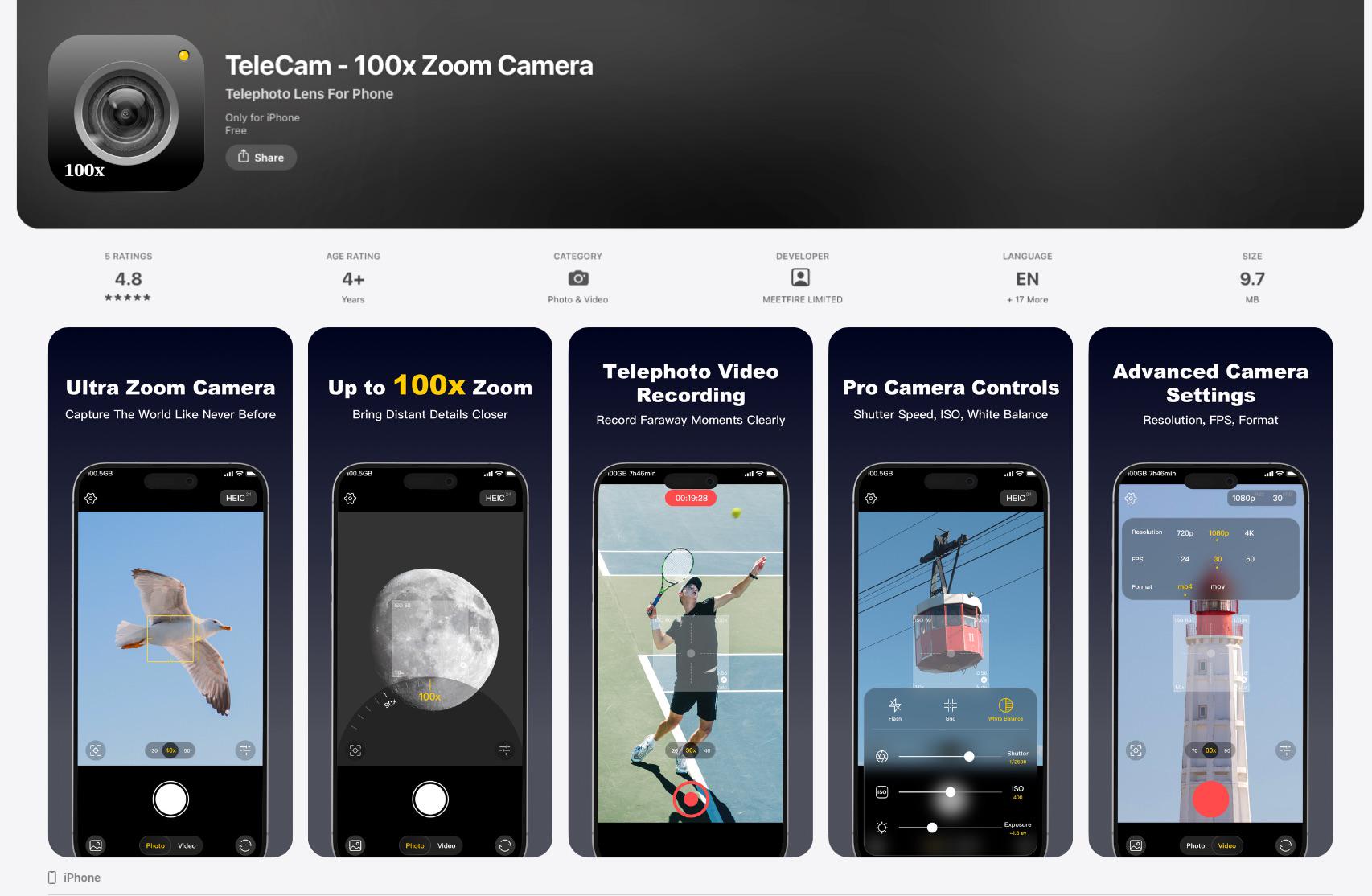
🎈 Free [FREE] TeleCam: Capture Distant Subjects with Up to 100x Zoom

Post image
18 Upvotes

[FREE] TeleCam: Capture Distant Subjects with Up to 100x Zoom

I once went to a concert and ended up sitting pretty far from the stage. I wanted to get some good shots of the performers, but they were just too far away😮‍💨\ Since cameras aren’t allowed at many concerts, I started wondering if I could make better use of my iPhone’s camera to capture things farther away💪

🎉That was the idea behind TeleCam

A - What it does 📸

TeleCam is an iPhone camera app that lets you zoom in up to 100x to capture distant subjects.

Whether you’re using a Pro or non-Pro iPhone, TeleCam helps you make the most of your device’s camera. Even without a dedicated telephoto lens, you can use it to capture distant subjects.

B - What makes it different 🔭\ Rather than focusing only on zoom, I wanted to give users more ways to get the shot they want.

🔭 Up to 100x zoom for concerts, sports, wildlife, the moon, and other distant subjects.\ 📱 Make the most of your iPhone’s camera. Designed to help you get more out of the camera hardware you already have, including on models without a dedicated telephoto lens.\ 🎛️ Manual camera controls. Adjust ISO, shutter speed, white balance, exposure, and focus when you want more control.\ 🎥 High-quality video. Record up to 4K at 60 fps, with video stabilization.\ 📸 Multiple photo formats. Save photos in HEIC, JPEG, PNG, or RAW.\ 🪄Automatic photo enhancement. TeleCam automatically optimizes image quality after you take a photo to help bring out more detail.

I’ll keep improving TeleCam to deliver a better shooting experience and better photo results over time. ✨

C - Cost💰\ 🎁TeleCam is free to download and use!

👉 App Store: https://apps.apple.com/app/id6807319282


r/iosapps • • 2d ago

🎁 Freemium I built Cohestry, a private second brain that connects your notes and maps them in 3D

2 Upvotes

I built Cohestry because I wanted my notes to actually come back when they became relevant, instead of disappearing into folders. It’s a native Markdown library and second brain that automatically links related notes, resurfaces old ideas, and lets you explore everything through a 3D graph. Your library stays on your devices and syncs through iCloud.

Compared with tools like Obsidian, I wanted the basics to feel much more Apple-native and require less setup. Notes, Markdown editing, PDF export and iPhone ↔ Mac sync are free. The Mac app is coming shortly with Apple Notes import and an optional MCP bridge for Claude, Codex and other agents.

Cohestry is freemium. Pro is $5.99/month, $39.99/year or $99.99 lifetime, with a 3-day trial. I’m the developer. My LinkedIn is https://linkedin.com/in/kingbillion1

App Store: https://apps.apple.com/us/app/cohestry-second-brain/id6811573132
Web: https://cohestry.app

Edit: the Mac app was just approved: https://apps.apple.com/us/app/cohestry-second-brain/id6811573132


r/iosapps • • 2d ago

🎈 Free I wanted Minesweeper to feel genuinely beautiful on iOS, so I built Onyx :)

Post image
62 Upvotes

Hey everyone! I’m Mark, the developer of Onyx. I’ve always loved Minesweeper, but I wanted a version that felt calm, thoughtful and truly at home on iPhone and iPad.

A - Answer

Onyx keeps the logic of classic Minesweeper while giving it a more considered experience: fluid touch controls, logic-only and random boards, daily puzzles, smart hints, custom themes, infinity mode and focused Find the Mine challenges.

B - Better

Apps on iOS tend to lean into nostalgia, and others keeps things very traditional. Onyx takes a different direction: quieter, more modern and shaped around deduction, customisation and smooth mobile play. I am trying to make it look appealing, feel smooth, clean and clear.

There are different modes to play around which are classical field, puzzles to find mine(s) or empty space(s) and infinity! Also keeping all the stats, times and other records.

The app has grown enormously through player feedback, and I’m still carefully improving every detail.

C - Cost

Completely free, with no ads, subscriptions or in-app purchases. It also works fully offline.

I’d genuinely love to hear what you think, especially about the design, controls and overall feel. Thank you so much if you decide to try it!!!

Link :) - https://apps.apple.com/app/onyx-minesweeper/id6790800332


r/iosapps • • 2d ago

💎 Lifetime I built Heart Rate Insights to compare years of Apple Health heart-rate data

Thumbnail
gallery
7 Upvotes

Hi! I’m the developer of Heart Rate Insights, an iPhone and iPad app for exploring the heart-rate history already in Apple Health.

On-device analysis. No account required. The app doesn’t automatically upload your health data. You decide whether to export, copy, or share anything.

A — Answer

Apple Health can collect years of readings, but I wanted to ask questions beyond one day’s chart: How did two periods compare? Were workdays different from days off? Was a difference visible throughout the day, or only at certain hours?

I built this to compare those periods while showing typical ranges and how much data each comparison is based on.

B — Better

Compared with Apple Health’s built-in views, Heart Rate Insights focuses on flexible comparisons:

  • Compare two periods, workdays with days off, or custom times of day.
  • Switch between trends, typical-day patterns, and distributions.
  • Inspect standout weeks alongside nearby weeks.
  • Create PDF reports to share with your doctor, or CSV exports for your own analysis.

The optional Prompt feature prepares text you can review and choose to share with an external AI service. No AI model runs inside the app.

It’s for personal review, not diagnosis or live monitoring.

C — Cost

  • Free, with no expiration: most views cover the latest 60 days, Patterns up to 90 days, and one export (PDF or CSV) is included.
  • Optional 14-day Pro trial: all available history, long-range patterns, and unlimited PDF/CSV exports, with no automatic charge. Afterward, Free limits return unless you buy Pro.
  • Lifetime Pro: $14.99 USD once for all available history, long-range patterns, and unlimited PDF/CSV exports.
  • One Report Export: $0.99 USD if you only need another export.

No subscription. Local App Store prices vary.

Download Heart Rate Insights

I’m xcv58 on GitHub, maintainer of Tab Manager v2.

Website · Privacy · Terms · Support

All screenshots use synthetic sample data. What comparison would you want to try with your own Apple Health history?


r/iosapps • • 2d ago

🎈 Free iOS] PicPost EZ – $1.99 → Free (Limited Time)

Post image
8 Upvotes

[iOS] PicPost EZ

– Capture, Note & Share! 📸

A – Answer: What does PicPost EZ do?

I just launched PicPost EZ, a simple app that combines a camera, photo album, and notes in one place!

Ever taken a photo and wished you could remember exactly what you were thinking at that moment?

With PicPost EZ, you can capture your moments, add notes to your photos, and share everything easily without switching between multiple apps.

📸 Camera & Album — Take photos, browse them in the built-in album, or import existing photos from Apple Photos.

📝 Photo Notes — Add text notes to individual photos and keep your memories, experiences, and thoughts together.

🔗 Multiple Photos & Notes — Select multiple photos and automatically combine their individual notes into a single text, ready to share.

🧵 Threads — Share your selected photos and combined notes directly to Threads, with the text automatically included in your post.

📱 Instagram & Facebook — Share your photos with the combined notes automatically copied to your clipboard, ready to paste into your post.

💬 Messaging Apps — Share photos and their combined notes with friends and family through messaging apps.

☁️ Apple Photos Integration — Photos you take are also saved separately to Apple Photos.

🌎 40+ Languages — Available in more than 40 languages for users around the world.

B – Better: What makes PicPost EZ different?

No more switching between your camera, photo album, and notes app just to prepare a social media post.

From capturing a moment to sharing multiple photos and their notes, PicPost EZ brings everything together in one simple app.

Capture the moment. Save your thoughts. Share them together.

C – Cost: How much does it cost?

💰 Regular Price: $1.99 → Free for a Limited Time!

PicPost EZ is currently available for free for a limited time.

Download it during the free promotion, and you can keep using it for free!

Developer Transparency

I'm JAESIK YOUN, the independent developer of PicPost EZ and the owner of CEglobal, a registered business.

PicPost EZ is currently published under my personal Apple Developer account.

Official website: https://ceglobal.org/

🍎 App Store: https://apps.apple.com/us/app/picpost-ez/id6821620482

I'd love to hear your feedback!