r/protools • u/Maksim_dvc • Sep 02 '26
Help Request How do I turn this permanent automation slider off this track??
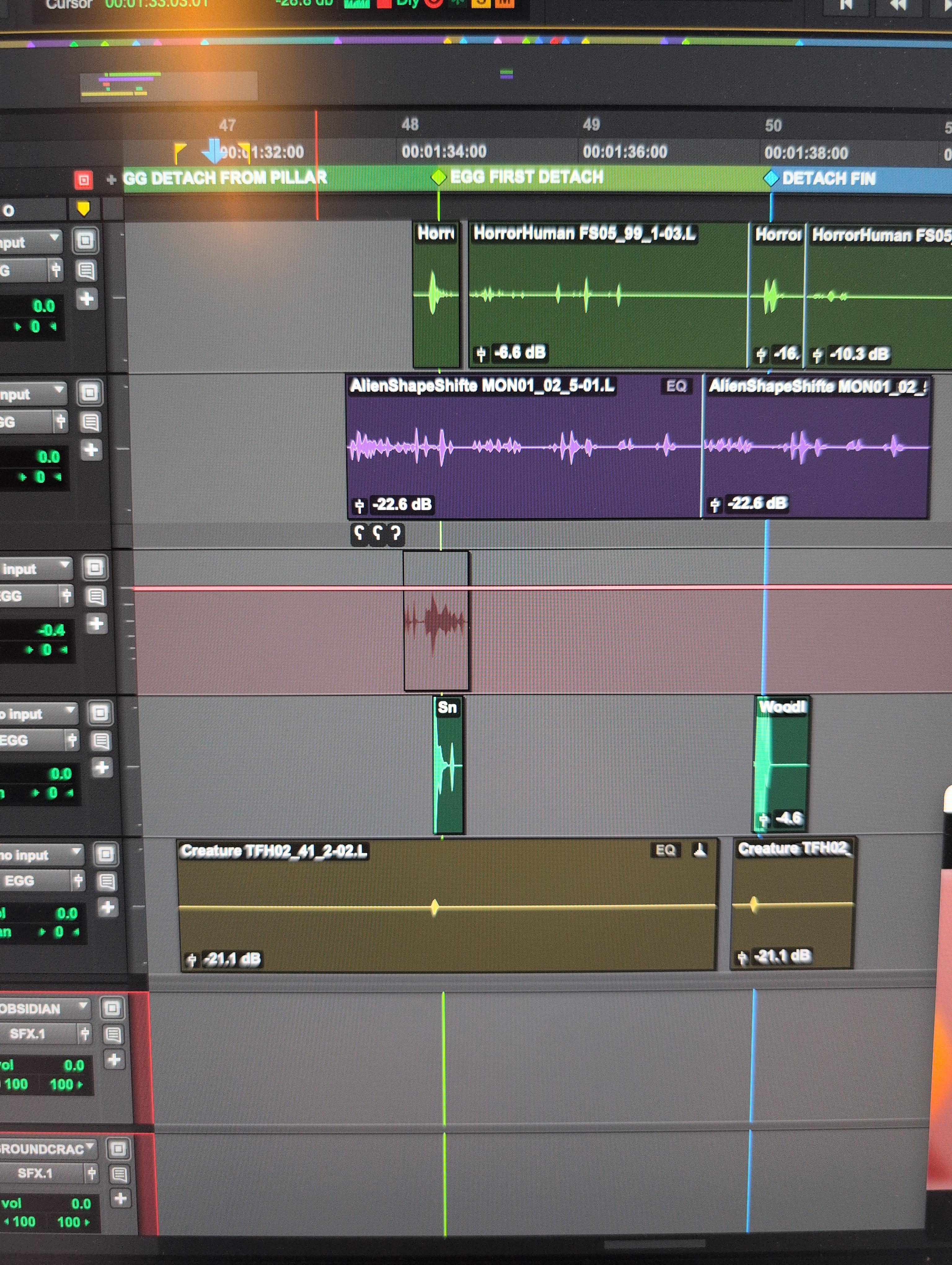
Seriously I can't figure this out for the life of me I don't even know how I turned this on and now I can't even select the clip
11
u/shiny_fox Sep 02 '26
On the track header below the name of the track you can find a drop down menu.
It will say volume right now (probably)
Change it to waveform :)
4
u/Maksim_dvc Sep 02 '26
Ahhh omg thank u!!
2
u/Kaituno Sep 02 '26
Or pres the "?" while the track is selected. That's the shortcut to togel from volume automation to waveform and back
7
6
u/Tall_Category_304 Sep 02 '26
Select track, click minus sign. If another line appears, click minus sign again.
2
u/audiodd Sep 02 '26
Under the track title and the rec enable, I, S, M, buttons will say something like "volume" on this track but "clip" on all other tracks, click that and choose "clip".
2
u/a1JayR Sep 02 '26
Control + CMD + (Left or Right) toggles through the automation lanes in selected tracks. “Waveform” is the standard clip that you can edit easily
3
1
u/MidnightMiik professional Sep 02 '26
I’m not sure what that automation line is.
But, assuming you’re on a Mac, if you hold Option and press - 2X, that will switch the global view to volume automation and then turn off that view. You should also be able to select which automation you’re viewing from the track. Your screen shot didn’t show what the view was.
Alternately, you could also select the track and press - to change it to volume automation or if it is volume automation, pressing - will get rid of it. The line is pink. Is the track record enabled?
1
1
u/Tunagoblin Sep 02 '26
“=“ key next to the backspace toggles volume and waveform when cursor is on the track.
1
•
u/AutoModerator Sep 02 '26
To u/Maksim_dvc, if this is a Pro Tools help request, your post text or an added comment should provide;
To ALL PARTICIPANTS, a subreddit rules reminder
Subreddit Discord | FAQ topic posts - Beginner concerns / Tutorials and training / Subscription and perpetual versions / Compatibility / Authorization issues
I am a bot, and this action was performed automatically. Please contact the moderators of this subreddit if you have any questions or concerns.