r/WindowsHelp • • Oct 14 '25

Windows 10 Windows 10 End of Support, what it means for you and what you can do.

Thumbnail
8 Upvotes

r/WindowsHelp • • Mar 04 '21

Mod Announcement Welcome to /r/WindowsHelp, here are some guidelines for requesting assistance

34 Upvotes

Welcome to /r/WindowsHelp, the subreddit for you to ask questions and get support for issues related to Microsoft's Windows family of operating systems. Please give this a quick read before posting.

This subreddit is only for help related to Microsoft Windows and its built in software, like Edge, Store, PowerShell, and so on. Issues about 3rd party software like Chrome or Steam should be posted in their subreddits or /r/techsupport. Also, this is not a hardware subreddit, so issues like your hard drive is not detected would need to be posted in /r/techsupport. General discussions, news, artwork, and so on should be in /r/Windows, /r/Windows10 or similar subreddits. Malware/virus removal has been covered extensively in this post: https://www.reddit.com/r/techsupport/comments/33evdi/suggested_reading_official_malware_removal_guide/

Posts are required to have a moderately descriptive title. Submissions with vague titles like just "help me" will be removed. You don't need to write an essay in the title, but everyone should have a rough idea what you are asking about before even clicking the link. Titles like "I'm encountering System Exception errors when launching Photos" or "20H2 update won't install" are acceptable, but the more details the better.

The body of your post should also be as detailed as possible. We are not mind readers, and nobody is going to want to play 20 questions. Help us help you, your post should include:

  • Your full Windows version, which on Windows 10 is listed in the Settings app under System -> About, it will be the OS Build number.

  • Details about your device, like the hardware specifications.

  • Any recent changes you have made, such as installing/uninstalling software or accessories. Any updates you have installed, tools you have ran, or anything else you think may be relevant.

  • Include details on your error messages and error codes, these are critical to figuring out the issue.

  • Tell us what you have already tried to fix this. Any tools you have ran, and changes you tried, and so on. I know it is a meme at this point, but seriously, reboot your computer, it often fixes things!

  • If possible, include screenshots or video. If you are including screenshots, try to use screenshot software like Snip & Sketch tool built into Windows 10, then you can upload them to a free image host like https://imgur.com to put in your post. We understand that using screenshot software isn't always an option, you can take photos with a phone or similar device, but please be sure to check to make sure everything is in focus and is legible.

This subreddit follows the same rules as /r/Windows, you can view the full rule page here: https://www.reddit.com/r/Windows/wiki/rules

The TL;DR of the rules is be polite, helpful, and don't encourage piracy.


r/WindowsHelp • • 7h ago

Windows 11 Internet and bluetooth not working

Thumbnail
gallery
3 Upvotes

About a month ago the option to turn on the internet or bluetooth completely dissapeared. So far I have tried to re-enable a few things in device manager under network adapters (I have forgotten the name of it, and it no longer appears on my computer). I have tried to shut down my computer, restarting it in every way I could find. I have restarted my internet and used the network reset button a few times. Any help is much appreciated!

The OS Build is 26200.9445.


r/WindowsHelp • • 33m ago

Windows 11 Since Windows Security Update my second monitor has been lagging.

• Upvotes

Alright. I have this very weird problem. Around 3 days ago I installed a security update via windows update. Ever since then, everytime I’m in a game, my second monitor lags. Especially discord. Streams, webcams, etc. Interesting thing is, that the second monitor gets laggier as I cap my frames on the main monitor displaying the game. So game fps uncapped -> choppy - 60 fps -> even worse - 30 fps -> windows slideshow.

That is very weird behavior. I’ve reinstalled drivers, updated my chipset drivers too. Exchanged cables. Disabled and enabled Hardware Acceleration on Discord. Nothing has worked.

Is there a way to roll back certain updates?

Appreciate the help.


r/WindowsHelp • • 4h ago

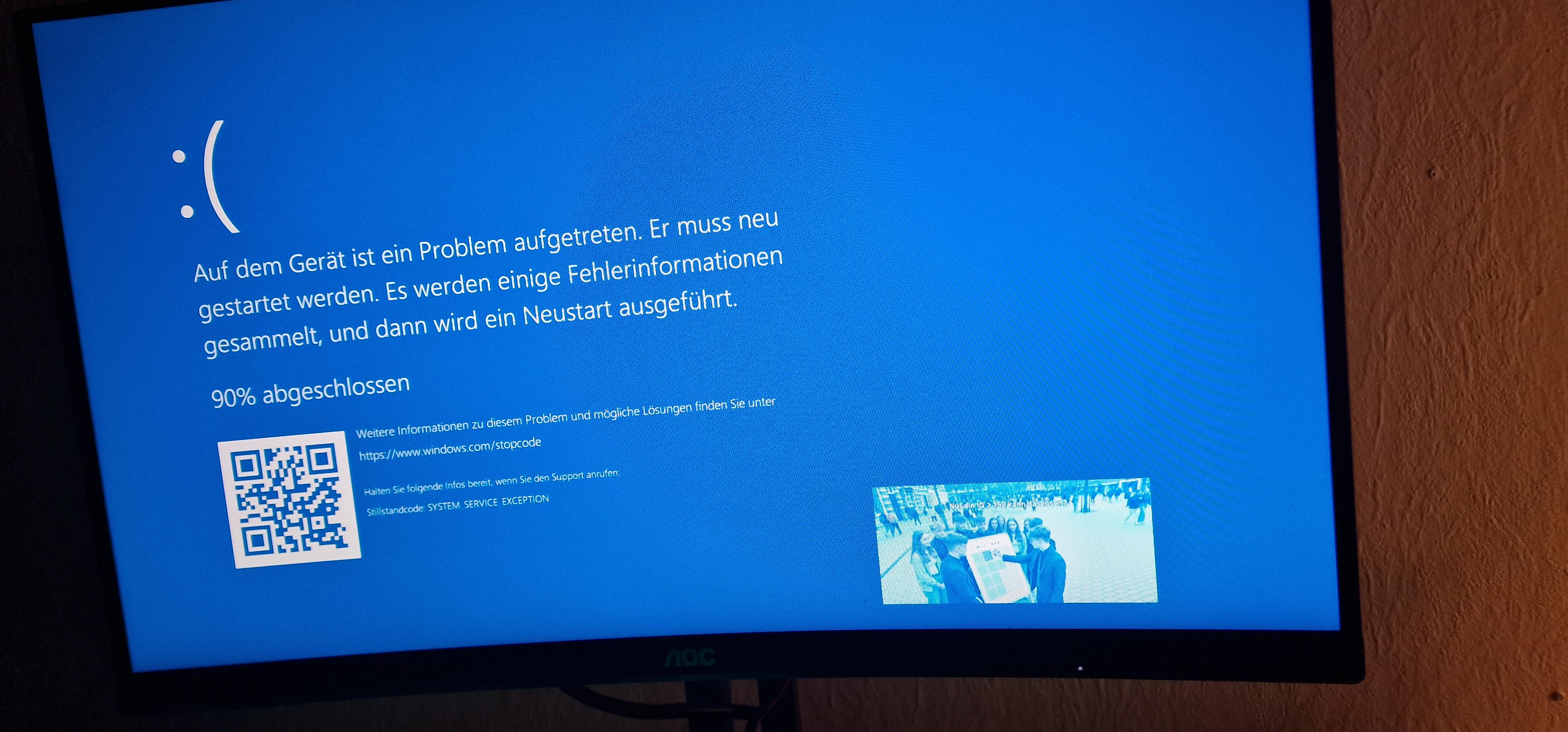
Windows 11 Meme im Bluescreen bei Win11 wie kann das sein (Kein Scherz)

Post image
2 Upvotes

Ich habe ein Meme mit den Worten "Nur ein IQ >150 kann das lösen?" in der ecke beim Bluescreen. Beim neu Start musste ich für Steam Anticheat neu installieren.

Wie kann sowas sein? Trollt mich Steam oder Irgendein Programm?

Ich habe jetzt mal den Offline defender durchlaufen lassen, der hat nix gefunden. Noch nie sowas gehabt. Ich bin kein neuling im PC bereich aber selbst sowas noch nie gesehen und da waren schon viele Fehlerbehebungen bei

Hat jemand ne Lösung oder Idee was es sein kann?😅

Win 11 Pro

Ryzen 7 1800x

Msi RTX 2070 Super

Adata 32Gb 3200Mhz

Asus B350 F Gaming

Alle Treiber bis auf Graka uptodate


r/WindowsHelp • • 1h ago

Windows 11 What is stopping me from updating to windows 11?

• Upvotes

been having a blue screen of death with the error code Attempted switch from dpc after i did a fresh windows 10 install so i figured i would just try with windows 11. but now im not sure whats right or wrong for

The app Pc Health Check says i can have windows 11 but under update & security says i cant?

OS Build 19045.7807


r/WindowsHelp • • 1h ago

Windows 7 Actually run processes on Windows/WinAPI

• Upvotes

Hi.

I'm trying to port a C script I wrote to Windows. This script, among others, executes the C compiler. On Linux it's just fork()-execv(), and waitpid() retrieves the exit code.

But the Win32 API is so much more complex. Not only is the code three times longer than the equivalent Linux code, it doesn't even run.

I create and zero PROCESS_INFORMATION, STARTUPINFO (inconsistent naming btw), then CreateProcess(argv[0], argv, NULL, NULL, FALSE, 0, NULL, NULL, &si, &pi); Then WaitForSingleObject(pi.hProcess, INFINITE);

Then there is a GetExitCodeProcess() call to retrieve the exit code, but it retrieves garbage data. I was wondering why, and it turned out the process didn't run at all.

The command passed to it is sound since I print it before calling it and running it manually works just fine.

The roundabout code is here: https://pastebin.com/piceZFhC

I'd be thankful for any help.


r/WindowsHelp • • 5h ago

Windows 11 what is the xmrig on the task manager, my ram is gonna dead

2 Upvotes

And how do I uninstall it? It consumes a huge amount of RAM—mostly 2–3 GB—and it causes severe lag, too.

here is the specs of my pc

i5 13420h
rtx 4050
512ssd

and some point it automatically bsod or shutdown itself
I can't seem to find the file location, so I can't delete it either—is there any other way?


r/WindowsHelp • • 1h ago

Windows 10 Why are the mb/s values for "disk" in task manager so inconsistent in terms of what spikes usage to 100%?

• Upvotes

The inconsistency lies in the fact that sometimes a task like "system" will spike the disk tab to 100% and slow the PC down horrendously from as little as 3 mb/s, but viewing other tasks on that tab show values like 60 mb/s with no effect on usage.

Task manager helpfully highlights the tasks that are spiking values in orange-red spectrum, so this isn't a case of 60 mb/s PLUS the extra 3 drives it to 100%, unless it's just flawed design.

The simplest explanation to me is that the mb/s is virtually meaningless; that disk is not a pool with a set capacity for tasks to draw from. But then why even display a mb/s value in the first place? It just leads to wildly inconsistent relationships between displayed usage per task and actual effect on total disk usage.


r/WindowsHelp • • 2h ago

Windows 11 Adding the my devices tab in settings

1 Upvotes

Hey guys, so I have 2 computers, both registered with my microsoft account. One running windows 11 home, one 11 education (the full version not the cutdown N version). Both devices show up on the microsoft account website in browser, both show up in the windows home device's settings, but the education one, which I use more, is missing the tab completely. I couldn't find much info about it, but my understanding is that windows education is equivalent to pro and shouldn't be missing features of the home edition, so I don't think that's the reason. They are also both fully updated and in the same region. I was wondering, if it can't be fixed, can it be manually added somehow (like the recently rolled out xbox mode which is region locked)?


r/WindowsHelp • • 2h ago

Windows 11 Updated My Windows 11 Laptop -- Strange issue since then

1 Upvotes

Good afternoon. I was simply working on my assignments when my laptop suddenly shut off. The fans stopped running, my screens went dark, I had to press the power button to turn it back on. It has never done this before.

However, all my tabs, Discord, etc. were in the same state as they were before the "shutdown." I dug a little into windows event viewer and my battery health, finding no errors and the battery functioning in optimal condition. Looking a little closer, I discovered something strange in Windows Event Viewer:

For some strange reason, my computer thought I had pressed the power button/lid, hurling it into hibernation (of which my power button/lid settings are set to due to prior issues with shoddy Nvidia drivers).

Anyone have this issue before? Again, it had only started to occur since the new Windows update. I am on build 26200.9445, Windows 11 Home, 25H2. It has only happened once, but once is enough to raise concerns considering my bountiful problems with laptops before.

I want to make sure that this *is* a Windows thing rather than a fundamental issue my computer's had all this time, only for the software change to reveal some deeper intricacies based on this "crash".

Thank you!

Here are the reliability monitor results from today
As well as the system sleepstudy

r/WindowsHelp • • 2h ago

Windows 11 audio stopped playing through monitor after update

Thumbnail
gallery
1 Upvotes

if i plug headphones in it works, but the tv speakers just stopped working after i updated windows (the speakers work outside of windows normally)

Edition Windows 11 Home

Version 25H2

Installed on ‎2/‎3/‎2026

OS build 26200.9711

Experience Windows Feature Experience Pack 1000.26100.372.0


r/WindowsHelp • • 2h ago

Windows 11 During a power outage, while on UPS power, shutdown -s -f -t 0 STILL applied updates before shutting down.

1 Upvotes

When the power is out and I'm watching the UPS battery bar tick down the last thing I want to be doing is something that says "please do not turn off the computer" very prominently.

How do I actually, urgently shut down Win11 in 2026 without it trying to install updates? At this point it would be safer for me to just hold it underwater until the bubbles stop down the power button which is barely any better than just not having a UPS at all.

I've looked at the flags listed in shutdown -? and none of them imply an any more urgent shutdown or skipping updates.


r/WindowsHelp • • 2h ago

Windows 11 Can anyone show me how to enable secure boot

Post image
0 Upvotes

I’ve watched countless videos none of them helped . Ive loaded the factory keys toggled it on but everytime i save and go back to the system info the secure boot state is off can anyone help please.
I’ve updated my bios to the latest version which I think is f.24 . I’m just trying to play some games 🙏
I have a hp omen 25L desktop


r/WindowsHelp • • 3h ago

Windows 10 "The drive or network connection that the shortcut 'Steam.ink' refers to is unavailable" for a program on an available drive

1 Upvotes

I recently wiped my computer and moved my OS to one of my SSDs. After reinstalling some stuff, i noticed that when I opened one of the programs (Steam, in this case), the icon that displayed on my taskbar was broken. Instead of displaying the Steam icon like it did before, it displays a black white page icon. I can still open Steam from the shortcut on my desktop and the search bar, but when I pinned it to my taskbar and tried to open it, I received an error message saying "The drive or network connection that the shortcut 'Steam.ink' refers to is unavailable. Please make sure that the disk is properly inserted or the network resource is available, and then try again."

Steam is installed on an available and accessible internal drive, and I can open it from there. I can open it from other shortcuts, but if I pin it to my taskbar like I always have, it can't be opened. This is only happening with Steam, no other program. It's also a fresh install on a computer that was factory reset a few days ago with practically nothing on it at the moment. Does anyone know why this is happening and how to fix it? I've tried googling just about everything I can think of, but I wasn't able to find anything like my case, just stuff about external harddrives and flashdrives.

In case it's relevant:

Windows 10 Pro
AMD Ryzen 7 2700 8-core CPU
32GB RAM
Nvidia GeForce RTX 5060 Ti (16GB)
OS Build 19045.6466


r/WindowsHelp • • 3h ago

Windows 11 Phone link is hijacking my calls! - SMFH

Post image
1 Upvotes

how do i get this fucking thing to stop?
I wanted to use phone link to read a message on the phone while in a call. But when i launched phone link the call got transferred to the laptop.
And when i clicked on transfer to phone it does that but on speaker.

When i click the bluetooth button on the call it switches back to the laptop. What kind of bullshit implementation is this? I'm using my bluetooth headphone. I don't want to fucking be on speaker. And i don't want the call to be on the pc too. I want it to be on my HEADPHONES.

And i don't want to NOT use phone link also. I need to know how i can make it so that the audio of the calls don't get hijacked like this. While I use phone link.

There might be this weird far fetched technical thing to do that will solve this, but I'm not that advanced. I don't even know if this is due to phone link, or my phone or WhatsApp. Why don't it have the option to select which bluetooth device is being used for the call? Absurd!

---

  • Processor AMD Ryzen 7 6800HS Creator Edition (3.20 GHz)
  • Installed RAM 16.0 GB (13.7 GB usable)
  • Graphics card NVIDIA GeForce RTX 3050 Laptop GPU (4 GB)
  • AMD Radeon(TM) Graphics (2 GB)
  • Storage 420 GB of 477 GB used
  • System type 64-bit operating system, x64-based processor
  • Pen and touch No pen or touch input is available for this display
  • Edition Windows 11 Home Insider Preview Single Language
  • Version 26H2

r/WindowsHelp • • 7h ago

Windows 7 Should I Install Tiny10 on This Laptop

2 Upvotes

I have an old laptop running windows 7, it feels really old so i wanted to upgrade to windows 10 but it definitely cannot run that.
I wanted to try tiny10 but i don’t want to download it just for the laptop to feel sluggish and slow so here are the specs
No GPU
4GB RAM
Intel core i5 1st gen
(I tried running it on a newer laptop using virtualbox by giving 2GB free RAM and 2 CPU and it felt jittery but I didn’t know if that’s due to the OS or the virtualbox)


r/WindowsHelp • • 4h ago

Windows 11 taskbar keep appearing when fullscreen + plug in charger

Post image
1 Upvotes

taskbar keep appearing when fullscreen + plug in charger. I use msi thin 16gb ram rtx 2050 i5-12450H Windows 11 Home Single Language version 25H2...i did almost everything on internet , ask ai..youtube..reddit..and nothing work...pls help me

also in Valorant in fullscreen after i afk for a while..it's minimized to desktop

Processor 12th Gen Intel(R) Core(TM) i5-12450H (2.00 GHz)

Installed RAM 16.0 GB (15.7 GB usable)

Graphics card NVIDIA GeForce RTX 2050 (4 GB)

Intel(R) UHD Graphics (128 MB)

Storage 565 GB of 943 GB used

System type 64-bit operating system, x64-based processor

Edition Windows 11 Home Single Language

Version 25H2

Installed on ‎15/‎2/‎2025

OS build 26200.9711

Experience Windows Feature Experience Pack 1000.26100.372.0


r/WindowsHelp • • 4h ago

Windows 11 Stuck and have not been able to get into my laptop

1 Upvotes

Laptop has been stuck in some whole boot loop? I tried to reset my laptop due it to not turning on when I tried to skip the drive, but now when it reaches 85% in the reset installation it just restarts the laptop and moves it back to 64%. Please help, ive been stuck here for 3 hours

PS: I have a HP Victus laptop


r/WindowsHelp • • 4h ago

Windows 11 Updates make my keyboard stop working

1 Upvotes

This first happened in August. After a Windows update, it restarted and the keyboard (within the laptop) stopped working. Then I uninstalled some updates, and turned off further updates from happening. The keyboard functionality didn't come back immediately, but after a few days of me not using the laptop. Then I thought, okay maybe it just needs to chill spend some time shut off and the keyboard functionality returns. Also a few times after that, when it shut down from low battery, next time i turn it on, the keyboard wasn't working. It had to be shut off and left alone for some time to start working again.

But tonight (October), it happened again. For some reason, updates were installed, even though I turned the stupid updates off, and my keyboard stopped working again. I am so tired and furious of these bugs. I finally have time to do some work stuff, and I can't!!

And also, while I'm here: whatever I type in Start Search, nothing shows up. It's been like this since i bought this laptop few years ago.

Windows 11 Home

Version 25H2
OS Build Nr: 26200.9711

AMD Ryzen 9 5900HS with Radeon Graphics (3.30 GHz)

32,0 GB (31,4 GB usable) RAM

Graphics cards:

NVIDIA GeForce RTX 3060 Laptop GPU (6 GB)

AMD Radeon(TM) Graphics (496 MB)

2,59 TB of 3,64 TB used storage

64-bit operating system, x64-based processor

No pen or touch input is available for this display


r/WindowsHelp • • 5h ago

Windows 10 Latest Windows Update Broke BD PROCHOT in ThrottleStop

1 Upvotes

Hello, after installing 3 Intel updates two days ago, I noticed that the BD PROCHOT setting is grayed out in ThrottleStop and I can no longer enable it. Is this related to the Intel Dynamic Tuning Technology drivers? Is anyone lived a problem like I mentioned?

OS Version: Windows 10 Home Single Edition, 19045.7807
CPU: Intel i5-10210U 1.60GHz
Laptop: HP 15 dw-1000nt


r/WindowsHelp • • 5h ago

Windows 10 Vulkan problemme AMD Radeon HD 8670M

1 Upvotes

My AMD Radeon HD 8670M (old I know) does not support vulkan is there a way around it

Laptop is dell inspiro 3537

Windows 10 64bit

I tried to run gow3 pc port and it says vulkan-dll not found I used gpu z and it says vulkan not supported for both the intel and amd. I tried amd Adrenalin Edition 22.6.1 for Legacy AMD Radeon Graphics Release Notes and the laptop crashed and stopped and I had to uninstall the amd drivers through safe mode etc...


r/WindowsHelp • • 6h ago

Windows 11 Boot NVME suddenly not selectable as boot drive by BIOS

1 Upvotes

I have a bunch of NVME's, one of which is currently supposed to be bootable, but my BIOS will not let me select it and boot to it.

My current install of Windows is on Disk 3. I have done nothing to it today.

My previous install of Windows is on Disk 2. Until recently, that installation was intact and barely touched. I recently wiped it and wanted to completely reformat it but the recovery and MBR partitions remained.

Today, I erased the remaining partitions on Disk 2, but now Disk 3 is incapable of booting, despite me doing absolutely nothing with it.

SecureBoot and CSM are disabled on this machine (but this is an ASUS motherboard and they have a weird job of labeling those functions, any help would be appreciated).

I have tried cloning the contents of Disk 3 to Disk 2, as well as switching the slot Disk 3 is installed in, none of that works.

The motherboard recognizes every single NVME in this computer, but not the master partitions, I forget the term/name for that.


r/WindowsHelp • • 6h ago

Windows 11 So what's the real reason Windows 11 notifications are always silent?

1 Upvotes

I've tried everything. I've updated drivers, I've restarted audio services, I've checked and double checked the settings even for each and every individual app, and still no sound from notifications, even with stock sounds. This isn't a new issue either. Every Windows 11 PC I've ever touched had this same issue and I cannot for the life of me figure out why.

Mine is Home, version 26H2 and build no. 26300.9711, but again, I've had this issue with all branches of 11.


r/WindowsHelp • • 7h ago

Windows 10 Stuck on Preparing Automatic Repair

1 Upvotes

Hey guys so i have a hp pavIion from 2016 i dont remember its model name but has a i5 7th gen uhm so if i plug it off power like it instantly shuts down and like it does not charge basically the other day i forgot to connect it to my ups and the power cut happened when i was working on it and it shut down and today i turned it on and it was not moving from the hp logo and so i force shut it down for 2-3 times and now its stuck on a preparing automatic repair screen about 2 hrs since that happened nothing new it’s stuck on the hp logo and preparing automatic repair what should i do man im scared that i might corrupt it if i plug it off power and just lose everything pls help