r/Bitwig • • Aug 26 '26

Bitwig 6.1 !

Thumbnail
bitwig.com
128 Upvotes

r/Bitwig • • Sep 26 '25

Help Bitwig Grid Course (free)

Thumbnail
polarity.me
167 Upvotes

This free to access course teaches you how to use Bitwig Studio's Grid. Learn how to use the Grid to build synthesizers, audio and note effects as a Beginner, step by step! This course is free and will be updated regularly with new content.

Please Let me know your feedback.


r/Bitwig • • 3h ago

Just some casual small talk, but...

Post image
9 Upvotes

First of all, sorry for posting such casual small talk in a serious Bitwig forum.

Koala Sampler, which is a sampler I really love, is releasing a VST version this time, and they actually mention Bitwig in their supported DAWs list. This is pretty rare for a VST instrument company, so I took a screenshot and posted it here.Since it's something you rarely see from instrument companies, I was so thrilled the moment I saw this phrase

This is definitely not a viral ad for Koala Sampler lol. Hope you all have a great day today!


r/Bitwig • • 9h ago

Matthias Holmgren Bitwig lookalike Free DAW - Have you seen it?

9 Upvotes

Who will teach us Bitwig from now on? I am concerned.


r/Bitwig • • 3h ago

Why can't I reveal the Grid Settings panel?

Post image
0 Upvotes

Hi! I'm very new to Bitwig, coming from Live.

I'm going through the user guide to learn my way around the software and now I'm facing this issue where I can't click on the Grid Setings at the bottom of the arranger. It seems like the actual button is behind that "zoom bar". Nothing happens when I click it.

I'm aware that the user guide available is for v5 and I'm trying v6.

Any ideas?

Here is the section of the manual where this is discussed:

https://www.bitwig.com/userguide/latest/the_arrange_view_and_tracks/

----

Note: I'm almost completely blind, therefore missing elements on the screen is a possibility.


r/Bitwig • • 1d ago

6.1.5 is online now

36 Upvotes

Just downloaded it to my Linux install. I am so happy with these frequent updates and that Bitwig seems more open to our comments.


r/Bitwig • • 1d ago

Video Listen to Uranium Decay While You Sleep

Thumbnail
youtu.be
14 Upvotes

Today, I decided to focus more on noise and sound in the Grid Patch. Instead of splashes and rain sounds, I went for something a bit more digital. To me, it kind of sounded like uranium decaying, so I just named it that. In the background, there are a few pad sounds and some white noise. It's all pretty simple, but I thought it sounded nice. Hope you enjoy it!

More patches: https://polarity.productions/dispenser/


r/Bitwig • • 1d ago

Clap I replaced my Bitwig Piano Roll with MidiSketch - If feels like having the FL Piano Roll

Thumbnail
youtube.com
10 Upvotes

The only thing i don´t get warm with in BW is the Piano Roll.
Few days ago i found a Plugin called MidiSketch. You can just google it.
It changes the Piano Roll and my Life with BW completly.
You have a fantastic Piano Roll like FL Studios Piano Roll inside BW AND it´s MPE.
So i can send Bends and lot more Data via MPE to BW Synths and Serum for example.

MidiSketch can be loaded as CLAP before the Instrument and sends the Data directly to the instrument in the same Track.
Otherwise you can also use it on a different Track and use the midi routing.
there are million more possibilities, but i just want to keep it basic.

Please have a look at the video :)


r/Bitwig • • 1d ago

Question Plan upgrade after 12 months

3 Upvotes

Suppose I buy Essentials now and a year and a day later I decide to upgrade to Producer, will it still cost 100 (that is 199 - 99) or will I need to upgrade to the latest version first?


r/Bitwig • • 1d ago

Multiple midi tracks to Drum device

2 Upvotes

Hi everyone,

I'm looking for a way to route separate midi channels to a single Drum device, to allow separation between hats/kick/snare and do polyrhythms between the parts

I have been creating a main track with Drum as the device, then using instrument tracks with no instrument and routing their midi output to the main track. This works, but when I go to write notes I can't see the pads in drum mode (they only appear on the track that contains the actual device)

Is there a better way to set this up?


r/Bitwig • • 1d ago

Question Essentials player mode

1 Upvotes

As an Essentials user would I be able to download presets from Bitwiggers and use them in "player mode"? Or is that only for the official Essentials pack? Moreover, "player mode" allows to inspect the canvas/patch (read-only) or just to change the remote controls? I'm on full Studio trial so unfortunately I can't inspect this by myself. Thanks.


r/Bitwig • • 2d ago

Superpowers for Bitwig: Capture MIDI, Freeze, Export with FX, MIDI Tools and more (Beta 5, now on Linux too)

Enable HLS to view with audio, or disable this notification

69 Upvotes

Superpowers adds new commands, menus and keys inside Bitwig Studio 6.1.3 – 6.1.5. It's made by one person.

What's in Beta 5

  • Capture MIDI: played something without recording? Press Capture, and the last 30 seconds become a clip.
  • Freeze: right-click a track or group to render it to audio and unload the plug-ins; Unfreeze brings them back.
  • Export with FX: stems rendered through their groups, returns and master.
  • Ramp: Start and End velocity under the Velocity lane.
  • Piano roll keys: ⌘E splits at the grid, ⌘3 switches straight/triplet, ⌘D duplicates full length.
  • MIDI Tools: Arpeggio, Strum, Chop, Stacks, Quantize, Rhythm Evolution.
  • Audio clips: Detect Key, Separate Stems, Audio to MIDI.
  • Arranger: ← / → fold groups, − / + collapse devices.

Install (about a minute)

  1. Download for your OS: Mac .dmg, Windows .exe or Linux .tar.gz.
  2. Close Bitwig and run the installer. It backs up your official Bitwig first.
  3. Open Bitwig. Restore Original in the installer puts everything back.

On Linux: tar -xzf Superpowers-Linux-*.tar.gz, cd into the folder, then run sudo ./install.sh. A Bitwig you unpacked yourself in your home folder works too, without sudo.

Download and guide: https://kalifrn.com/superpowers

Heads-up: this is a beta that patches Bitwig's own files, so keep the installer around to restore. Windows and Linux were mostly tested offline, so reports are very welcome: every installer has a Send Report button. Not affiliated with Bitwig GmbH.


r/Bitwig • • 2d ago

I used REA to decompile kalifrn6 Bitwig Superpowers. Why keep source code closed?

17 Upvotes

FIRST OFF:
kalifrn6-art states right in the main README.md:

Compiled code can still be reverse-engineered.

https://github.com/kalifrn6-art/bitwig-superpowers/blob/main/README.md

What I'm wondering is. Why? It's seems to be a code-gen RE'd project in and of itself. I can see the potential negative implications of posting Bitwig's official RE'd jar file source. It's commercial software. And this is all a gray area. No one wants to see Superpowers shut down because its very neat. But I RE'd the official JAR too and all the function names are semantically obfuscated anyway like most Java projects. Nothing new under the sun, look no further than the Minecraft community for the past 15+ years.

But why not make just the functions kalifrn6-art added source code open source for others to contribute to on the Github instead of keeping it closed?

Maybe it's just me being weird about the philosophical implications of code-gen projects (all the code-gen projects I've built I keep open source because I feel like the LLMs to create my projects I'm using stand on the shoulders of giants and the only reason they work is because they've been trained on all the code in the open source community that was hand-written).

For those of you interested building your own tools based off of Bitwig Superpowers, this MCP kit worked quite well:

https://github.com/morluto/rea/

I RE'd it with:

  • Claude Code and Opus 4.6 (since it doesn't balk at reverse engineering requests)
  • Pi and Orca (an "uncensored" Qwen model) using Strata on my local hardware

Both got the same results.

I then re-compiled the "decompiled" stuff and Bitwig works on Linux. Added "-thewrz" as a suffix to the Arpeggiate tool for fun:

Anyway. I appreciate the cool stuff u/kalifrn has built, I just don't understand the need to keep it closed source because it would be more fun to collaborate with code-gen to make even more cool tools.


r/Bitwig • • 1d ago

Anyone using ES-9 and an audio interface as a combined audio device on Bitwig?

Thumbnail
1 Upvotes

r/Bitwig • • 2d ago

Video Custom native tracker module in Bitwig's grid sequencing the Digitone 2

Thumbnail
youtube.com
6 Upvotes

Implementing "native" modules in the grid is quite fun.


r/Bitwig • • 2d ago

MIDI recording from hardware has bad offsets?

1 Upvotes

Windows, BW v6.1.4 (x64), hitting record to get notes from my OXI One, and first kick is late, and all the other kicks are late, but by a different amount (beats 2+ are all offset by SAME amount) suggesting both an initialization problem and perhaps a separate problem explaing all the rest being off? Anyone experienced anything like this? (yes i contacted support)

Also, midiView image below verifies all notes leaving OXI at perfect times.


r/Bitwig • • 2d ago

How can I randomly select the layers in FX SELECTOR?

5 Upvotes

hi, i created an FX SELECTOR with e.g. 10x infiltrator VST and have this FX Selector on my master channel, i know you can trigger for example the FX Selector with a different midi channel, cool, but i want that a randomizer modulator or if not possible can trigger these different infiltrator layers in my FX Selector, is this possible somehow?


r/Bitwig • • 2d ago

bitwig-agent-bridge: control all of Bitwig from a script or an AI agent using opencode MCP over a virtual MIDI port

0 Upvotes

I wanted to drive Bitwig programmatically — and, specifically, to let an AI agent actually make music in it — so I built bitwig-bridge.

The problem: Bitwig's only real programmatic doorway is the Control Surface API, and that runs inside Bitwig. There's no external socket to poke. So the bridge wires one up.

How it works — three small pieces:

script / agent ──HTTP──▶ bitwigd ──virtual MIDI (SysEx RPC)──▶ AgentBridge ──▶ Bitwig Control API

- a Bitwig controller script (AgentBridge.control.js) that receives SysEx RPC frames and dispatches them to the Control Surface API,

- bitwigd, a small Node daemon that opens the virtual MIDI ports, speaks the protocol, and exposes a local HTTP + WebSocket API,

- an MCP server so agents (I use it with opencode) get bitwig_* tools.

The protocol is JSON over SysEx (F0 7D <json> F7) — 7-bit clean, and it handles non-ASCII track/clip names.

What you can do today (host API v17, Bitwig 4.4.10): transport (play/stop/record/loop/tempo/position), list and set tracks (name, mute, solo, arm, volume, pan), launch scenes, browse a device's remote-control pages and set parameters, create/launch/write notes into a cursor clip, list drum-machine pads, and app undo/redo/duplicate. It's built to grow command by command.

The Linux gotcha, if you're on Linux: Bitwig only opens ALSA rawmidi devices (/dev/snd/midi*), not the ALSA sequencer — so RtMidi "virtual ports" are invisible to it. You need snd-virmidi to create a dummy rawmidi device Bitwig can see, and you should pin its card index (options snd-virmidi index=10 midi_devs=1) so the port name stays stable across reboots (otherwise your interface shifting the index silently breaks Bitwig's stored port assignment). All of that's in the README.

It's early and additive, but it's already genuinely fun to have an agent play/stop, mute tracks, launch scenes and draw notes while you watch.

Repo: https://github.com/CurePortal/bitwig-bridge

If you try it: issues and PRs welcome — adding a command is one case in dispatch() plus (optionally) a tool. I'd love to hear what else people want exposed.


r/Bitwig • • 3d ago

Guys im using bitwig producer, it doesnt have saturator, can you suggest me good all around saturator like ableton,which does pretty much everything in terms saturation like clipping, colouring.etc

5 Upvotes

also other fx plugins alternatives for producer edition, like eq, limter.etc


r/Bitwig • • 3d ago

How about your experience to use VidPlayVST with Bitwig?

4 Upvotes

For scoring film and animation, any tips?

*Context : Does Bitwig Studio support video?

Bitwig Studio does not directly support video playback, but syncing video via a VST plug-in like VidPlayVST can work for many scoring scenarios.


r/Bitwig • • 4d ago

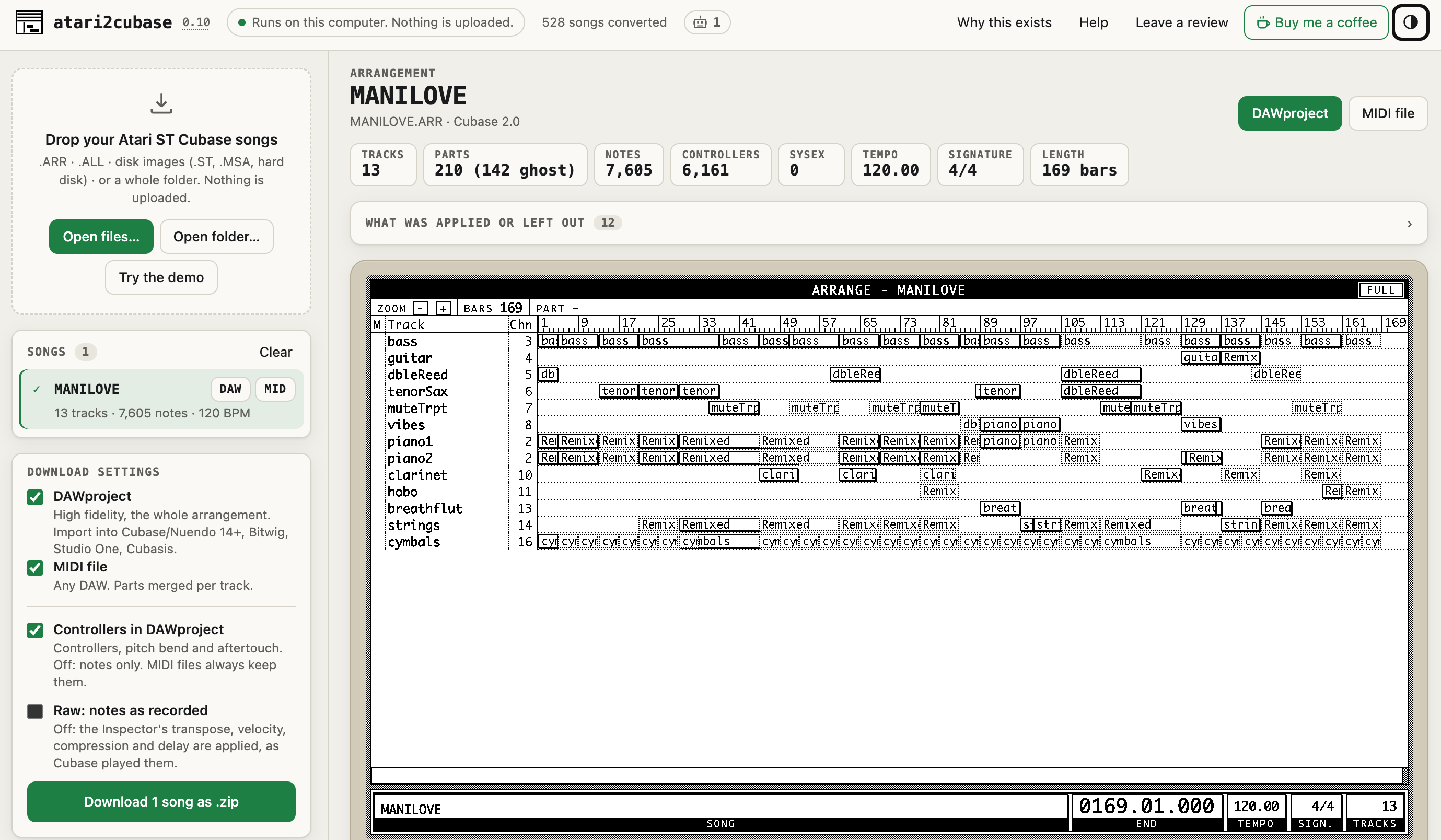
Old Atari ST Cubase songs → DAWproject → Bitwig / Studio One (free converter)

Post image
19 Upvotes

If you started on Cubase on the Atari ST and switched DAWs since: this converts the old .ARR and .ALL files to DAWproject, which Bitwig (5.0.9+) and Studio One (6.5+) import, with tracks, parts and tempo changes in place. I've tested the import in Cubase; if you try it in Bitwig or Studio One, please tell me how it went. Free, in the browser, nothing uploaded. Link in the comments. Happy converting!


r/Bitwig • • 4d ago

feature-request Anyone else really miss the Bitwig 5 / Studio One style Piano Roll layer workflow in v6?

4 Upvotes

I switched to Bitwig from Studio One a while ago, and overall I'm loving almost everything about it. Honestly, the workflow in Bitwig 6 is fantastic, EXCEPT for one thing that has become pretty much my only frustration with the DAW: the new Layered Editing behavior in the Piano Roll.

Coming from Studio One, one of the things I loved most was how smooth multi-track MIDI editing felt—you always had the full track list right inside the Piano Roll to quickly toggle visibility and switch your active edit target. Bitwig 5 had a very similar, seamless setup with the full track list and the Pin / Lock / Pencil icons directly inside the editor.

In Bitwig 6, moving to a strictly selection-based workflow feels like a step backward for how I write music:

- I like staying inside the Piano Roll (especially in full-screen Edit View) and flipping between background reference tracks and my target track on the fly.

- Having to go back to the Arranger to Cmd/Ctrl-select clips/tracks every time slows me down.

- Clicking another single track in the Arranger immediately clears the multi-track layer view (even with the new "back arrow" history button, I still really miss simply pinning a chord or drum track in place).

I totally get why some people prefer the new selection-based approach, but I just really wish we had an option/toggle to always show all MIDI tracks in the Piano Roll layer list and "Pin" them, giving us the best of both v5 and v6.

For those who also preferred the Bitwig 5 / Studio One style workflow, how are you adapting to this in v6? Any favorite workarounds?


r/Bitwig • • 4d ago

remote control editor

1 Upvotes

hi,

Why under bitwig, are we limited to banks of 8 parameters when we want to edit a vst? Is there a way to update them automatically in the remote control editor? All parameters at once?


r/Bitwig • • 5d ago

Bitwig Suggestion: Add Quantize Automation

14 Upvotes

I've looked around and asked on Discord, and it doesn't seem like there's a way to do this. Am I the only one who'd really like a way to quantize automation?

If I'm using a MIDI controller to record pressure, volume, or another parameter live, it'd be nice to have an option to reduce the point resolution and snap the horizonal values to the nearest grid point.

And perhaps smoothing. This would be really useful for anyone dealing with a little input lag or ... just not super precise with the knobs and faders.

If I want cleaner automation, I have to click all the points in with a mouse, which can take a long time.

It seems odd to me that we can quantize audio recordings and MIDI but not automation.. Am I missing something? Would anyone else find this useful?


r/Bitwig • • 6d ago

News Been working on some new devices! + How’s Superpowers been working for you?

Thumbnail
gallery
108 Upvotes

Hey everyone!
I’ve been experimenting with some new devices lately and wanted to share a bit of what I’ve been working on!

Dynamics+
A dynamics processor with mid/side, serial and multiband routing. It features different compressor models, an OTT-style compressor, clippers and limiters with oversampling, true peak limiting and lookahead.

Saturator+
Follows a similar philosophy to Dynamics+, with mid/side, multiband and serial routing. The UI is heavily inspired by Roar, but it uses Bitwig’s native shapers, which are actually pretty good! It also includes feedback and a compressor at the end of the chain.

Flux
A multi-FX device inspired by Infiltrator and ShaperBox, with its own sequencer. Still experimenting with different ideas for this one!

Autotune?
This one’s more of a personal experiment for now. I’m still figuring things out, especially since some parts are similar to existing autotune implementations and I’d rather avoid any potential issues. Eventually I’d love to work on my own pitch correction algorithm. The UI is also heavily inspired by Ableton’s Auto Shift.
These are just some personal experiments I’ve been having fun with lately. I really enjoy exploring what’s possible and building tools around my own workflow.

On another note, how’s your experience with Superpowers been so far?

I’d love to hear from those of you who’ve been using it! What’s working well? Anything that could be improved? Any bugs or features you’d like to see?
I’m also working on more updates for Superpowers, so your feedback is really helpful!
And if you’ve been enjoying Superpowers and would like to support my work, I’ve set up a donation link. Everything helps me spend more time experimenting, developing and improving these projects.

https://kalifrn.com/superpowers/

Thanks for all the support! ❤️