r/HomeNetworking • • 0m ago

Advice Router limiting bandwidth to mesh node.

Post image
• Upvotes

My TP-Link Deco mesh system is getting limited by the router to about 100mbps. This happens very often and it fixes itself after restarting the router it is connected to, just for it to become unstable and go back to the 100mbps limit. ISP said it might be an issue with the mesh unit itself. Ethernet is not possible as my house is not wired for it nor does it have coax in rooms that needs an AP.

What might be the cause here? Any advice is appreciated.


r/HomeNetworking • • 29m ago

Hi everyone, trying to set up my Asus RT-AC86U to my nbn box although I can’t seem to get the ethernet ports to work around the house? And the speed is quite slow

Thumbnail
gallery
• Upvotes

-Any help is appreciated-

For context
Signed up with Superloop and just want to get better speed with my 1000/100. Am currently sitting on 90/50 with this router.

Unable to get the Ethernet ports in the house to receive internet either even though the receiving ports next to the nbn box are hooked up?

I’m definitely missing something😂 not very good with internet setups as you can tell lol

Don’t really want to have a 15m Ethernet cable running across the house✌️


r/HomeNetworking • • 31m ago

Access point Zyxel BE5100,sfrutta appieno la ftth 2.5 gbps con un Samsung galaxy s25?

Post image
• Upvotes

Buongiorno! L'access point zyxel BE5100 ,srutta appieno la 2.5 ftth su Samsung galaxy s25? Voglio sfruttare al massimo in wi fi della mia connessione ftth 2.5 gbps sul mio Samsung galaxy s25. Questo access point andrà collegato tramite lan ad uno switch 2.5 gbps (che a sua volta è collegato al router ftth 2.5)


r/HomeNetworking • • 2h ago

Advice Omada TP-Link er605

1 Upvotes

Can this router acts as a switch cause i want to configure vlan which like i want to put trunk for it😞 How can i config so that it can support vlan and the rest of the pc


r/HomeNetworking • • 4h ago

Help programming an old Carmanah Wireless Triple Jackpot sign without a lottery terminal

Post image
0 Upvotes

I recently got a Carmanah Signs Wireless Triple Jackpot display and am trying to program my own numbers into it without the original lottery terminal.
The equipment I have is:
Display: Carmanah Signs Wireless Triple Jackpot, part 2-43832 Rev1
Wireless adapter: GTECH/Carmanah RS485/USB Transceiver 2.4 GHz, part 2-12639 Rev2
Firmware: [20100126](tel:20100126)_Rev5
The adapter has a USB Type-B port and a 9-pin DB9 serial port.
I also have a DB9 male-to-male serial cable.
The sign powers on and displays numbers, so it appears to be working. I also have the original installation instructions, which state that the transceiver connects to the sign wirelessly and can use either a DB9 or USB connection.
I would like to use a Windows PC to set the three jackpot values manually and change them whenever I want, essentially using the sign as a programmable numeric display. I do not need to connect it to an actual lottery network.
Does anyone know:
Whether legacy Carmanah or GTECH software exists for programming this model?
Whether the USB transceiver can communicate with a PC through a serial driver or terminal program?
Whether the wireless protocol or message format is documented anywhere?
Whether it would be possible to build a simple custom controller to send values to the sign?
I’m happy to troubleshoot the PC connection and can provide photos of the equipment labels, ports, and installation manual if helpful.
I’d appreciate advice from anyone who has worked with older Carmanah/GTECH jackpot signs, wireless displays, RS-485 devices, or similar legacy equipment


r/HomeNetworking • • 5h ago

Advice Moca Filter?

Post image
1 Upvotes

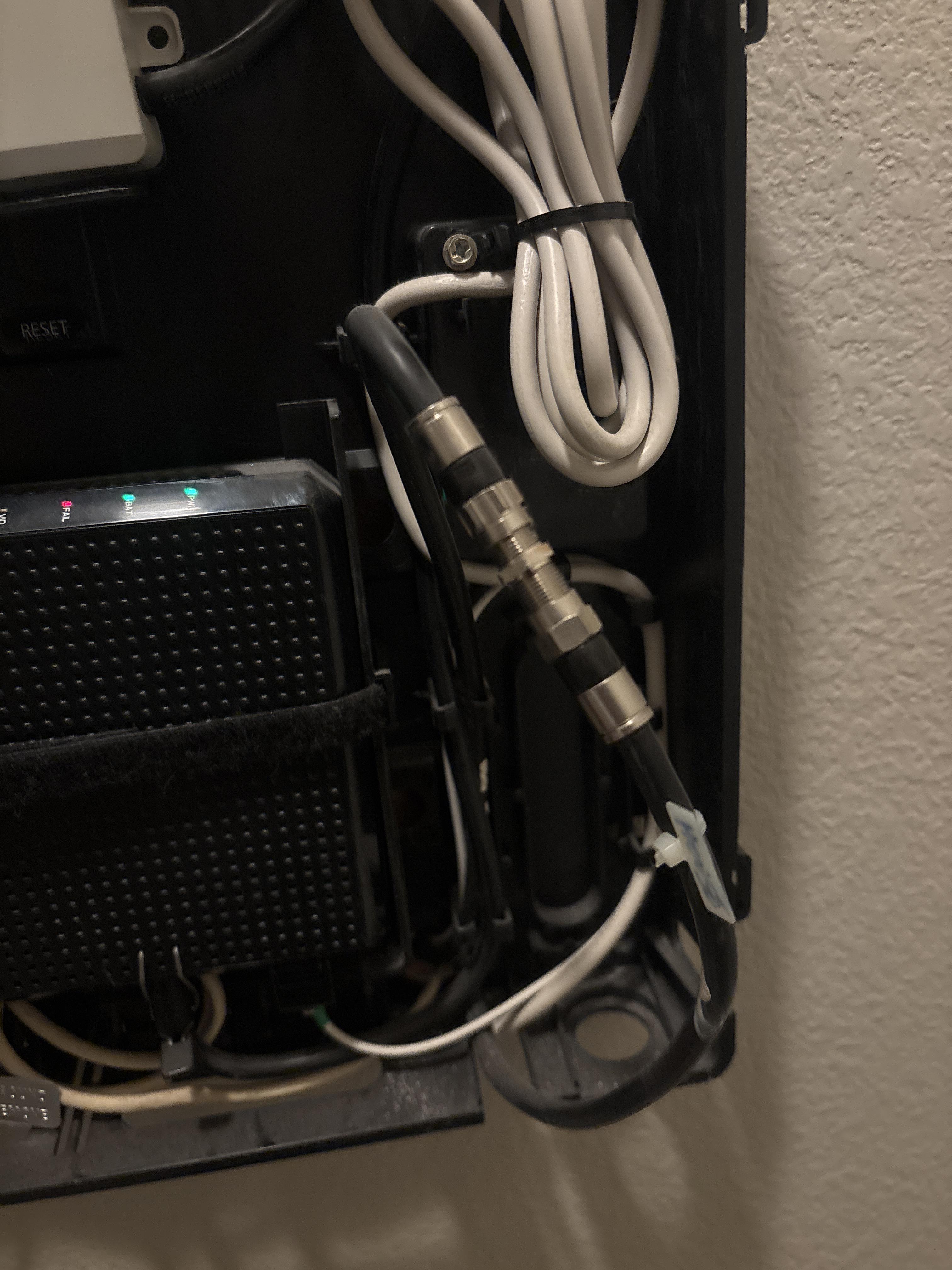
To anyone that knows more about internet connection than me, maybe you can assist, im trying to use moca adapters to get wired connection to my PC upstairs, I am unable to get a ethernet cable cable to my router because it is downstairs, after setting up the adapters, connecting one coax cable to a moca compatible splitter that connected to the wall, and plugging in the Ethernet cable into my router. I can’t seem to get the second adapter thats connected to my PC to link. Online research has pointed me to it possibly being a moca filter in the cable box, this looks similar to what I have seen online but I am unsure. Any advice with how to proceed would be greatly appreciated!


r/HomeNetworking • • 8h ago

Advice Best cheap personal router?

0 Upvotes

So I’m 20 and still living at home as a student, and my parents will constantly block my wifi access. I also have connection issues due to the amount of devices that are on the household wifi (lots of siblings). I’m wondering if there’s any simple routers I could set up so I don’t have to deal with these issues? I mainly watch shows/play games and would use at most two devices at a time.


r/HomeNetworking • • 8h ago

PC Only Available on Network through Unmanaged Switch

2 Upvotes

Odd issue...but I am guessing this has a simple solution.

I setup a Home Assistant PC and got it working on my desk connected to an unmanaged switch I keep on my desk. I can connect to it from a wired connection sharing the same switch as well as the overall WAN. I gave it a static IP, and blocked internet access.

I plan on installing the PC in my attic, where I have a direct connection to a port on my managed router (ASUS EBG19P). The port is setup same as all of the other wired ports...and it often shows up on my routers admin page...but I cannot ping it or access the home assistant home page.

Any help would be appreciated! Thanks


r/HomeNetworking • • 8h ago

Static IP addresses for Devices - within DHCP

Thumbnail
0 Upvotes

r/HomeNetworking • • 8h ago

Access point with XE75?

Thumbnail
1 Upvotes

r/HomeNetworking • • 8h ago

My game constantly disconnects... Hoping to solve the issue

0 Upvotes

I currently have a pretty wonky setup so that could ultimately be the cause of this issue. I use a Netgear AC1900 WiFi USB adapter on my PC which I am assuming is outdated and not that great.

I would 100% go with a MoCA adapter if I could but the room that has the modem does not have a coax port but my office which has the computers do. The options I am seeing are something like TP-Link® AV2000 2-Port 2000 Mbps Gigabit Ethernet Passthrough Powerline Starter Kit but I'm reading Reddit comments and people do not seem to think it's all that great.

Another option recommended was TP-Link Archer TXE75E AXE5400 Wireless Tri-Band Wi-Fi 6E & Bluetooth 5.3 PCIe Adapter, installing it directly into my motherboard.

I ran a speed test and 293.1 Mbps download and 123.9 Mbps upload is what I got. I am paying for a 1gig fiber network through Quantum and their website says I should ideally get up to 940 Mbps.

How do I fix this? I ran with it for couple months but the disconnect is driving me insane.


r/HomeNetworking • • 11h ago

UniFi CGF 10GbE Port Performance Issues

Thumbnail
1 Upvotes

r/HomeNetworking • • 11h ago

Advice High ping spikes with OpenWrt in Proxmox

Thumbnail
gallery
0 Upvotes

Hey everyone,

I'm troubleshooting a networking issue in my homelab and would appreciate some advice on identifying the actual bottleneck.

My setup:

  • Fiber ONT: Unfortunately, it doesn't support bridge mode. I've disabled its DHCP server and assigned a static IP to the Proxmox host.
  • Proxmox: Runs OpenWrt as a VM and passes the network interfaces through Linux bridges.
  • OpenWrt: Acts as my main router, handling NAT, firewall, DHCP, and the LAN.
  • ZTE H188A: Connected to OpenWrt and used only as a Wi-Fi access point and Ethernet switch. Its DHCP server is disabled.

The network works, but I'm experiencing severe latency spikes when pinging 8.8.8.8.

Here is an example from my phone:

  • Average ping: 241 ms
  • Maximum ping: 977 ms
  • Packet loss: 6.3%

Normally, the latency can be around 40–50 ms, but occasionally it suddenly jumps to hundreds of milliseconds.

The most interesting part is that the issue is much worse on Wi-Fi devices connected to the ZTE H188A. Devices connected through the ZTE's Ethernet ports experience significantly smaller spikes.

My main suspect is the cheap 100 Mbps USB-to-Ethernet adapter I'm using for one of the Proxmox network interfaces. I'm wondering whether it could be causing packet drops, latency spikes, or some kind of bottleneck.

However, I'm not sure whether the problem is actually caused by the adapter, Proxmox bridges, OpenWrt configuration, the ZTE's Wi-Fi, or the fact that the ONT is still routing instead of operating in bridge mode.

What would you check first, and how would you isolate the cause? Would replacing the USB-to-LAN adapter with a proper Gigabit Ethernet adapter be a reasonable first step, or should I run some specific tests before buying anything?

Thanks


r/HomeNetworking • • 11h ago

Advice Advice/recommendations for new build setup

Thumbnail
gallery
2 Upvotes

We are in the process of building a home and the plan is to run Cat 6A throughout. Planned for 7 rooms with 16 ports for required connections and fail-safe redundancy marked in red on the images. This being my first time venturing into home networking, outside of a basic switch and router setup, I need advice on a few things:

  1. choosing a wall mount cabinet, patch panel, and switch
  2. best place(s) to mount
  3. should I keep the TP-Link Archer GX90 wifi router with everything or central location
  4. placement for Plex server

Ideally I want a wall cabinet that locks so no one inadvertently messes with anything. Right now the plan is to install it in the basement under the stairs so it's out of the way and central to everything, which is marked in yellow on the basement. My other thought was to be it on the top floor also marked in yellow (2nd story) in the spare closet closest to the exterior wall for easy access running Xfinity/Comcast to it.

I plan to have my Plex server in my office or just connect it to the switch directly since it's built in my Cooler Master HAF XB EVO ATX case and that would let me remove 2 connections in my office.


r/HomeNetworking • • 12h ago

Advice 24 port on one row quiet 1u rack switch but cheaper than a USW-Pro-Max-24?

1 Upvotes

Hey all, I'm looking for a layer 2 switch, ideally with 24 ports on one row for the home rack.

I'm trying to see if i can find something cheaper than a USW-Pro-Max-24. Hoping to do some vlans


r/HomeNetworking • • 12h ago

Red LOCAL iphone a iphone

1 Upvotes

Buenas gente estuve intentando con chat gpt y nada me funciono tal vez aca alguien sepa algo mas

Tengo un router que estoy 99% seguro tiene AP ISOLATION activado (no tengo pc para conectar el cable ethernet ahora mismo) y desactivarlo o crear una red aparte o algo

Intento crear un servidor en cualquier juego y el otro dispositivo no puede encontrarlo aun asi ponga IP del servidor y demas nunca se conecta o encuentra
Por ejemplo quise jugar en macbook ,crear un servidor en un juego y conectar la otra macbook NUNCA encuentra el servidor

Intento jugar desde mi iphone algun juego multiplayer red local y mi otro iphone tampoco lo encuentra
Basicamente no puedo hacer nada Jaja ni macbook ni el iphone pueden crear servidores en los juegos supongo por el ap isolation?
El tema que tambien juego minecraft en el celular y conectándome del otro aparece y podemos jugar facil
Es el unico juego que permitio conectarnos en la misma red wifi

Ya probe zero tier one ,tailscale ,compartir wifi de mi iphone al otro

En macbook macos27 golden gate no existe segun chat gpt crear una red lan local como windows

Ya no se que opcion usar ,alguna idea ?

La idea es no quitar el AP ISOLATION ya creo es util


r/HomeNetworking • • 13h ago

Advice Wi-fi with no connection, works with VPN

2 Upvotes

Hi everyone. I was advised to try out this sub. Please kindly redirect me if I should be posting this in a different subreddit.

For the past two months, our wifi has had a connection issue. It started off happening a couple times a week, where while we would be connected to the wifi (with 3-4 bars as seen on our phones) we could not actually use it. After asking for days, our wifi provider sent in a team of two people to take a look, and since then, this connectivity issue has been daily, 24/7. We’ve had non-functioning wifi for a month now. Two other teams have come in to fix it, and our modem has been changed once to the latest model. The wifi seems to work for maybe 10 minutes after a reset is carried out by either the customer service person or us, but goes back to not working. Customer service does not file our situation as an issue since every test they run comes back with perfect results, as they say the speed etc. of our wifi seems to be at its highest. They refuse to help in any way other than resetting the wifi due to this.
Here is the catch. I seem to be able to connect and use the wifi when I turn on my VPN. It’s not fast, but it works. Aside from this, we are able to open Youtube videos on the TV just fine with no problems. This is not the case for our phones and laptops. Just that one TV.
Today, after some advice, I changed our DNS to the one that the online test would be fastest. Now, we’ve gotten maybe a couple hours total today where we had connection, but presently it’s still not working. I tried two different DNS servers as well, to no avail.

I’m seriously tired and frustrated. I’d really appreciate any wisdom anybody could offer or help us fix this.


r/HomeNetworking • • 13h ago

Advice Bufferbloat with mesh network (wired backhaul)

0 Upvotes

Hi everyone,

I have been trying to solve latency spikes during moonlight/Apollo streaming from my gaming PC to my tablet within my home for 6 plus months now. I believe I've determined it's not an issue with my host (very powerful gaming PC) nor my client (galaxy tab s9 ultra and steamdeck). I think it's a bufferbloat issue.

I have an Arris Touchstone CM8200, gigabyte fiber internet, running to an Eero mesh system with Eero 6 pro nodes. I recently installed a wired backhaul via moca 2.5. My speeds are good and my Eero app shows 1gbt wired connection to each node. Host is wired via gigabit switch.

I ran waveform tests today, and am getting a B. Unloaded 59ms, download active +33ms.

I am running out of ideas on what to try or do.

Should I try a different modem? Buy my own or have ISP provide? ISP has offered to upgrade me to Eero 7 (not 7 pro) for no cost. I haven't asked them about a different modem yet. I'm also willing to buy myself a new modem and maybe try access points instead, but I'd rather keep it free or low cost if possible.

Anyone have any suggestions? I'm honestly at a loss at where to go from here.


r/HomeNetworking • • 13h ago

Recently suffering from slow download speeds despite 1Gb fiber line

1 Upvotes

I have a 1Gb up/down fiber line. When I run speedtest.net, it's showing the right speeds (900+ Mbps up/down). However seemingly in the past week or so, when I go to download large files (like a 1GB video file), it takes several minutes (instead of 10-15 seconds like it used to). This happens on wifi or ethernet.

I have a personal computer and a work computer right next to each other, both on ethernet lines. I noticed the issue when I had to download 100GB file on my work computer last week and it took 10 hours (should've been 15-20 minutes). It runs on a VPN for work. I tried switching to wifi - didn't matter. Rebooted computer. Didn't matter. Flushed dns, didn't matter. Tried without VPN on - didn't matter.

Now on my personal computer, downloading a 1.5GB video file from my OneDrive folder took a very long time (not even sure it finished when I finally gave up on it).

I recently switched to a TP-Link Deco mesh system in my home. I didn't notice the problem when I set it up 1-2 months ago. Streaming services all seem fine throughout the house and on devices. It just seems to be with downloading large files and recently. I do not have any QoS settings or throttling set up anywhere that I did manually or purposely that I know of. Quantum Fiber is my ISP and they say there is no throttling or data caps set up.

I just don't know how to check where the issue might be occurring. Any ideas where I should look?


r/HomeNetworking • • 13h ago

Wifi 7 Router + Mesh AP Suggestions

3 Upvotes

After doing some research, I've found the Ubiquiti UX7 to be the most suitable router + AP combo. I would be using one AP, with wireless backhaul, going through one floor back to a router wired directly to the modem. I just want to know if this will cause any headaches, as this is for my parents and I (I am living with them temporarily) and ultimately they cannot accept a system that might require any level of tinkering to work. The hardware needs to be relatively easy to set up and maintain. I was looking at the two UX7 units, or the TP Link BE67 two unit system. I'm not a fan of the TP Link offering because it paywalls many features (admittedly, may not be used by myself or my parents, but the principle irks me). I also do not like how TP Link seems to put systems into EOL status after only 3-5 years; Ubiquiti support seems to extend closer to 10 years on average.

The one concern I have is the TP Link BE67 appears to have somewhere from moderately to significantly better long-range signal strength and wireless backhaul capabilities. This is important for two reasons: One, I will be PC gaming/VR gaming on the second floor via wireless backhaul. Two, if possible, the more long-range connection that reaches outside the house, the better. I fear the UX7 might struggle with this compared to the BE67.

I am avoiding WiFi 6E as just about all offerings are EOL from what I can tell. If there is a competent tri-band 6E router + AP setup that is $400 or less and is guaranteed to receive security updates for the next 5 years, please suggest. It is also worth noting I am located in the US and many European hardware companies are not currently shipping to the US due to regulation changes made by the FCC earlier this year. I also understand WiFi 8 comes out soon, but I expect that to be out of my price range if the launch of WiFi 7 is anything to go by; I hope to snag a deal on a WiFi 7 system once BlackFriday (US discount holiday) rolls around and WiFi 8 systems are available

Use case: Two-story, 2,000 sq ft house with the access point on the second floor. 10-20+ IoT devices, combination of Google/Alexa home assistants, 4-6+ 4K TVs, a desktop computer for gaming, Meta Quest 3 connected to that desktop PC, and 4-6 other laptops or other devices using 5/6ghz, maybe some are WiFi 7 compatible, like cell phones. Not necessarily a high-bandwidth use case, but I would like to do a bit of future-proofing as this is a gift for my parents and I don't want them to need to upgrade again any time soon. They've been using gen 1 google WiFi for a decade and it's time to replace it as this product is end of life as of 2024. They have fiber internet with the capability to upgrade to relatively fast speeds.


r/HomeNetworking • • 14h ago

Backyard ADU Access Point + Hardwired Devices Shutting Down Modem

1 Upvotes

Happy Monday! I live in a backyard ADU that has an ethernet connection running underground to the main house, and we share a Google Fiber network.

Currently, the set up is:

Main House: Google Fiber Jack (modem) connected to the WAN port on an older GFiber Wifi 5 Mesh "puck". Another ethernet cord connects the GFiber Mesh LAN port into an ethernet wall plate, which carries it underground into another wall plate in the ADU.

ADU: A 2nd GFiber Mesh router is connected at the wall plate, and provides WiFi to the ADU.

I wanted to hardwire in my Xbox and work computers, using a Gigabit switch (TP-LINK TLSG105), but when I connected the switch to the LAN port of the ADU GFiber router, it forced a hard reset on the modem and everybody lost their internet for 30min.

I don't want to inconvenience my family in the main house by trying different combinations, so what I'm trying to figure out is:

How do I branch hardwired connections, and keep the WiFi Access Point in the ADU, using only the single ethernet connect that is passing through the primary router in the main house? Maybe I'm mixing up the order of the gigabit switch and Wifi Mesh router? Maybe the routers aren't compatible for what I'm trying to do?


r/HomeNetworking • • 14h ago

my wifi is inconsistent on laptop but super fast on every other device, i tried every fix but nothing worked should i order TP-Link Archer T3U Plus (AC1300) i heard its good, any reviews on it?

0 Upvotes

same as title ......................................


r/HomeNetworking • • 15h ago

Upgraded to Gigabit internet at home; AC1750 Router won't go over 500mbps on Ethernet (Cat7)

0 Upvotes

Hello everyone,

Recently my ISP upgraded me from 500mbps to 1Gbps Internet at home. I only have Wifi 5, so I didn't expect to be able to pull it wirelessly, but I was surprised to see that my TP-Link AC1750 Router can't seem to deliver over 500mpbs to my M4 Mac Mini over Cat7 Ethernet.

My current setup is:

  • AC1750 connected via Cat7 Ethernet to the modem. The modem is in the living room; the AC1750 is in my office / TV Room. The Mac Mini is connected to the AC1750 via Ethernet with another Cat7 Ethernet cable. Speed test caps out at 500Mpbs.
  • I used a 30m Cat7 Ethernet cable to connect the modem directly to the Mac Mini to eliminate the AC1750 as a variable and voilá: I pulled about 950Mbps on the Mac Mini.

So my question is two-fold:

  1. Why is it that the AC1750 can't handle the bandwidth? It has gigabit ethernet ports, and its labeled being able to handle over 1300mpbs via Wifi on TP-Link's website. I know those are the theoretical limits, and specially with Wifi, there's a lot of variables, but I'm surprised it comes so short of 1Gbps. Is it simply too much for its puny CPU and RAM?
  2. Which Router should I get that can easily handle at least 1Gbps traffic wired, and which can get me closest to it via Wifi? I was looking at the TP-Link Archer BE220, but I would be open to other alternatives.

UDPATE: Following the recommendation by several folks in this thread, I disabled QoS on the AC1750 and now I've gotten over 880mbps on the Mini via Ethernet. Thanks to everyone who replied.


r/HomeNetworking • • 15h ago

Question about cables

Thumbnail
1 Upvotes

r/HomeNetworking • • 15h ago

Hitron CODA56 crashes especially during Zoom calls

0 Upvotes

Hi. I've looked around and wasn't able to find anything. If there's a post with a solution, please point me toward it.

OK, so I bought my own Hitron CODA56 cable modem and I've got Comcast in VT. It keeps crashing, often during video conference calls. While I pay for Gig service, I seem to get 200-500/30-80 Mbps. A power reset solves the problem. But this is beyond inconvenient.

I reached out to Hitron support. I get told:
I’m making sure your case is flagged for urgent review by a supervisor—your experience will be highlighted so it gets the attention it deserves. You’ll get a follow-up by email soon.

Of course I never hear back.

the modem says the software is

SW Version 7.3.5.3.2b1SW Version 7.3.5.3.2b1

Is there a way to figure out what's wrong and to update the modem?

Thanks!

Mike