r/OLED_Gaming • u/LSUdude88 • 11h ago
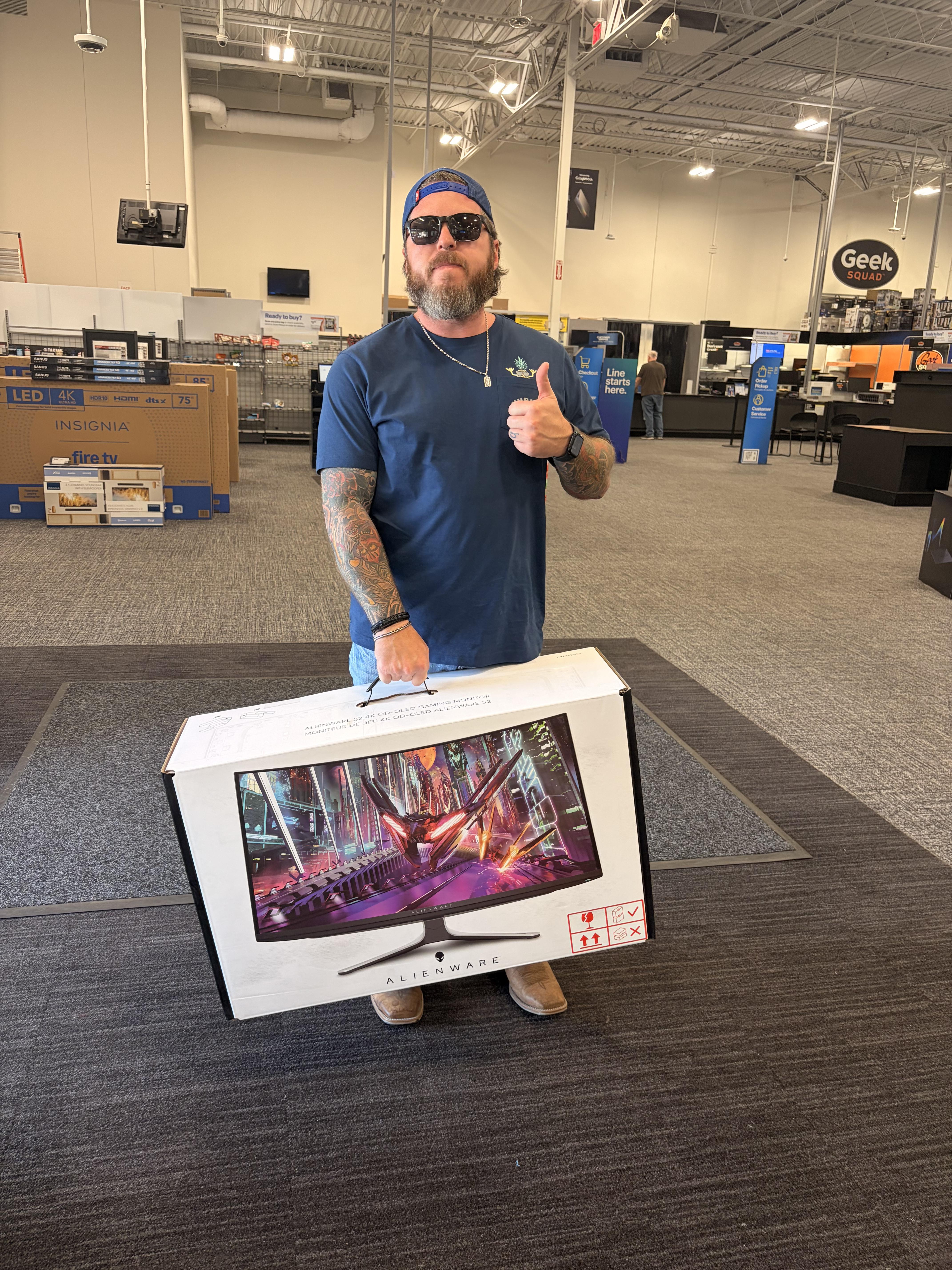
Building my first PC. Just picked this up!
617
Upvotes
r/OLED_Gaming • u/LG_UserHub • Apr 07 '26
We are thrilled to announce that our selected participants are:
Congratulations!!
Please check your Reddit Chat for more information on how to claim your prize!
Hey r/OLED_Gaming,
Let's talk about the holy grail of desktop setups: the 5K2K ultrawide. For years, the trade-off was clear. You either got the massive, pixel-dense 5K2K canvas for insane immersion and productivity, but had to sacrifice pure gaming speed and HDR brightness. Or, you went for a lower-res, standard OLED to get the performance.
But when we ask, "Which 5K2K gaming monitors deliver the most immersive experience?", the answer shouldn't force you to choose. It should be about combining that massive ultra-wide real estate with uncompromising, bleeding-edge gaming specs.

Enter the LG UltraGear evo™ 39GX950B—the world's first 39-inch 5K2K OLED gaming monitor1.
We built this to be the definitive 5K2K gaming monitor, giving you a massive 21:9 canvas at a razor-sharp 143 PPI.
To make sure this 5K2K display actually delivers the HDR pop you expect from a premium gaming monitor, we backed it with our 4th Gen Tandem OLED tech2, hitting an ultra-high 1,500 nits peak brightness3. Plus, it features the world's first 5K AI Upscaling, meaning you get that immersive, high-res image without necessarily needing a massive GPU upgrade4.

But marketing claims only mean so much. We want to see how this 5K2K beast performs in your actual, everyday battlestations. We’re looking for 3 hardcore enthusiasts to put it to the test.
| Feature | Specification |
|---|---|
| Display Size & Resolution | 39-inch 5K2K (5120x2160) UltraWide (21:9), 143 PPI |
| Panel Technology | 4th Gen Tandem OLED (W-OLED) |
| Peak Brightness | 1,500 nits |
| Refresh Rate (Dual-Mode) | 165Hz at 5K2K (Open-world/RPG) 330Hz at WFHD (Racing/FPS) |
| Response Time | 0.03ms (GtG) |
| VRR Support | NVIDIA® G-SYNC® Compatible, AMD FreeSync™ Premium Pro |
| Connectivity | DisplayPort 2.1 (UHBR 20), HDMI 2.1 x2, USB Type-C (PD 90W) |
| Smart / Audio Features | 5K AI Upscaling, AI Scene Optimization, AI Sound |
Integrate this 5K2K gaming monitor into your setup. We want your honest, "no-BS" review of this form factor, paired with high-res photos. Show the community what true 5K2K immersion looks like in person on a premium 39” display.
To enter, please fill out the Google Form and leave a comment below sharing what you're most excited about with this product!
📍 Link to Google Form: https://forms.gle/E1qaV9ZuuhURm4rPA
Deadline: April 20 (PDT)
Selection: The final list of testers will be announced in this post, and selected reviewers will be contacted via DM from u/LG_UserHub.
39GX950B Pre-orders are now live! View full product details & specs: > 🔗 https://www.lg.com/us/monitors/lg-39gx950b-b-gaming-monitor
Fair selection will be made in discussion with the mod team.
All costs (shipping/tax) are fully covered by LG.
1 Based on published specifications of 5K2K OLED gaming monitors as of March 2026, LG 39GX950B is the largest gaming monitor with a 39-inch 5K2K (5120x2160 display.\*****)*
2 LG 4th Gen Tandem OLED has been verified as Flicker-Free, Discomfort Glare Free, Low Blue Light, and Eyesafe 3.0 (CPF60, RPF40 by UL.\*****)*
3 39GX950B offers a peak brightness of 1500 nits, measured under internal test conditions. Actual brightness may vary by usage environment.
4 Upscaling performance may vary depending on the input source quality.
5 All Images shown are simulated for illustration purpose only. The above features may vary depending on the user's computing environment or conditions.
r/OLED_Gaming • u/dougramos1988 • 5h ago
Xbox Séries X
LG Oled C2 55”
r/OLED_Gaming • u/Round-Inflation-7112 • 17h ago
Cleaning them… I do not baby my things, at all but god damn these are a pain in the ass to keep clean.
Your electric dust blower takes care of the daily dust but when you eventually, inevitably, need to wipe these down omg
It is so damn easy to scratch these screens and so damn hard to clean them gently
I don’t baby my shit but I also don’t want to willingly scratch a $800 monitor… solutions
I am so tired of streak marks from literally anything, even distilled water
edit: I have a QD, and the microfibre has scratched the screen which is the issue if yall can’t read
r/OLED_Gaming • u/eaglet123123 • 20h ago
So I went with the 32" option and got my first ever OLED monitor! It looks so nice! I'm sitting 65-70 cm away from it (eye to screen), and everything goes with ease. No need to turn my head around to see the whole screen (or very few occasions when I need to look at the side bar or something), so no neck hurts. Everything is perfectly clear at 4K, no downgrade from 27" at all. And it seems the web browser can show a little bit more contents than 27" monitors, even at a 150% UI scale. The only thing is that I didn't really experience the "immersion" some people mentioned during gaming. So I'm planning to move it even closer towards me. Overall it's a perfect shift from 27" monitors!
r/OLED_Gaming • u/EpicNoobSocial • 4h ago
Hey everyone,
I just burned about 3 hours getting my ASUS PG27UCDM onto the latest firmware (MCM108), so here’s what finally worked for me. Maybe it saves somebody the headache.
r/OLED_Gaming • u/gebraryz • 19h ago
after almost 6 years I upgraded from a 24” Full HD Samsung monitor to a 31.5” 4K MSI QD-OLED and I’m just amazed. I come home from work and can’t help smiling
the difference is huge but I waited way too long to upgrade so if anyone is in the same situation as me and thinking about upgrading, there’s no reason to wait
r/OLED_Gaming • u/NuM_Brrr_WoN • 2h ago
I previously had a Samsung G60SD, 27” 1440p 360hz Matte OLED monitor. I currently have a 32” Asus Semi-Glossy 240hz OLED monitor. I’m planning on getting the new Stage Tour game and preordered it for my PC, the Steam version. I feel like I might just want a bigger display in general for gaming so I can sit back and game with my controller instead of sitting forward mostly. I also think it would be great to have something a little larger for Stage Tour if playing with multiple people. It’s been a while since I tried using a TV as a monitor a few years back, is the Samsung S90H pretty solid, is see it’s 165hz, HDMI 2.1 ports, Matte screen, and has pretty solid brightness. Would anyone recommend this as a gaming monitor essentially? Also might be cool to have TV and streaming app features as well.
r/OLED_Gaming • u/The_Sassy_Sloth • 18h ago
Hey guys,
Got a new OLED monitor on Saturday, but accidentally ordered a glossy one instead of matte.
I tried using it for a couple of days because I was super excited about OLED, but as you can see from the photo, there's a window right behind my setup. The reflections are just too much.
I’m looking to swap it for a matte OLED. Budget is €500. I mostly play single-player games and casual shooters now (CS career is officially over).
Any solid recommendations in this price range? Appreciate the help!
EDIT: I kept the foil on because i wasn´t sure if i want to keep the display.
Otherwise i would have peeled it of just for the sound lol. xd
r/OLED_Gaming • u/h3w1tt84 • 8h ago
Anyone actually seen both together in person? Is the LG that much better? I’d be gaming on 5080 PC & PS5 Pro.
r/OLED_Gaming • u/Professional-End2065 • 25m ago
So I have these settings for my ps5 pro but I feel like something is missing for it to look better let me know what you guys think or if this is fine because I don’t really know and here is how rdr2 looks with these settings
r/OLED_Gaming • u/-_-lllllllllll • 1h ago
I’m noticing a small, bright horizontal line/patch near the lower-left of my AW2725Q that fades in and out (normal brightness → slightly brighter → back to normal, repeatedly).
It’s especially noticeable on green, cyan, and yellow backgrounds. It’s also visible in the monitor’s built-in OSD test, so I assume it rules out a DisplayPort issue.
Has anyone experienced this or knows what could be causing it?
BTW, I’ve already tried a manual Pixel Refresh and a power purge, but neither helped.
Almost impossible to catch on video or photo but I tried to in the photo attached. Much more noticeable in person
r/OLED_Gaming • u/TomToma17 • 5h ago
I just want to ask people that have owned OLEDs/know about them more then I do. I have the Asus xg27aqwmg.
Are there horizontal lines normal? I saw some posts that they should dissappear after 150~ hours.
Right now im at 100 hours, pixel clean times 35 and the interval is every 7 hours. Asking since I'm still in the 2 week return window
Hope the lines are visible enought, if someone could help or need more info, I am happy to provide it!
These pics were taken around 60~hours, it seems better now, but again, asking for clarification
r/OLED_Gaming • u/SwiftSN • 1h ago
Lately, I've been desperate to get myself an OLED monitor. But, research has genuinely been making my head spin. Been looking for a 1440p, 240hz, 27 inch display. I'm in a light-controlled environment, and do a pretty even split of gaming and productivity. The latter includes storywriting. Every panel type has a compromise that I'm not willing to settle for.
Budget WOLEDs have the old RWGB subpixel layout, newer WOLEDS (tandem) have awful grey banding outside of content, and QD OLEDS have text fringing and blacks that are harder to maintain. Mostly worried about the fringing when I'm writing.
Ideally, I would take the Gen 2 WOLED and their brightness comprimises since I don't really care about HDR. But, at least to my knowledge, Gen 2 is basically dead—can't find them. I'm also aware of a new RGB Stripe QD OLED coming out in Q1 2027, but that is 400hz and way out of my price range (less than $600). I doubt we know if or when they're even going to release a 240hz version.
I would appreciate some direction here. Craving a better viewing experience (currently running a Fast IPS panel), but not sure where to go.
r/OLED_Gaming • u/eggwarders • 9h ago
Looking to upgrade to a 4K OLED / WOLED / QD-OLED without spending over €600, but torn on size. I keep seeing people say 4K on a 27" is a waste, but I currently use a 27" 1440p IPS + 24" 1080p IPS setup and love the 27" form factor, and I can't easily picture a 32" on my desk and I'm not sure if I'd like a monitor that big.
I’m eyeing the Alienware AW2725Q (27", 240Hz QD-OLED), which is currently on sale for €510.
Should I pull the trigger on this now, or wait for Black Friday to see if 32" models drop to a reasonable price?
r/OLED_Gaming • u/Apmm19 • 4h ago
Im a new owner of an OLED monitor and have been using my monitor for a couple hours and got a warning to use image retention refresh every 4 hours of usage. Do I have to do this even if my monitor is brand new? How often do you guys do it. Is it necessary?
r/OLED_Gaming • u/belfalas92 • 8h ago
r/OLED_Gaming • u/GeekingLion • 6h ago
I know the defaults are 10 but I find that when black stabilizer is at 10 that it has a bit of a lifted black level to the point where blacks come across as a little gray. I find that 8 even improves the saturation and the black levels a lot more. At 8 suddenly trees in game look more greener and the overall brightness seems a bit more darker but not enough to crush blacks I think. I don't know if I'm crushing blacks as I am not an expert on this stuff I'm just going by what looks good to my eyes. I do this for both SDR and HDR games. I don't see any noticeable differences when changing white levels so I just kept it at
10. For reference I have the LG B5 OLED.
r/OLED_Gaming • u/dibna • 18h ago
After 1000h of use and about 150 pixel clean cycles. Same as it was on beginning.
I still getting visible grey banding especially when swimming in subnautica, running in game night in Tarkov, or creeping in KDC2 as you can see below.
Lowering refreshing to 240HZ did not help, when I set black and other settings levels to hide banding, then I loose picture details when in game.
Did any one succeed to return tandem oled and get money back after few month of use with providing reason that grey banding was clearly visible during normal usage?
It was bought on Amazon Poland.
PS. Pictures are slightly overexposed, but as you can see, they were taken during the day, at night its getting only worse.
r/OLED_Gaming • u/KeivArt • 13h ago
i also plan to use it on my ps5 to enjoy gta 6 at best
r/OLED_Gaming • u/Unfair-Map-517 • 8h ago
Looking to see if/when I should cash in my Microcenter protection plan chips. I’ve got another 12 months left on my warranty. Have had it for 2 years now.
Anyone know if there’s any major quality of life improvements on the brightness front for Woled /LG’s product? Can’t really do qled due to eye/headache strain from the blue light.
r/OLED_Gaming • u/norsini • 8h ago
After ruling out ultrawides for now (I strongly prefer QD-OLED and would want a 5K2K model), I’m left with two options for my gaming PC (with an RTX 5090):
• buy the PG32UCDM3, since it seems to be the best 32” 4K
• “save the money for now”, abandon my desk setup and connect my PC to my 65-inch Samsung S99H (which also has Philips Hue lighting and a Sonos sound system).
If you used your PC exclusively for gaming, and only single-player games, RPGs and story-driven titles, which setup would you choose?
r/OLED_Gaming • u/Nodqe97 • 12h ago
I'm currently building my new room for gaming and chill, i'm currently looking for a new monitor and I can't decide which size/format i wanna go with.
Mixed Game/content consumption
27" would Go nice in a dual Setup next to each other.(Currently on a 27" single)
32" Looks so much bigger but im Kinda hesitant about 4k on my GPU since its gonna be a little Bit more hefty on my 9070xt
34" would be nice for quite a Lot of games, also racing Games feel nice If i don't want to have a full rig with Like triples which would inflate the Money i would need to spend anyways. 21:9 movies would also Look much nicer to watch.
Has anyone ever owned all of these and has some opinions on whats good and bad so it might make it easier for me to choose from, any opinion is welcomed.
Maybe i also haven't thought through everything and might need to rethink a little Bit If i missed something.