r/PhotoshopTutorials • • 4h ago

¿Alguien me puede ayudar a poner todos los logos y todo lo que no sea el fondo en rojo absoluto, 255,0,0 - #FF0000?

Post image
1 Upvotes

I know it's very basic, but for me it's impossible. I have zero experience with this and it's turning out to be impossible for me, I would really appreciate it!

Also, if you could give me the extra detail of teaching me using a free tool, I would appreciate it even more

We’re a group of people who make liveries for cars, but we use an app that’s supposed to save us from having to use editing software. The thing is, it’s pretty buggy, and we’re having to do some things manually. And we’re all idiots who can’t figure out how to do it, so I’d love to be able to teach them.

https://drive.google.com/file/d/11zrBd4l3eSqtaNP8_mMu3ivff5VGGTGt/view?usp=sharing


r/PhotoshopTutorials • • 4h ago

AI Generation Help

Thumbnail
1 Upvotes

r/PhotoshopTutorials • • 11h ago

How to do this effect?

0 Upvotes

Hey, how to do this typography shiny effect the easy way please?


r/PhotoshopTutorials • • 1d ago

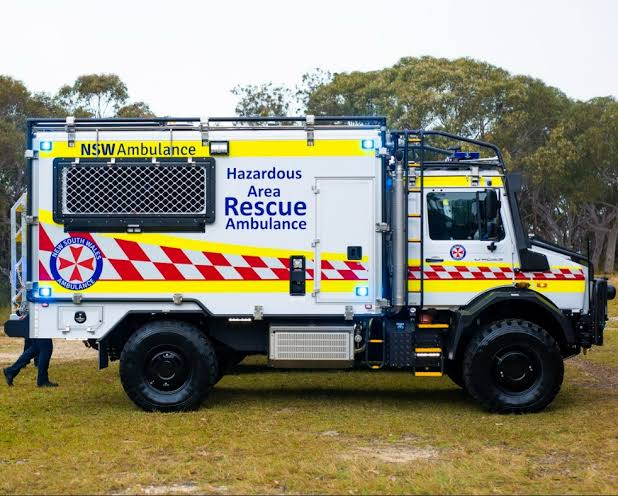
How would I recreate the red and white sillitoe pattern with it's curves easily?

Post image
4 Upvotes

Something that i've been struggling with recently are Australian emegerncy vehicle patterns for projects. When they are straight it's easy but since 2020, most services are shifting to this slightly angled and rounded design. I'm not sure how to replicate it from a bunch of squares? Would anyone be able to walk me through it please?


r/PhotoshopTutorials • • 1d ago

Why does my brush streak white on images??

2 Upvotes

I constantly have this issue which makes using ps very undesirable to me. I wanted to blur an area of my photo. I create a new layer (its above my original layer in the panel). I selected the blur tool from the tool bar. I clicked sample all layers. Brush strength us 50%, mode is normal, brush is soft , hardness is 0. If I go to brush over the area I want to blur, it just turns white. What am I doing wrong?


r/PhotoshopTutorials • • 1d ago

What’s the One Plugin You’d Recommend to Every Graphic Designer?

Thumbnail
0 Upvotes

r/PhotoshopTutorials • • 2d ago

Need a hug favor

Thumbnail
1 Upvotes

r/PhotoshopTutorials • • 2d ago

Hi, I’d like to know how to achieve this kind of text effect in Photoshop. If you could explain it to me step by step or share a video tutorial, I’d really appreciate it!

0 Upvotes

r/PhotoshopTutorials • • 3d ago

Где учиться делать новый дизайн в фотошопе?

0 Upvotes

Всем привет и я хочу поднять тему где найти обучали по фотошопу что бы делать превью как сейчас у блогеров или просто какие то баннеры.

Смотрю Ютуб там самые новые видео 1-3 года назад но по идеи это уже не актуальный дизайн.


r/PhotoshopTutorials • • 3d ago

Text stuck on all caps

1 Upvotes

No it’s not the “all caps” TT button because I tried to activate and deactivate it, nothing happens. And the font does have lowercase because when I enter the text manually it’s possible to do either lower or uppercase.

But I am doing copy/past to a lot of text (it was sent to me in all caps) and I don’t want to manually type everything, it will take a long time. Is there a solution for this or should I punch a hole through my computer because I am at that point.


r/PhotoshopTutorials • • 4d ago

How do I export an edited photo without a background?

Thumbnail
gallery
0 Upvotes

Prepared to be crucified for taking a picture, but I’m not logging into Reddit at my work station lol.

Editing process (incase I’m messing something up here):
Open photo > crop and change resolution/img size > create path with pen > save path and create clipping path > save as .eps with embedded color profile off

When I drop the photo into indesign or illustrator it’s great, no background just image ect. However when I go to export as a png to use on the web it still includes the background. When I use the remove background tool part of the background still comes through (pic 1) and when I use export as with the transparency option on or off it still saves with the background (pic 2). Any help is appreciated, thanks!


r/PhotoshopTutorials • • 5d ago

How to achieve this inverted metallic look?

7 Upvotes

I tried inverting + levels + Find edges but the colors don't seem to be quite inverted, her clothes look inverted but her skin doesn't.

In my attempt it also ends up looking too grainy, would smooting everything help with that before the effects?

Added original image for reference + my attempt.


r/PhotoshopTutorials • • 5d ago

Testimonials

Thumbnail
gallery
1 Upvotes

My work using adobe photoshop.

Brand I used Pizza hut , Samsung , Subway


r/PhotoshopTutorials • • 6d ago

does anybody know how to create these kind of abstract backrounds

2 Upvotes

i tried looking for tutorials but i cant find a tutorial on how to make one this complex


r/PhotoshopTutorials • • 6d ago

how to make my photo look like silent hill 3 cover

1 Upvotes

i love silent hill 3 soooo much and want to edit my photo like sh3 cover. does anybody know how can i do it in photoshop?


r/PhotoshopTutorials • • 6d ago

PhotoCraft: The open-source image editor you already know how to use.

Thumbnail
getartcraft.com
9 Upvotes

r/PhotoshopTutorials • • 6d ago

Free Photoshop layer style packs

Thumbnail
0 Upvotes

r/PhotoshopTutorials • • 7d ago

[Help Request] How can I remove brushed-metal texture and create chrome/matte black finishes without changing the product silhouette?

1 Upvotes

Original PNG (4796 x 3584): View or download the original PNG.

I've now got an AI-assisted product-rendering workflow working: I first use AI to generate the overall scene, then refine the details in Photoshop using additional detail images generated by AI.

I'm very happy with some parts of this workflow, especially creating batches of brushed-metal product images in different finishes. With Photoshop adjustment layers, I can easily change the metal color while preserving the existing product details.

But I'm stuck on one specific problem: converting this brushed-metal shower product to polished chrome or matte black.

If I use AI to change the finish directly, it also changes small details or the outline. I need the product's silhouette and fine details to stay at exactly the same pixel coordinates, with the original 4796 x 3584 resolution and the background unchanged.

With Photoshop, I find it difficult not only to remove the brushed texture, but also to achieve realistic chrome and matte black finishes.

The original rendering is below, along with close-ups of my current attempts. Does anyone have a good method for this? I'd really appreciate a repeatable workflow, whether it's Photoshop alone or a combination of Photoshop and AI, that can change the material while keeping the product's shape and fine details unchanged.

Thanks!

Layered PSD (about 175 MB): Download from Google Drive.


r/PhotoshopTutorials • • 8d ago

Photoshop 2026 on my new 2026-MacBook Pro – strange numerical overlay stuck on screen until restart. Anyone seen this?

Thumbnail
5 Upvotes

r/PhotoshopTutorials • • 8d ago

Accurate Printing Size in photo shop - help with precision

Thumbnail
1 Upvotes

r/PhotoshopTutorials • • 9d ago

anybody know how to achieve this effect?

Post image
3 Upvotes

i’m new to photoshop and i’m trying to achieve a similar glitch effect to this picture but i don’t know what it’s called. thank you guys!


r/PhotoshopTutorials • • 9d ago

I made a free, browser-based image-fx sandbox!

Post image
5 Upvotes

r/PhotoshopTutorials • • 9d ago

Missing photoshop options help

Thumbnail
gallery
1 Upvotes

Hello I’ve been trying to follow a tutorial but they have different options to me, they have access to strokes and other Illustrator like features, the documents have a pen and ruler on them as well but also cannot find that


r/PhotoshopTutorials • • 10d ago

Trying to learn to edit :-)

Thumbnail
youtube.com
2 Upvotes

Small scary flight of mine & learning to edit :-)


r/PhotoshopTutorials • • 11d ago

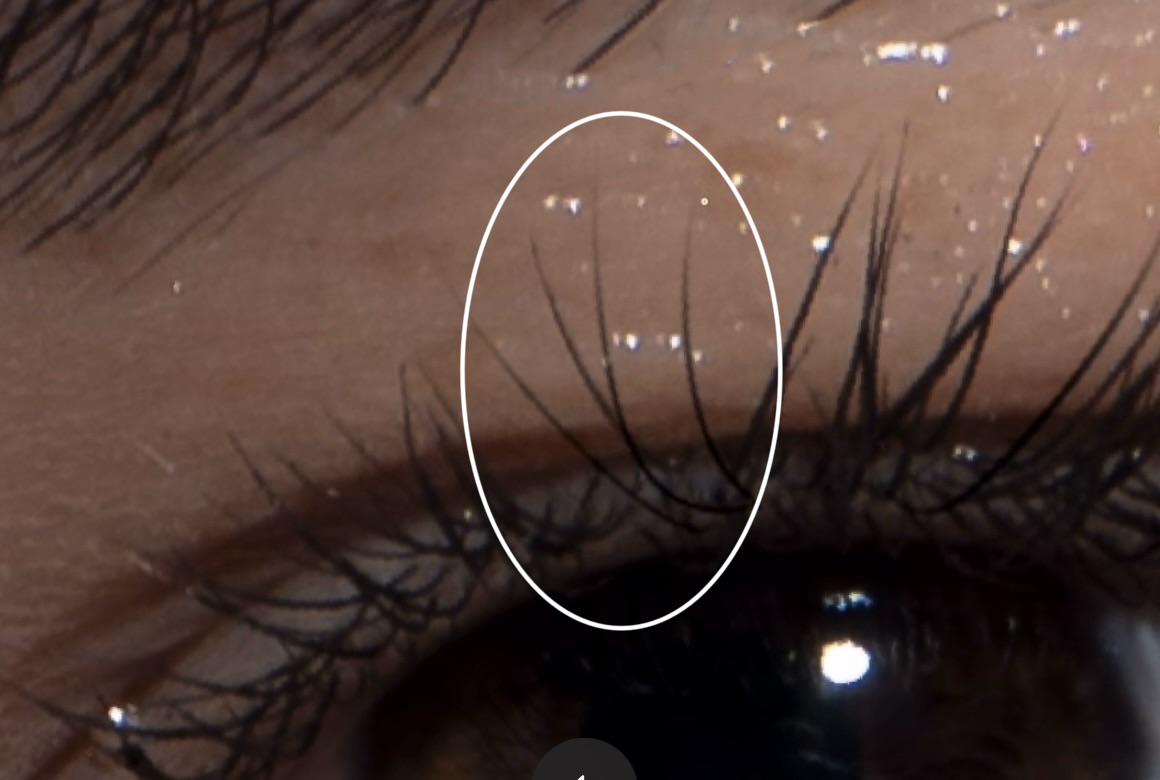
Looking for a natural individual eyelash brush/plugin for Photoshop

Post image
8 Upvotes

Hi everyone! 😊
I’m a retoucher and I’ve been doing high-end retouching for about 2 years. I’m still looking for the perfect brush, plugin, or any other tool for adding individual eyelashes — not full sets of lashes, but single lashes that look really natural and blend seamlessly into the existing ones.
Could anyone recommend something that works really well for you? Or if you’ve created your own brush for this, I’d really appreciate it if you could share your workflow or any tips on how you achieve a natural result.
Thank you so much! 🤍