r/BC250Gaming • u/Sudowoodo-Official • 2h ago
$500 price tag coming soon

29
Upvotes
r/BC250Gaming • u/meta_45 • 8h ago
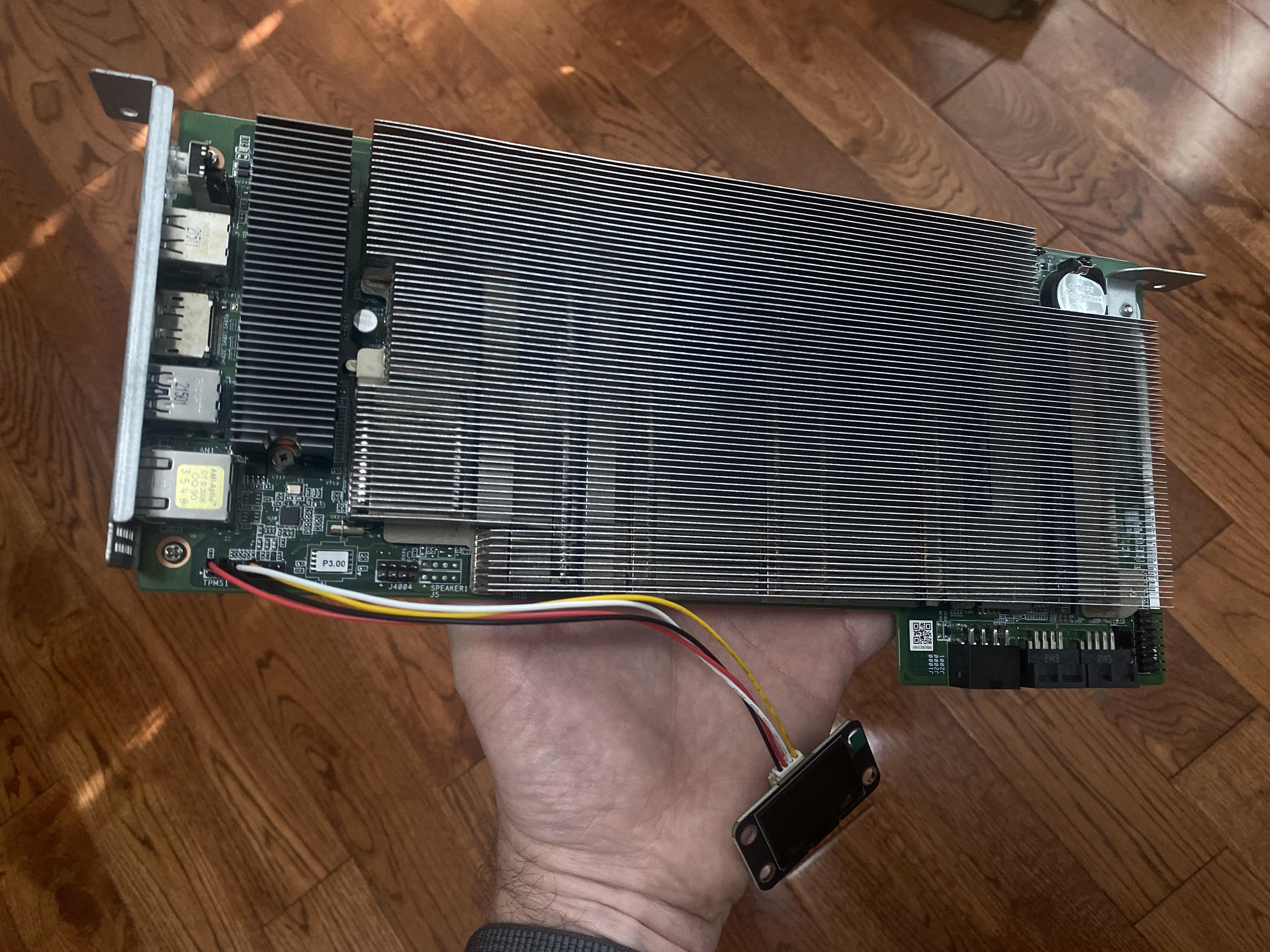
Thought I’d share my BC-250 build with the community!
For cooling, I wanted to replicate the airflow setup of a mining server I saw on YouTube that used this card. I ordered some 60mm fans from DigiKey, but only realized after they arrived that they were voltage-controlled rather than PWM. They’re rated for 12V, but I’m currently running them at a constant 7V to keep the noise bearable (around 55-60 dBA according to the Decibel X app).
Initially, I planned to design a chassis in CAD and 3D print it, but the printing costs turned out to be higher than I expected. So I ended up using the same cardboard box the card came in!
I made a small pedestal to raise the card off the bottom of the box, leaving some space for airflow underneath. I also tried to channel the airflow through the card rather than letting it escape around the sides.
On the software side, I’ve installed Bazzite and enabled the Skillfish governor. No BIOS tweaks or CPU/GPU core unlocking yet.
So far, Spider-Man Remastered runs at around 35 FPS, with both CPU and GPU temperatures hovering around 55°C.
For those of you running Bazzite on the BC-250, are you getting similar FPS? Curious how my results compare and whether there’s more performance to squeeze out of this card.
r/BC250Gaming • u/Sudowoodo-Official • 14h ago
I thought I was crazy but BC250 on stock cooler indeed only work with a certain orientation.
I used to run my board without a case before I bought my mATX case and the orientation was vertically 180⁰ off which means the I/O shield is on the right side with the heatsink facing side panel (PCIE facing up)
After I got my hands on the mATX case, as how the case was traditionally designed, I need to rotate the board 180⁰ so that the I/O shield facing the left side (PCIE facing down)
My temp suddenly goes up to 10⁰C more, on the same game, on the same settings. I thought it is because of the mesh panel, but after removing all the panel the temp remain the same. I did everything I can and the only way I can reduce the temp is by turning down the resolution and in game settings.
Then I stumble upon a comment from one of the member here saying that the heatpipe was designed with a certain orientation or else the fluid inside the heatpipe will be fighting the gravity. Then I did a research and indeed some heatpipe are designed to work only with a specific orientation or else the system will experience a jump of up to 10⁰C in temp.
As you can see, I did some testing with the board laying flat and I got my old temp back. I think we need more testing to verify this phenomenon
r/BC250Gaming • u/SeaworthinessGreedy8 • 6h ago
Anyone knows how fix artefacts ?
45 and 60 fps with artefacts on some moments while you play it.
r/BC250Gaming • u/igorpiedade • 6h ago
Hey guys,
Since I finish my build , I’m looking for a controller that works fine with it. I have a PS5 and tried to pair the dualsens, but there’s a huge input lag when using dualsense over Bluetooth. On usb cable it works fine, but I want to play wirelessly . I was wondering if the Xbox controller works good. I just bought a Xbox Ally X20 and saw a Xbox 25th anniversary for sale. Was thinking to get it for both, the BC250 and the Ally X20 when docked .
Does anyone use the Xbox controller over Bluetooth with the BC250 and Steam?
r/BC250Gaming • u/OkDebate6649 • 1h ago
When I enter the open-world areas in Bloodborne, my FPS drops to the mid-40s.
I've tried changing the graphics settings and lowering the resolution, but it makes no difference. The FPS stays around the same level.
It feels very similar to playing Elden Ring, where the FPS also drops in open-world areas.
Is there any way to fix this? Are there any settings or tweaks that might help?
r/BC250Gaming • u/makita_zuimm • 17h ago
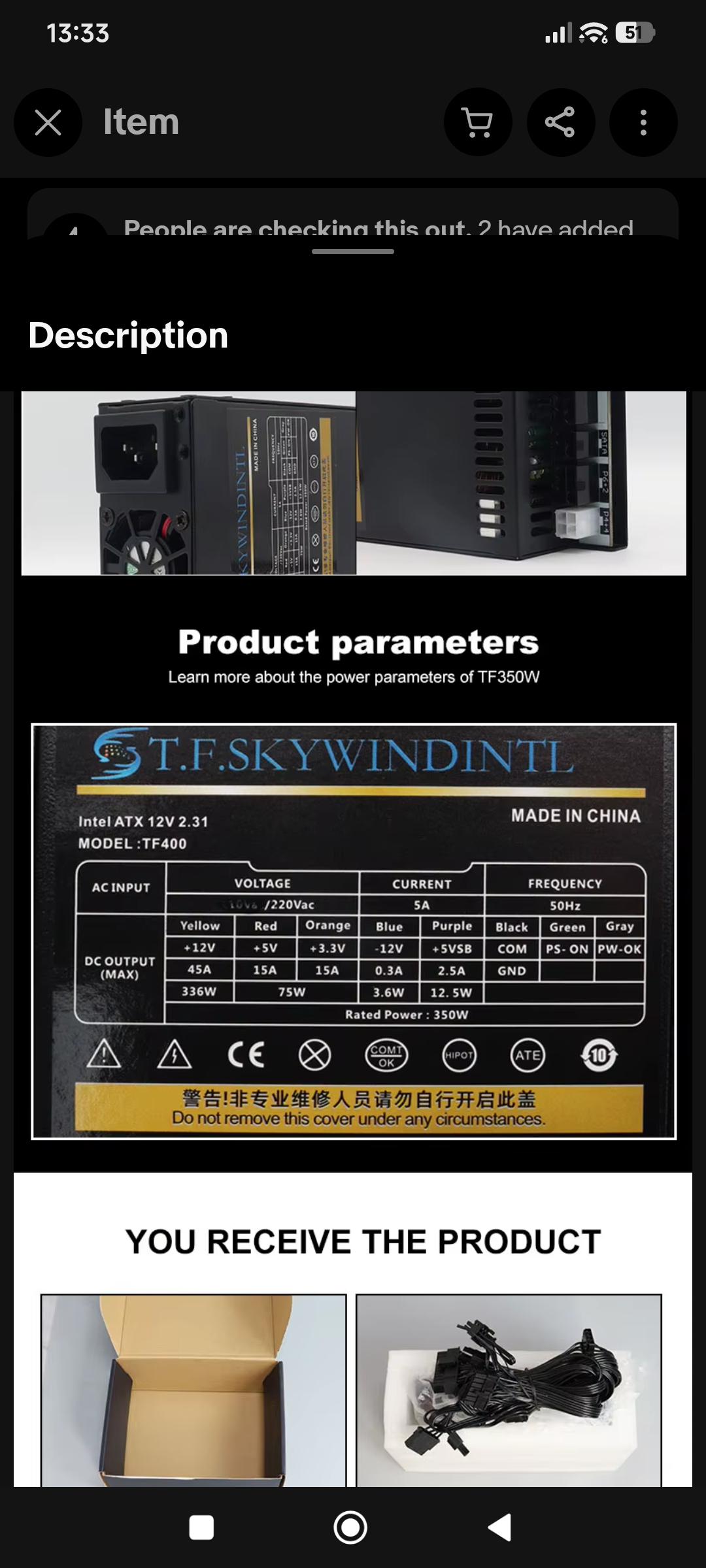
Hi everyone, I need some help. My AMD BC250 arrived and I was very excited. I even got a 650W power supply ready because I saw that it worked, but it didn't...
I connected the 4+4 pins of the 12V and made the jumper, but it still didn't start.
r/BC250Gaming • u/Melodic_Ad_5097 • 14h ago
I spent a very long time troubleshooting Bluetooth latency and for quite some time thought it was either the adapter or my devices. I plugged the dongle in the rear USB 2.0 port and have an ssd hooked up to the USB 3.0 port. Turns out the USB 3.0 port emits frequencies that basically jams the BT/WIFI dongle. When I used an extension cable to move the dongle away from the rear IO, all my BT latency went away.
TLDR: Do not plug you BT/WIFI dongle directly into the rear IO if you’re using the USB 3.0 port. The USB 3.0 port will jam the signal from the dongle.
r/BC250Gaming • u/ImTooDripp • 12h ago
Enable HLS to view with audio, or disable this notification
No a jump start but I like to call it that, but I have to do this every time. Is it the PSU or something else? The light pulses on the switch the first time, then it boots up the second
r/BC250Gaming • u/coldhandsss • 14h ago
I had a fully running, non-OC bc250.
Wanted to explore overclocking, and hopefully reduce some visual oddities by increasing power and having installed the backplate cooling.
I also had an ESP 32, which connected the bc250 to home assistant, and allowed turn on via BT controller.
The Microfit adapter from MOSFET party arrived, installed it last night and it seemed to work ok on initial boot. Didn’t test or change any settings as it was late.
Since last night, the bc250 board won’t stay powered for longer than a few seconds. Fans turn on, lights flash and do their thing, but it’s all gone within 5 seconds. Doesn’t show up on WiFi.
The esp itself is controllable at all times, will boot and all of that. The esp also shows up on WiFi and provides power readings to HA, so the power seems to be alright.
Have I missed something?
Thanks!
r/BC250Gaming • u/apeto86 • 12h ago
I have been using my board on Bazzite for few weeks now and so far I've been able to unlock the 40 CUs @ 2000mhz (+bring down the idle frequency to 350mhz), apply the acpi fix to get lower idle CPU frequency, enable the sensors and set custom fan curve that makes the board more silent when idle and set up 8GB SWAP instead of using ZRAM. So far everything looks fine, all the games I've tested have run stable between 50-80 FPS (RDR2, NBA 2K26, Far Cry 6, CS2, Commandos Origins, Mafia The Old Country) therefore I can say I'm pretty much happy with what I have.
However, there is one thing I haven't been able to do which is the 8 Core CPU Unlock, which is because the board cannot do (complete) a warm reboot. Once I do a reboot, the board restarts and after posting I get the bazzite logo which disapperas and (which is normal, but instead of coming back again during a successful cold boot), I get a black screen. I can see the LEDs flasing on the board, but nothing happens.
I managed to figure out when adding 'nomodeset' to the boot args, the board boots up after a restart and I can get 8 active cores, but is not usable due to the unloaded graphics driver. If I do a reboot without 'nomodeset' I get the black screen and if I turn the board off, I get 6 cores at next cold boot (as how the script works: after the cold boot - which 'unmasks(?) the 8 cores, the system requires a warm reboot to get all cores activated).
So, I dropped the focus on the 8 cores and concentrated on resolving the boot issue which I could resolve by adding 'reboot=pci acpi,force cold' to the kernel boot args. This however, due to the cold restart arg is not compatible with the 8-core unlock script at all, but at least my board can do a reboot when triggered finally.
I am aware of this modded BIOS: https://github.com/coderredlab/bc250-8core-unlock/blob/main/README.md but unfortunately, it uses the same method (a warm reboot is triggered during a cold boot) as the bc250-core-cu-unlock script, thus I fear my board would get into a boot loop.
What about https://github.com/Forbidden-Darkness/AMD-BC-250-UEFI-v2.2-Firmware-Menu-Script/tree/main ? I haven't been able to find the description of what this does during boot (if does a warm reboot during cold boot or not).
I am not sure if I should go ahead and flash the bios as I don't want to brick my board.
P.S.: forgot to mention I tested the board with other OS and the warm reboot did not work either..
r/BC250Gaming • u/T3chDad • 1d ago
I have seen that many have recommended redoing the thermal paste and pads. Holy crap you were right! This stuff is like Play-Doh that's been sitting out in the sun for a couple of days! I'll be replacing the compound on the APU with PTM7950 and the pads with some 12.8W/mK pads. After some burn-in to get the phase change going, I hope I can go with some higher clocks because I was encountering thermal throttling. Fingers-crossed.
r/BC250Gaming • u/Jaugirtas • 12h ago
I'm currently planning a Nexgen case build with an AIO. In the build guide / description, the creator uses a Corsair Commander fan controller (Commander Duo/Core). However, where I live, Corsair controllers are overpriced to the point where it doesn't make sense. For those of you who built in this case or a similar what cheaper/more widely available alternatives did you use for fan and pump control?
r/BC250Gaming • u/Userwerd • 11h ago
Redoing OS for BC250, I put cachy os on it but the BC250 script kept black screening when skillfish was installed. Did it manually and got some progress but now games load but fail to fully launch.
Any advice is appreciated, cachy, bazzite, I just prefer easy stuff.
r/BC250Gaming • u/JPsousaFPV • 1d ago
Consegui deixar estável e vou passar um tempo só curtindo 6cores 3850mhz + 40cu 2000mhz rodando bazzite
Temperatura de CPU nao supera os 60 graus no furmark com 136fps no furmark em 1080p
VRM aparentemente nao está esquentando tanto, irei fazer um suporte para pressionar melhor eles no thermal pad, e colocar no gabinete para melhorar o resfriamento do backplate
Tive algumas instabilidades ao habilitar os 8c/16t, vou curtir um pouco assim e depois testo se mexendo nas tensões consigo estabilizar com os 8 nucleos
Consegui jogar GTA 5, RDR2, CS2 e até rodar o port de God of war 3 remastered do ps4 deixei os gráficos nativo e travado em 60fps, rodou muito liso e sem nem forçar demais da placa, sei pq a fonte quando exigida está com um Coil whine irritante kk
Estou usando ak400 c o suporte baixado do printables e pro VRM cortei dissipadores diversos que tinha aqui em casa
r/BC250Gaming • u/VENMGameZ • 15h ago
Ordering all the parts, the PSU is what I want to get right, don't want it struggling when I unlock all the cores.
r/BC250Gaming • u/West-Way-All-The-Way • 21h ago
As the title - I would like to join the discord community of BC250.
r/BC250Gaming • u/Unhappy_Remote2192 • 1d ago
Hi everyone,
I decided to go with a PS5 so I'm putting this whole package up for sale, haven't used any of this as of yet.
I'm based upstate in Paris, Texas. so if you are around the Dallas area you're more than welcome to pick up if you'd like.
Or I can ship internally within America for extra.
Please feel welcome to send me a DM if you're interested.
CPU cooler is white.
Can be a bit flexible on price.
As I'm an international student in America, I use wise to bank here, or cash is okay on pickup.
Thx,
Jeremy.
r/BC250Gaming • u/CT-LT-Waxer • 1d ago
Got mine a few days ago and been messing with it. Started showing some graphical artifacts in the top left. I've taken the backplate off, but didn't replace the pads. Thought I tightened it down enough. Just got the heatsink with fans that's pictured, but this literally just popped up on the home screen.
I unlocked 40 CUs and 8 cores. Is this maybe bad CU's, instead?
Also, I know this shit is jank, but the temps are actually alright with the push/pull
r/BC250Gaming • u/Abject_Hovercraft417 • 1d ago
Enable HLS to view with audio, or disable this notification
Hello I setup a dual relay esp32 to control my bc250, the bc250 is shown booting up and displaying but for some reason the power supply trips off turning everything off
Does anyone know why?
r/BC250Gaming • u/Mr-Dilanger • 19h ago
If I was a PC maker and seeing how popular the BC 250 has become, I would have made a new business model for selling PC hardware. The BC250 to a business owner is lost revenue. Another look at is the Steam machine. Steam should have just sold us a mother board with integrated memory and APU and we would have done the rest. When a BC 450 or something like it comes out is it going to be a dual use card or E-waste scavenger project?
I think the BC 250 is a really good thing and it is efficient. A MinisForum barebones AI X1 is $575.00...easy 1k when you add memory. Versus BC 250, 200 - 300 dollars (at the moment)
Another question. Is the BC-250 going to be a trend of more do it your self PC building or is this the one time deal and manufacturers learned their lesson not to make cards like this again?
r/BC250Gaming • u/lady_lane_arcane • 1d ago
Just gonna ask for help wiring my power button before I make assumptions and fry everything as someone who isn't an electrician. First pic is the wiring diagram provided for my button and second pic is what I'm looking at IRL. The diagram is throwing me because in this case the power source and the DEVICE are the same thing? I know wire 16 on the 24-pin is PC_ON, 18 is ground, and 10 provides 12V.
r/BC250Gaming • u/RyanYEEEE • 2d ago
Previous post:
https://www.reddit.com/r/BC250Gaming/comments/1wjc8li/i_put_a_bc250_inside_an_rog_astral_rtx_5090/
After the initial test assembly, I figured out what needed to be adjusted and reassembled everything for the final build.
Changes made:
Replaced the rear fan with a slim 15mm-thick fan and repositioned it inside the graphics card shroud.
Cut a piece of PC case mesh to fit and used it as a cover panel.
Used an RGB controller with a remote for wireless control.
Test-fitted the shroud and remounted it to make sure everything was properly aligned and level.
That's it!
r/BC250Gaming • u/TheTrain_24 • 2d ago
Got my BC250 a few weeks back. Spent a fair bit of time looking over all of the various heatsink fin opening methods.
Went with the sanding method and very happy with the results.
My process was:
1 - Take heatsink off of BC250
2 - Clean off the copper area and tape it to prevent scratches and damage (painters tape)
3 - Orbital sander with 80 grit discs (I had these on hand, could likely have gone a bit lower)
4 - Once the tops were all off I did a final pass with fine git 220 to make sure nothing was sharp
5 - Compressed air to clean out all the little bits
6 - Take off painters tape and do a full wash to clean further
7 - Dry with hair dryer and put new tape on the bottom
8 - Leave for 2-3 days to ensure fully dry
9 - Attach and test
I did end up losing the first fin row on both sides which is not ideal but overall not an issue.
You can hold the fins in place while doing it as the heat from the sander is quickly absorbed and spread out.
Running very cool and looks great!
I used a total of four 80 grit discs and one 220 grit disc. The 80's got worn down pretty quickly (might have just been crappy discs). The 220 would have been fine to use for something else but I don't usually reuse stuff thats been used on metal.
r/BC250Gaming • u/lovecansaveu • 1d ago
What should I use to cool the back plate, do I leave it on. I will add putty to the ram, but I doubt a heatsink will fit if put the bc 250 on the side with an aqau elite dual fan1 1with a1 210m wide heat sink on the back plate.