r/Corsair • • 9d ago

Official CORSAIR Introducing HS80 v2 MAX Wireless Gaming Headset

Post image
10 Upvotes

We are excited to announce the latest refresh in our gaming headset lineup, the HS80 v2 MAX Wireless!

HS80 v2 MAX builds on the success of v1, boasting:

  • 50mm non-Newtonian laminate drivers delivering great sound while minimizing acoustic ghosting
  • Simultaneous 2.4GHz and Bluetooth connectivity (no need to swap between the game and a guide or phone call)
  • Dolby Atmos Spatial Audio support
  • Up to 110 hours of wireless battery (quick charge in 15 minutes for 6 hours of playback)
  • 10mm broadcast-grade mic capsule for high-quality comms

More info at the link 👇

🎧 HS80 v2 MAX Wireless Gaming Headset


r/Corsair • • 9d ago

iCUE Megathread - 5.52 Release Notes

12 Upvotes

NOTICE: With the CORSAIR.com Forums shutdown, all firmware patch notes can be found on our Explorer Site. This will include: SSD Toolbox, SSD Firmware, Thunderbolt Dock Software, and Controllers

-----------------------------------------------

iCUE 5.52 Release Notes

What's New

  • Added support for selecting Stream Deck virtual devices for Xeneon Edge widgets within the application
  • Added widget access permissions management
  • Enhanced application security by resolving a vulnerability with CDCS
  • Added screen orientation management for the iCUE LINK 5” LCD Screen Module

Bug Fixes

  • Fixed an Issue where the main monitor orientation occasionally changed to match the iCUE LINK 5 LCD” screen module from the lock screen
  • Fixed an Issue where the Xbox Mode popup incorrectly appeared on the HS80 Max Wireless
  • Fixed an Issue where the HS80 Max Wireless name displayed incorrectly in Devices and Printers after module installation
  • Fixed an Issue where the device image for the HS80 Max Wireless did not match the actual hardware
  • Fixed an Issue where iCUE would crash on launch when specific peripherals were connected
  • Fixed an Issue where Quick Lighting Zone was unavailable for the inner ring on the LINK TITAN RX II AIO Series
  • Fixed an Issue where the Block Cursor Access option was missing in the iCUE LINK 5” LCD Screen Module Setup
  • Fixed an Issue where the iCUE LINK 5” backlight defaulted to 100% brightness after completing the Setup Wizard
  • Fixed an Issue where the Link Provider plugin was not loading or functioning as expected
  • Fixed an Issue where iCUE could crash when testing the Stream Deck widget on LCD keyboards or pumps

Known Issues:

The below issues are ONLY the major tier issues - there are a number of other minor fixes and tweaks as well that are being fixed but really not classified as "major" issues due to the small number or relatively low impact.

STATUS Issue Reported ETA for Fix  Notes
Investigating Commander Core XT - onboard memory mode issue. When iCUE is closed, fans ramp up. TBD Team is aware and are working on it. WORK AROUND: Assign a fixed % setting to the onboard memory. UPDATE: Oct 8th - Fix noted above is a separate issue. Team is actively working on this one still, pinged team for another update.
Potential Root Cause Found - Testing continues GPU Sensors Swapping TBD Oct 8th Update: Working with CPUID to correct this issue. Waiting on the update from them.

Let us know your experience with the latest update or any issues you've been experiencing with iCUE, below!

Please upvote any comment that represents your issue as that gives me another visual way to track ongoing issues.

If you find that you're having an issue that is noted as fixed, please grab your iCUE logs and send in a ticket to our team. Then comment down below your ticket number and the issue you're having so we can help get those tickets sent to the right person!

Thank you all for being part of the community and reading through this thread!


r/Corsair • • 9h ago

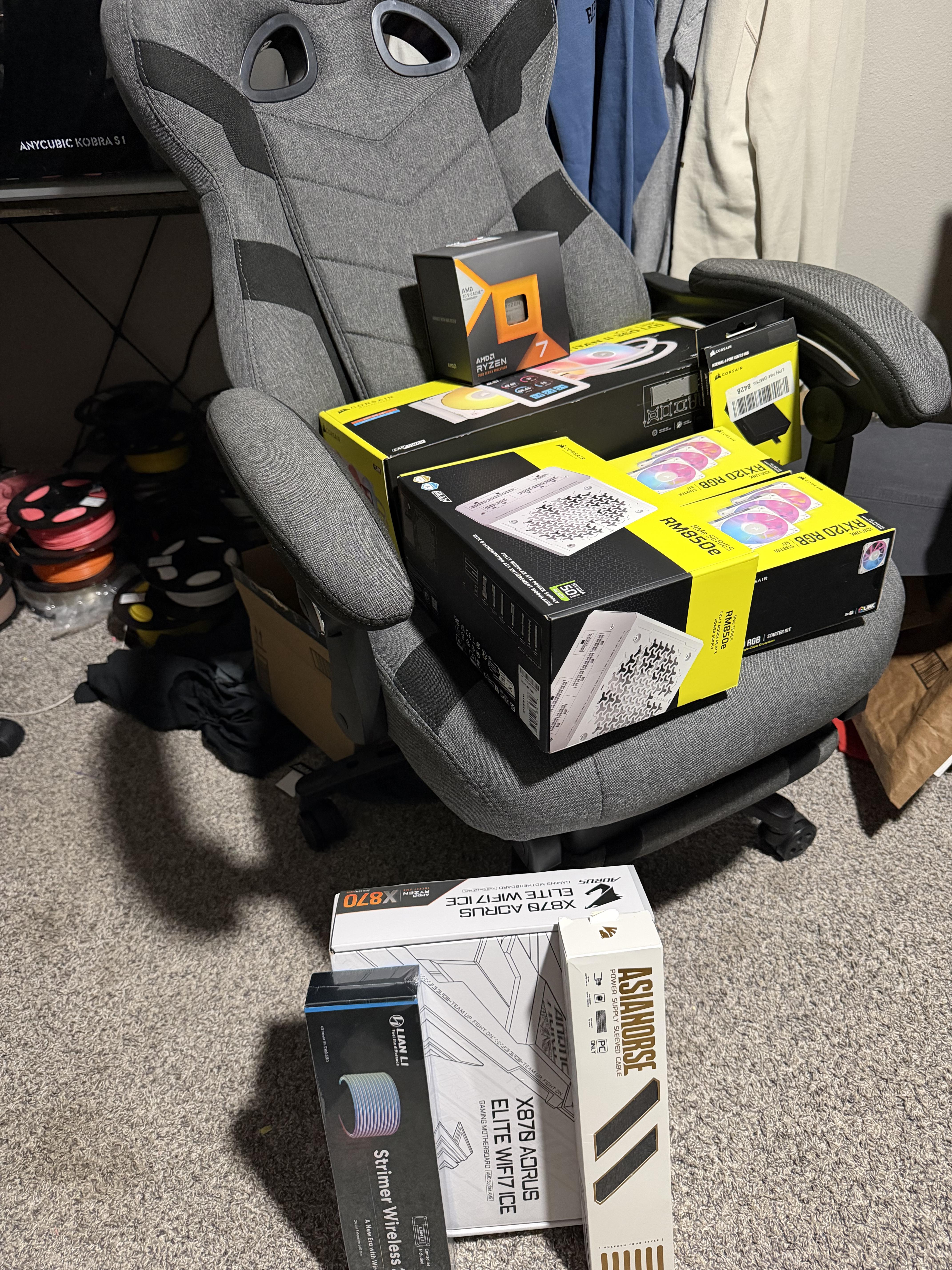
Discussion What yall thinkin?

Post image
30 Upvotes

Corsair titan 2 with the 5 inch lcd
Loan li o11 vision compact (on the way)
6 x Corsair rx120
Amd Ryzen 7 7800x3d
Gigabyte aero 5070 12g (on the way)
Corsair usb hub
Corsair rm850e
Asia horse sleeved cables (for the cpu cable and extras just in case)
Lian li wireless 24 pin strimer
Lian li wireless 16 pin strimer (on the way)
Lian li vertical gpu mount (on the way)
Corsair vengeance rgb rs ddr5 32gb 6000MHz (on the way)
Sandisk Optimus 2tb ssd (on the way)
Gigabyte aorus x870 elite wifi7 ice


r/Corsair • • 8h ago

Help 30 Days Since I Sent My PSU for RMA - No Update from Corsair Support - #200924295

5 Upvotes

Hi everyone,

I submitted my Corsair RM750 PSU for RMA on 18 September 2026 and today marks 30 days since submission.

I understand that RMA processes can take time, and I appreciate that the support team may be handling multiple cases. However, I’ve sent several follow-up emails asking about the status of my RMA and where my PSU currently is, but unfortunately, I haven’t received any replies.

As a working professional, I rely on my PC for my daily work, and this situation has been affecting my productivity, but I would really appreciate a simple update on the current status of my PSU and an estimated timeline.

Support Ticket: #200924295

I genuinely hope someone from Corsair can look into my case and help me get some clarity.


r/Corsair • • 19h ago

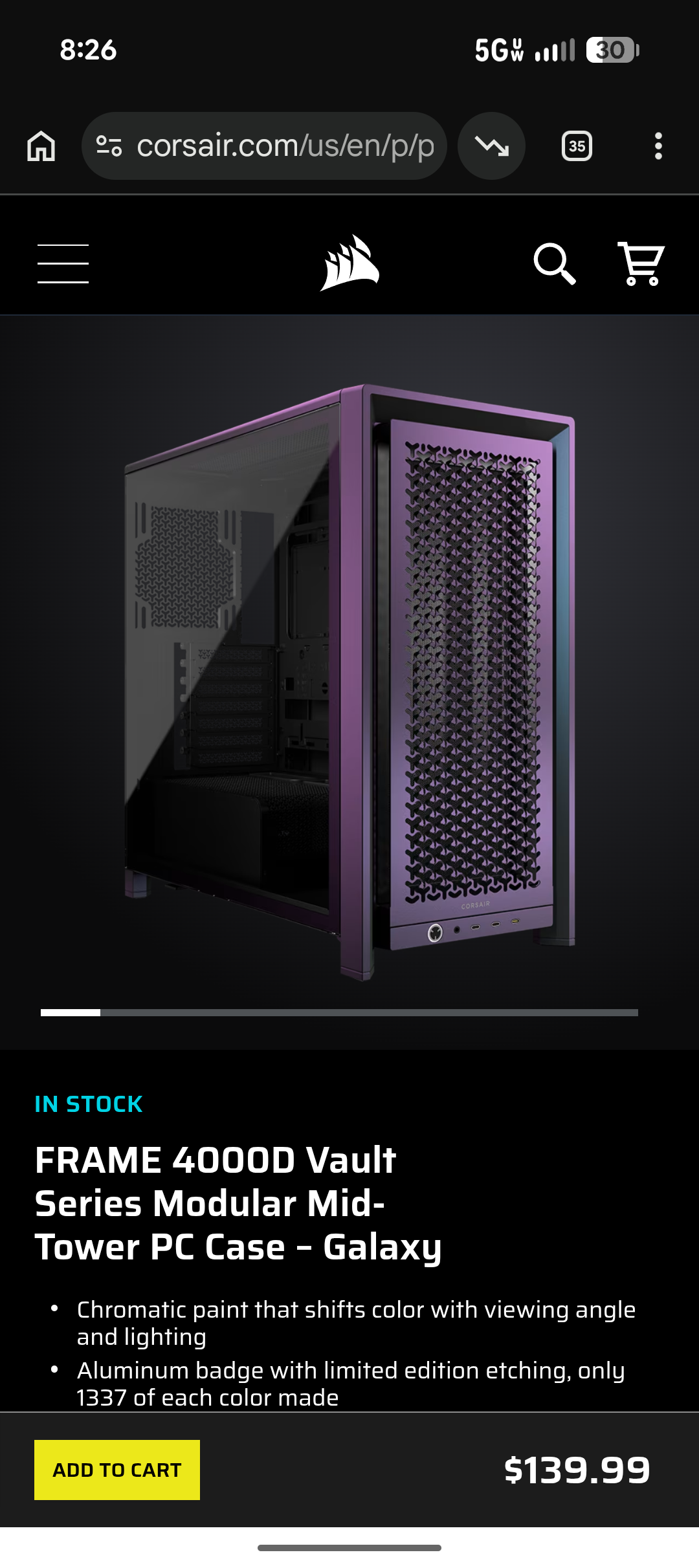
Discussion i messed up. i bought the frame 4000d and went online to buy an the modern front port thing and saw this

Post image
22 Upvotes

ITS CHROMATIC!!! the color changes as you view it from different angles. and it already includes the front port that i bought on their website before i noticed this.

so i essentially bought a case i didnt need and a an upgrade that is already present on this case.

i have not seen this advertised anywhere. i only saw this because i was looking up accessories for the frame 4000d on the corsair website itself. i have never seen a case before advertising chromatic highlights.

i am into casemodding and wanted the 4000d in order to like take a portion off and cut a hole into it or something rather than take the whole case off.

also the black frame 4000d: the texture is really nice. images dont do it justice. its metal stamped and textured all over. it feels solid as heck.

im actually dismayed because the hole i was planning on cutting into the case is already present and im not able to put my fingerprint on the case unless i research other mods.

my holy grail of modding would be to add rgb strips similiar to the phanteks cases at the metal.

****

the tradeoff to buying this case and recieving the better chromatic finish and upgraded front port with the 3 usb-c ports is that the chromatic finish case comes with no fans.

****

i just thought people should know about this buying option if they are considering the frame 4000d. i dont know if theres a chromatic (vault) version of the frame 5000d.


r/Corsair • • 18h ago

Builds 3D printed the 5400 Air Case vertical mount off Printables.

Post image
13 Upvotes

3D-printed the vertical GPU mount for the 5400 Air case. (Waiting on the horizontal bracket for the Titan II 360 AIO screen.) Used PETG-GF filament.


r/Corsair • • 15h ago

Builds Decided to play around with the lighting on my wife’s PC

Enable HLS to view with audio, or disable this notification

6 Upvotes

Here’s the original build from a few months back: https://www.reddit.com/r/Corsair/s/yoKliIn3sR

Decided to figure out how to best maneuver the 8pin strimmer to the GPU instead of keeping it in the shroud, and then replaced it by wedging in/mounting some lighting strips around the top and bottom of the PSU shroud on the 4000d Frame. Made a bigger difference than I thought tbh.


r/Corsair • • 5h ago

Discussion QX120 bearing noise - H100i cooler

Enable HLS to view with audio, or disable this notification

1 Upvotes

Less than 1 year of usage, 60USD fan, yay go corsair.

(no, its not touching anything, the bearing grinding sound is intermittent)


r/Corsair • • 12h ago

Help Will Corsair SF750's cables be long enough in ASUS PA401?

Thumbnail
2 Upvotes

r/Corsair • • 12h ago

Help Where do I post for a little support question?

2 Upvotes

I keep getting posts deleted because they are in the wrong forum. Where do I go if I have an iCue / Mouse problem??


r/Corsair • • 13h ago

Help Order waiting to be processed.

0 Upvotes

Still waiting for my order to be even processed. Ordered October 7th. I am in the US.


r/Corsair • • 22h ago

Help 5800X3D + Corsair Nautilus 360 RS ARGB owners — what temps are you getting?

3 Upvotes

Hey guys, anyone here running this combo? I've been testing mine and would like to compare temperatures, especially at idle.

My setup:
• Ryzen 7 5800X3D
• Corsair Nautilus 360 RS ARGB
• ASUS Prime B450M-A, BIOS 4645
• 32GB DDR4-3200 and an RTX 5070

The radiator is top-mounted as exhaust, with the pump below the radiator and no kinks in the tubes. Pump speed is around 3100 RPM. I'm using the Windows High Performance power plan with DOCP enabled. Curve Optimizer isn't available in my BIOS.

Here are the CPU temperatures I've recorded:
• Idle: 46–48°C at 28°C room temperature, with CPU power around 28–34W
• Firefox open: 52–53°C
• Valorant: 60–66°C
• Valheim: 58–65°C
• Cyberpunk: 63–70°C
• Four Cinebench 2026 runs: 74.8–77.5°C CPU Package, at roughly 110–114W

I also tried AIDA64:
• CPU + cache: around 74°C
• CPU + FPU + cache: 83–84°C Package, with HTC/PROCHOT reported as “No” during that test
• FPU only: reached 88.9°C Package and 91.3°C CCD

The 28°C room temperature was measured during the idle session, not throughout every test.

If you're using this CPU with the Nautilus or another 360mm AIO, how do these results compare with yours? I'm mainly wondering about the 46–48°C idle temperature. Please mention your room temperature, fan speeds and whether you're undervolting, if possible. Is there anything in the setup or mounting you'd check?


r/Corsair • • 18h ago

Help Vanguard 96 Wirelless not working

1 Upvotes

Hello. I have a Vanguard 96 keyboard, and I’ve started having issues with it. I was messing around in iCUE, setting up profiles and such, when I got a notification that the battery was critically low even though the LED display showed there was still plenty of battery left. I plugged it into my PC with a cable (previously, I had been using the wireless dongle). Then, when I unplugged it to switch back to the dongle, it froze. Now, it won't light up or respond to any key presses; the display just turns on (showing a black screen) but displays nothing. iCUE doesn't even recognize it when it's connected via cable, only when using the dongle. And when it does detect it, the power-on logo lights up in red...


r/Corsair • • 14h ago

Discussion Not happy whit LX Fans

0 Upvotes

Hello I had Four QX Fans a few Years ago and I absolutly loved them but selled them.

Now I have LX Fans and I think about to Return them

Yes the Performance is better but

The RGB Lightning Looks boring

I have Four LX 140mm and all have a Anoying Sound at Specific RPM it Even causes my case to vibrate

Then the Timeshift Mode is boring to Only You Can make it Looks the Fans Are Not Spinning

No Reverse and Not possible to make them Look Like they spinning very Slow

I am the Only One that dont Like the LX Series?


r/Corsair • • 20h ago

Build Question Anyone using Corsair Makr 75 PRO for gaming? What switches are you using?

1 Upvotes

Picked up a new opened box Corsair Makr 75 pro from amazon really cheap. Bought it mainly for the really nice aluminium case but wasn't sure how good the HE and rapid trigger features would be compared to competitor keyboards

Has anyone changed the switches and did you notice any issues? Do some switches work better than others?


r/Corsair • • 1d ago

Help Corsair SKIFF 100 PLUS keyboard won't update

2 Upvotes

I've recently bought Corsair SKIFF 100 PLUS keyboard (US layout) and for the life of me I cannot update that thing. I have the latest Win 11. I've tried everything possible including:

  • Killing all apps that might interfere
  • Turning off an antivirus software
  • Unpluging my mouse dongle (just in case)
  • Trying rear USB
  • Trying front USB
  • Uninstalling the HID driver from the Device Manager
  • Trying updating on a different computer (Win 10)

It all fails, both through the web browser updater (a private tab with no extensions, Chrome and Edge). I've tried also the iCUE software, it failed too.

In case of the web browser updater, the first step of uploading the firmware to the device goes through entirely to 100%. Then the flashing stage begins, the keyboard RGB quickly blinks at the very beginning, status bar cycles constantly with no percentage showing, then after like 10 seconds it says it failed.

In case of the iCUE app, it shows me a notification that the update is available. I begin the update, the status bar under Updating goes through in its entirety, then the window suddenly closes without showing whether it finished properly or not, and the notification about the update shows again.

In both cases I didn't receive any particular error code. The current firmware version loaded in the keyboard is 1.0.49

The keyboard otherwise works fine, I can load the RGB color into the onboard memory just fine. All I wanted is to do the update, that I may have resolved some ghosting issues, based on what I read earlier in some user's Reddit post.


r/Corsair • • 1d ago

Help h100i lcd freezing on startup?

2 Upvotes

i’ve been putting up with this for about 2 years now, decided to sort of stop being lazy. every time i turn on my computer, it does its boot animation but completely freezes on the last preset i set it to when i first got the water cooler; it also doesn’t show the option to change the screen at all, only the rgb around it. i’ve reset my computer and turned off psu for a minute, done enumeration, forced an update, etc, i’m just tired of it.

any help please?


r/Corsair • • 1d ago

iCUE Profile My Custom Clean N' Detailed EQ Profile for Corsair HS80 Wireless (Fixed the muffled sound and brought out hidden clarity!)

1 Upvotes

r/Corsair • • 1d ago

Discussion Corsair HS65 surround headphone

0 Upvotes

Yo guys i wanna make a honest review on this product so I’ve been using corsair hs65 for 2 years now and im really impressed with its build quality and durability. Despite accidentally dropping it many times from high grounds throwing it around many times it still works well and the microphone is still functional still clear I’ve used it for streaming, gaming, or talking to people online this headphone was my daily use and im really impressed of how this product can survive my rage when playing 💀
I also replace the ear cushions regularly to keep them in good condition. So thank you CORSAIR for making such a great product it was such a hell a journey oh and btw its starting to show a sign of retirement now so before my corsair hs65 finally retires i just want to show my appreciation for this amazing product.


r/Corsair • • 1d ago

Discussion Corsair Nautilus II 360 AIO Leaked Coolant Onto My SSD, Potentially Destroying It

4 Upvotes

I wanted to share my recent experience with Corsair, both regarding their new Nautilus II AIO liquid cooler and the extremely disappointing customer support I’ve received.

I recently completed a high end gaming PC build featuring an AMD Ryzen 7 9800X3D, Gigabyte X870 AORUS STEALTH motherboard, and RTX 5080. I chose Corsair components (All my fans, case, PSU, keyboard & mouse.. all Corsair) because I expected quality, reliability, and dependable customer support from an established brand.

Unfortunately, my experience has been anything but that.

The Initial Problem.. Zero RPM Reading

Over a week ago, I contacted Corsair support after noticing that my Nautilus II AIO pump was reporting zero RPM. Naturally, I was concerned about whether the pump was functioning correctly and whether there was a potential hardware issue. Before continuing use of the PC, I did confirm the pump was working and the CPU temperatures were reading fine, I could hear the pump and it was audibly louder when I increased the pump speed.

Rather than receiving timely troubleshooting assistance, I waited approximately a week for an initial response. When Corsair finally responded, the troubleshooting process consisted of requesting photographs and BIOS screenshots and then it was passed on. Despite my efforts to troubleshoot the issue, I still have not received a meaningful resolution.

The Situation Gets Significantly Worse.. Coolant Leak

Last night, while using my computer, the system suddenly froze and crashed. After restarting, the computer would repeatedly boot directly into BIOS instead of Windows.

After troubleshooting, I discovered that my motherboard was no longer detecting my NVMe SSD whatsoever.

Upon further inspection, I found something extremely concerning. My Corsair Nautilus II AIO was leaking coolant from the bottom seal of the pump’s cold plate assembly.

The coolant had leaked directly onto my SSD heatsink and made its way underneath, saturating the SSD’s circuit board and components.

When I removed the SSD, I found coolant around and underneath the chips. I carefully attempted to clean the SSD using isopropyl alcohol and an air blower to remove the remaining liquid then let it air dry under a fan overnight.

Unfortunately, even after cleaning and drying it, my motherboard still does not recognize the drive in BIOS.

At this point, I strongly suspect the coolant exposure caused permanent damage to the SSD, although I have not yet been able to confirm the full extent of the damage because I can’t even get out of my BIOS.

My Attempts to Contact Corsair After Discovering the Leak

Immediately after discovering the coolant leak and the damage to my SSD, I submitted another email to Corsair support explaining the new issue and the seriousness of the situation.

In that email, I specifically requested a phone call today so I could speak directly with a representative about the leaking cooler, the potentially damaged hardware, and how Corsair intends to address the situation.

As of writing this post, I have not received the requested phone call. I also attempted to contact Corsair directly through their customer support telephone number, hoping to speak with someone rather than continue waiting for email correspondence and I’m stuck over the weekend with a bricked computer.

Unfortunately, I was prompted to leave a voicemail instead of being connected with a representative.
This is particularly frustrating considering the circumstances. I’m no longer dealing with a simple technical support question. I’m dealing with a liquid cooling product that has leaked onto expensive computer components and potentially caused significant hardware damage.

I would expect an issue involving a coolant leak and potential damage to other components to receive a greater sense of urgency. My Biggest Frustration Is Corsair’s Customer Support

What makes this situation especially frustrating is that I contacted Corsair about a potential issue with this cooler more than a week before discovering the leak.

I understand that a zero RPM reading doesn’t necessarily mean a pump is defective. However, I was actively trying to troubleshoot a concerning issue with a liquid cooling system, and the response time and lack of resolution have been extremely disappointing.

This is a newly built, high end gaming computer. I invested considerable money into quality components, and I certainly didn’t expect a liquid cooler to become the reason my system stopped functioning.

At what point does an issue involving a leaking liquid cooler and potentially destroyed computer components warrant a timely response from customer support?

Final Thoughts

I’ve purchased Corsair products because of the company’s reputation in the PC building community. Unfortunately, this experience has seriously damaged my confidence in the brand.

I’m sharing this because I think other PC builders should be aware of my experience, particularly anyone using a Nautilus II AIO.

If you’re experiencing unusual pump readings or other concerning behavior, I would recommend inspecting your cooler carefully and addressing any potential issues immediately.

Due to the urgency of the situation and the lack of timely assistance from Corsair, I’ve taken matters into my own hands and ordered a replacement CPU cooler and NVMe SSD through Amazon with expedited shipping. I simply cannot justify leaving my newly built, expensive gaming PC unusable indefinitely while waiting for Corsair to acknowledge and resolve an issue caused by one of their products.

These are expenses I never anticipated having to incur, especially considering how recently I completed this build. My decision to purchase replacement components was made out of necessity, not because I consider the matter resolved.

I fully intend to pursue reimbursement for the replacement SSD and a refund for the defective Corsair AIO, along with an evaluation of any additional damage caused by the coolant leak. I believe that is a reasonable expectation when a cooling product fails and potentially damages other expensive components.

I shouldn’t have to absorb the financial burden of a defective product simply because I cannot afford to wait weeks for customer support to provide a resolution.

I will be documenting the damage and continuing to pursue a resolution with Corsair. I’ll update this post as Corsair responds and the situation develops.

Has anyone else experienced a coolant leak with a Corsair Nautilus AIO? And for those who have dealt with Corsair regarding liquid cooling damage to other components, how was the warranty or damage claim handled?


r/Corsair • • 1d ago

Help 5080 in a corsair 5400 stopping fans

Post image
13 Upvotes

Hey everyone, just built in the new Corsair Air 5400 and I’m having an issue with the integrated GPU anti-sag arm. Because of my GPU's design, the arm sits right where one of the fans is and completely blocks it from spinning. Has anyone else run into this with this case?


r/Corsair • • 1d ago

Discussion I built a free, open-source macOS app for the XENEON EDGE

Thumbnail
gallery
5 Upvotes

I bought a XENEON EDGE for my Mac, but iCUE doesn't support the Edge on macOS. Touch input was landing on the wrong display, and I couldn't change the panel settings.

I've put my macOS companion app on GitHub:

https://github.com/Seol-JY/xeneon-edge-companion

It reads the touch controller directly and maps the input to the Edge. Taps, scrolling, dragging and long press for right-click work. Touching the dashboard doesn't move the mouse cursor.

There's also a widget dashboard with CPU, GPU, memory, temperatures, network activity, an app launcher, timer, volume controls, and Claude Code/Codex usage limits. You can keep a terminal on one side, change widget sizes, and rearrange the layout in the editor. The photos show it running in my setup.

A few other things it handles:

  • In dashboard mode, the menu bar and Dock stay off the Edge. The mouse pointer stays off it too, unless you hold Option. Other app windows that end up there are moved back to the main display, and pushing down at the bottom of the main display still brings up the Dock.
  • The factory white point looked quite blue on my panel. The app adjusts the panel's RGB gains over DDC/CI, so the color settings stay in the panel after you quit the app.
  • Settings are reapplied when the Edge reconnects or wakes from sleep.

There's no prebuilt download yet. You'll need to build it from source using the instructions in the README, with Xcode or the Command Line Tools installed. It requires an Apple Silicon Mac running macOS 14 or later. The DDC/CI color adjustment needs a USB-C connection with DisplayPort Alt Mode. On first launch, macOS will also ask for Input Monitoring and Accessibility permissions.

I've only tested it with my own setup so far, so there may be issues with other configurations. The UI supports English and Korean, but some widget text isn't localized yet, as I originally set those widgets up for my own use. Touch is single-finger only; the panel firmware only reports one touch point on macOS.

This is an unofficial project, not affiliated with Corsair. It's free and MIT licensed.

If you try it, let me know what works and what doesn't, either here or in GitHub Issues. Please include your macOS version if you report a bug. If there's enough interest, I'll make a DMG so you won't have to build it yourself.

If you find it useful, a star on GitHub would be appreciated.


r/Corsair • • 1d ago

Help carbide series spec delta rgb fans not lighting up

0 Upvotes

the fans on my case spin but do not show any rgb. i have a msi b550 motherboard and i unplugged the header from jrgb2 and plugged it into jrgb 1 like it said to on google and there was no change. i also checked the cables themselves and theyre all plugged in and msi center still doesnt pick them up.


r/Corsair • • 1d ago

Discussion Vanguard 96 volume wheel loose or normal?

Enable HLS to view with audio, or disable this notification

2 Upvotes

This is my 3rd regular vanguard from bestbuy after exchanging 2 of them with bad/ clicky linear keys. I don't remember the volume wheel having this much play on the other 2. Is this normal for you other vanguard 96 owners?


r/Corsair • • 1d ago

Build Question Air 5400 Fans

1 Upvotes

Looking to add the same fans that are on the bottom of the case to the top. I want the bottom to be the intake (default) and the top to be exhaust (assuming this is the best setup for the case). Do I need the LX fans on the top to be reverse?

It’s been a long time since I’ve built a pc, so any advice with this case is appreciated.