r/OneXPlayer • • 2d ago

Clarification of the subreddit rules.

Thumbnail reddit.com
0 Upvotes

After complaints about the moderation here, I have spent time elaborating on the rules page.

I really don't think these things should need saying, but apparently they do. Apparently it's not enough to display a warning when posts are created, saying "please post thoughtfully and considerately". The warning will now instruct posters to read the rules thoroughly before posting.

Everyone who has ever been banned from this subreddit has been banned for one of these four things:

  1. No squabbling, insults, harassment or personal attacks.
  2. No racist, homophobic, ableist or transphobic slurs.
  3. Choose a proper title for your post - use words to describe what it's about; a clear and proper description.
  4. Photos and screenshots should be interesting and on topic. Nobody wants to see a screenshot of your order tracking.

I really don't think it's that hard, but apparently this is a huge problem for some. Also, "someone else got away with it last week and you didn't notice" is not an excuse.


r/OneXPlayer • • 6h ago

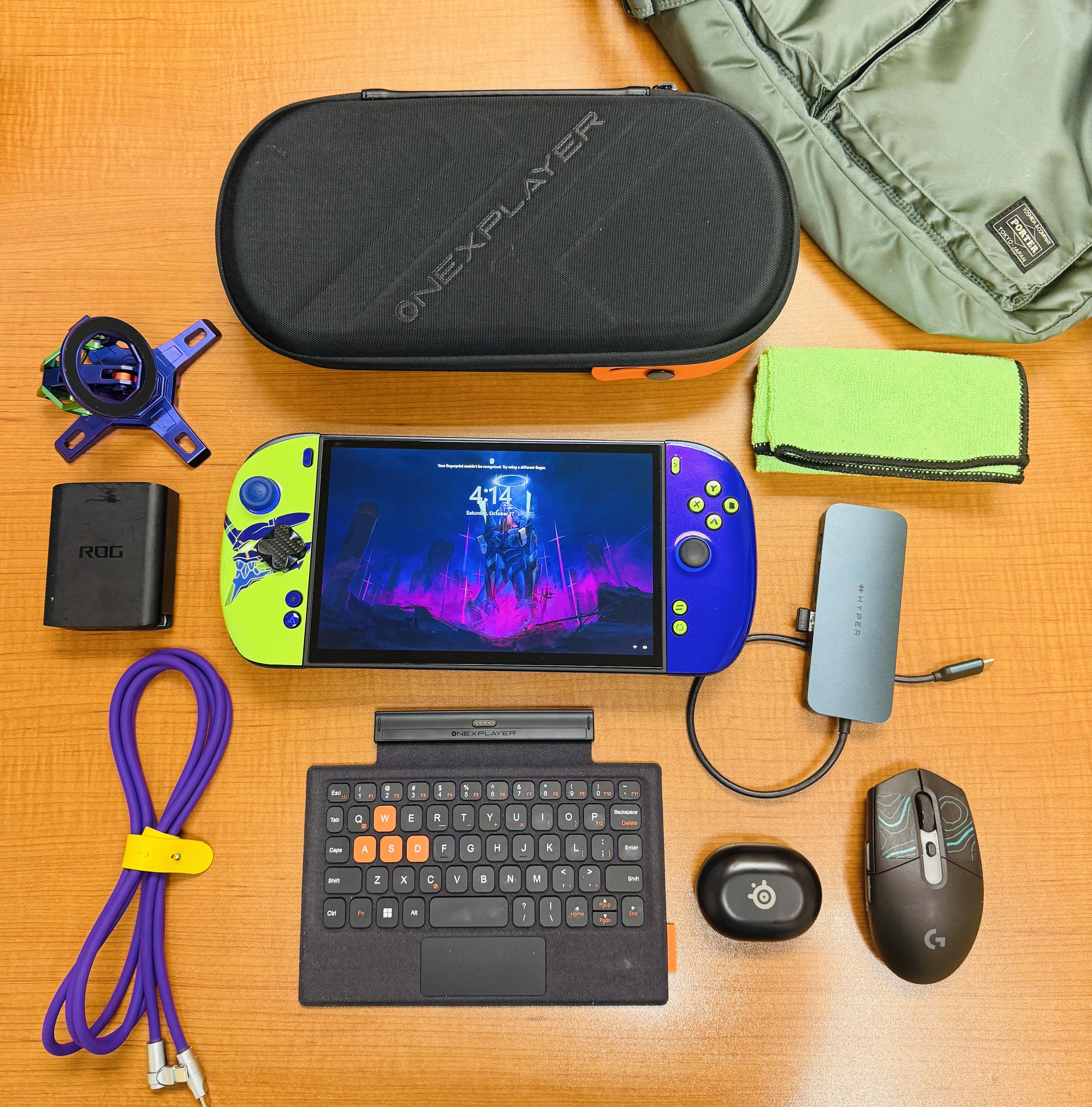
Intel OneXPlayer 3 Every Day Carry

Post image
8 Upvotes

Everything on this table is a product I’m happy to have in my setup, and am happy to answer any questions.

This handheld truly lives up to expectations, and exceeds them. Highly recommend!


r/OneXPlayer • • 11h ago

For Sale / Wanted [USA - Orange County, California][Local pickup only] WTS / FS - OneXPlayer 3 with IGG bonuses $1450

Thumbnail
gallery
17 Upvotes

Selling OneXPlayer 3 (24 GB RAM / 512 GB SSD model). It is in excellent condition with no issues. It will have a fresh Windows 11 install with all drivers and necessary apps.

Includes IGG perks: case (new), backpack (new), screen protector (new).

$1450 cash / zelle / venmo

Local pickup only in Orange County, California. Due to high cost of item, meetup location will be at the Irvine police station E-Commerce exchange zone. Please DM me if any questions or interest!


r/OneXPlayer • • 10h ago

OXP3 vs RTX 5080 laptop on holiday

8 Upvotes

I brought my OXP3 32gb and my legion pro 7i 5080 (also with OLED) on a one week holiday in Indonesia to see which one I'd gravitate towards. I spent about 5 hrs gaming in total across a few evenings in the hotel room; mostly playing ff7 rebirth, galactic racer, pga2k25 and msfs 2024.

I spent 90% of my gaming time on the OXP3. I'll break down the specs and experience:

OXP3 experience:

The form factor is so fun and immersive. It's comfortable to use it sitting or lying down. I also plugged it into the hotel tv and gamed on it using the wireless controller adapter, which is a good accessory but battery life disappointing. Main takeaways:

Good:

1) While handheld, the machine is quiet, cool and pushing 50 fps+ in everything.

2) on the crappy hotel tv, it's annoying that OXP3 is not locked 60 because without vrr it can be jittery, and look like 30fps or worse.

3) playing 1080p on tv from the bed (8 feet) was still mostly a fantastic experience and the graphics held up.

4) the more I use the controller the more I love it. Great sticks and buttons.

5) quite comfortable especially if you put a pillow in your lap to prop it up and take weight off hands.

6) kick stand is helpful to have even in your lap or on bed, kind of as a balancing leg that takes weight off.

7) battery life is excellent with Intel efficiency (performance; 60fps) mode with tdp otherwise at 30watts.

8) also easy to use on a plane.

9) position of ports, fan intake and exhaust is sublime for handheld use. Excellent engineering decisions there. Especially the single large fan as it's so quiet.

Bad:

1) machine is a buggy mess; it wouldn't restart or shut down until i updated the OXP3 drivers, Intel drivers and windows. Just crap and annoying and so un console like.

2) lack of a physical keyboard is a pain when it comes to Wi-Fi passwords, optiscaler pop ups, typing in airports in msfs 2024. Constantly using touch screen and then wiping the screen. On screen keyboard is too slow to use.

3) on screen keyboard doesn't work properly when in game on msfs 2024, and windows touch keyboard doesn't pop up.

4) couldn't plug in TV HDMI adapter, power, wireless earbuds and controller dongle at the same time. Had to sacrifice power and run on battery.

5) finger print sensor fails 70% of time. So crap.

6) pain in the butt to constantly have to exit steam big picture mode to sort out Windows issues.

Gaming laptop experience:

Good:

1) insane performance. Playing everything 90 fps+ with pristine dlss graphics, and in the case of FF7 Rebirth with dlss 5 at 55% scaling (via optiscaler) with FG = 100fps. That's next beyond gen.

2) seemless; everything works perfectly, mouse, keyboard, Nvidia, Intel, windows, screen. All in harmony with zero bugs and easy navigation.

3) it's so overkill for hotel tv that it just looks disappointing on anything but its own monitor, given the capabilities. But of a harsh negative, but it's too much capability for that setup.

4) despite this, easy locked 60fps on non vrr screen.

5) insane productivity monster for holiday video editing.

6) great for checking work emails etc.

Bad:

1) once plugged in, it's not moving anywhere; needs to be on a desk so it doesn't suck in bed sheets or pants instead of air.

2) you have to sit in a chair to use it.

3) it weighs a ton and it is totally impractical to use on a plane; just too big.

4) while battery is great for portable work, at about 6hrs, it throttles enormously while gaming on battery and lasts about 1.5hrs. so gaming on battery just isn't practical.

5) even though the legion pro 7i 2025 has a sensational balanced mode with great cooling, it's still WAY louder than OXP3.

Conclusion:

1) OXP3 is FAR from a console experience even with steam big picture mode, which is what I have from windows startup. If there's ever max support for steam OS I'm in! But I doubt it will ever be good enough (I have a mini ssd for example)

2) gaming laptop is a total performance beast and a breeze to navigate, but form fact is just not FUN.

3) despite all of this, next time I'll definitely take the OXP3 only, and borrow my wife's Macbook for work. Legion can stay on my desk at home, where it continues to be an incredible work and gaming machine, and great for portable work.

Bonus:

If I had to have only one; laptop, of course, because of portable productivity / work. Can't beat the versatility of a laptop.

r/OneXPlayer • • 1h ago

Are there any offline stores in Kunming, Yunnan, China, that sell the ONEXPLAYER 3?

• Upvotes

Are there any offline stores in Kunming, Yunnan, China, that sell the ONEXPLAYER 3?


r/OneXPlayer • • 2h ago

How do I make the triggers activate earlier

1 Upvotes

If I press the triggers in let's say a shooting game it won't register it's press unless it's 80% pressed. Is there a way to make it detect a press at say 30%?

Switching to hair triggers is not ideal because the game also has driving mechanics where I'd like to throttle the gas


r/OneXPlayer • • 1d ago

Onexplayer 3 (32GB) with it's G3 extreme is amazing. Blood of Dawnwalker, 20W, 1080p all Medium, XeSS, with Framegen via Optiscale

Enable HLS to view with audio, or disable this notification

41 Upvotes

So as the titile says. Oxp 3(32GB) with it's G3 extreme is amazing. Blood of Dawnwalker, 20W, 1080p all Medium, XeSS, with Framegen via Optiscaler. Settings in game is DLSS balance with Framegen, but optiscaler routes this to Xess and FG with XeLL. I don't go lower than 70fps except for when after loading assets. I can game for around 3 hours in this setting (50% brightness. No wifi)

XeFG is set to 3x, but I don't feel a lot of latency. I can still do a lot of tight parries. Comparing this to my 9950X/5090 rig with no framegen, so that really speaks volumes of how Intel's Framegen and Low Latency tech performs.

First part of the video shows the OXP with what settings I use. Second part is the in-game capture. I'm using game bar, so FPS in the capture doesn't look that smooth, but in actual gameplay, it is. Should have recorded using my gaming rig via capture card.

Anyway. Good piece of hardware. My wife got angry with me last night, I stayed up awake until 6:30am... at least I'm besides her instead of the gaming room.


r/OneXPlayer • • 21h ago

Installing SteamOS on OXP3

13 Upvotes

Trying to get the ultimate SteamOS experience on OXP3

Using these 2 guides:

https://github.com/HHHHanasak1/onexplayer3-steamos-setup (installation and bugfixes)

https://github.com/HHHHanasak1/xess-xmx-linux (native XESS fix for Linux)

Wish me luck guys :D I have the device for 2 days and already tired of Windows BS. Gonna post the feedback after I'm done

I'm running POST WITH UPDATES in comment section

______________________

VERDICT:

Guys, unfortunately, it's too early. I think I spot a bunch of issues:

  1. Perfromance degradation (needed correct SimpleDeckyTDP+settings)
  2. Rarely, but system can freeze at some point (happened twice in 5 hours)
  3. Random pixels changing colors. Not always, not all, but it's there. Random pixel can become red, green or blue for half a second. But it's hard to spot imo
  4. HDR works, but as I understand, it's Gamma 2.2 and a bit worse than full HDR (HDR was updated)
  5. UI is not as snappy as I experience on GPD Win 5 for example (fixed above)
  6. Decky Loader has really slow download times, made it look like main store doesn't work
  7. Some games easily show XeFG x4, some games don't
  8. Optiscaler has weird behaviour in some games (The Witcher 3 NG can't enable XeFG)
  9. Haptics are as bad as in Windows, but you can spot it more here + no control over strenght (I could test mod from Rog Ally via decky plugin, but I'm not sure it's worth it)
  10. INSTALLATION IS NOT INTUITIVE RIGHT NOW. You need KB, you need external monitor (maybe, I didn't, but it's mentioned in instructions). At one point your display will freeze for 30 minutes while installing at that's NORMAL behaviour. It's not hard to do, but you need to be ready
  11. 2 times sound went off and came back later (doesn't happen since)
  12. You need to be experienced in Linux debugging/googling. Keyboard weirdness, UI size weirdness in desktop mode ect (it's not hard, but you need to go and solve it)

Now we all can be sure that Winhanced is the way to go for now. Unfortunately, SteamOS isn't a better experience right now, at least for me. Maybe in few months it will get better on SteamOS (especially with CachyOS if OXP3 gets official support). (not sure now, since performance is good I will stick around)

Good day everyone!

UPD 18/10/2026:

  1. Found out that instruction author rolled out new update, which improves things quitew a bit
  2. Found out that I needed to put CPU into performance mode in SimpleDeckyTDP, not only increase the TDP itself.
  3. No more performance degradation from my side it seems. I will stay on SteamOS for a while!
  4. UI is snappy as hell now

r/OneXPlayer • • 17h ago

Can anyone explain how to toggle "repeat key" on the OneXplayer 3?

3 Upvotes

Can anyone explain how the "repeat key" actually works?

Using a Onexplayer 3

I configured my m2 button with the "repeat key" function.

If I press it, all of my buttons now are in turbo/repeat mode untill I re-apply the config. I have not found a way to toggle the feature off.

The description of the button tells me this should only be happening while the button is held.

Does anyone know how I can either toggle the feature on/off or make it only work while held?

Thank you.


r/OneXPlayer • • 19h ago

Is the ONEXPLAYER 3 compatible with a pencil ?

2 Upvotes

Hello!

I wasn’t able to find any info on the new ONEXPLAYER 3. Does anyone known if it as pen support ?

Thank you in advance :))


r/OneXPlayer • • 1d ago

Day2 with OXP3

Thumbnail
gallery
29 Upvotes

This thing is a beast. Very happy with my purchase. Had it sitting at the house for about 2 weeks and was worried that I received a dud. This unit is immaculate. Inserted my minissd but wasn’t reading it all day yesterday even after shutting it down , woke up and started up and it finally read the minissd. Played Crimson Desert & CyberPunk so far and I’m excited with how it’s running. This thing is bigger than I expected , pics online don’t do it justice. This is my first gaming pc handheld and I have no regrets with the purchase. Controls don’t wiggle at all either. If you’re on the fence about buying one. Shoot the bullet and get you one you won’t regret it !


r/OneXPlayer • • 1d ago

XeSS XMX on Linux - Bazzite, CachyOS etc. - OneXPlayer 3 -

11 Upvotes

Forgive me if this has been posted, but would this be the solution to XeSS issues on Linux — namely Bazzite?

https://github.com/HHHHanasak1/xess-xmx-linux

Sorry if this was posted already! I just really need to get away from Windows 11 :)

Thanks!


r/OneXPlayer • • 1d ago

Activate gyro

3 Upvotes

I've allocated the 'trigger gyro' function to the M1 key in program controller part of onexconsole but it doesn't seem to do anything. Anyone know how it's meant to function?

Onexplayer 3.


r/OneXPlayer • • 1d ago

OneXPlayer Mini Chose X2 Mini(Non Pro) over OXP 3 ...is it a good decision?

6 Upvotes

Chose X2 Mini(Non Pro) over OXP 3 ...Difference was just 100$. I don't care about anything .. just want powerful device ,more FPS and stunning visuals. Is it a good decision? Please share your thoughts .. new to this sub!


r/OneXPlayer • • 1d ago

Apex advice please - Protective case and USBC with battery.

2 Upvotes

Hi OXP subreddit. Received my Apex a few weeks ago and now have time to set it up.

It came with the big protective case, which feels safe, but also extremely bulky. Are there alternative cases that can fit the system with the TPU case or is there something similar to the ROG Ally X JSAUX case that has a TPU case with a hard plastic cover?

Also, for USBC, is it possible to game with usbc AND the battery? without the battery I can cold boot with 100w and increase up to 40W without an issue, but with the battery it is limited to 20w. I tried the bypass but that didn’t let me go past 20w.

Any advice appreciated. Thanks in advance!

edit, i found posts about using the Legion Go S Killswitch case as the card cover. Might go with that route


r/OneXPlayer • • 1d ago

OneXFly OneXGPU 7600M for OneXFly 8840u in 2026?

2 Upvotes

I want to play the latest AAA games without spending a fortune. I got my OneXFly (8840u, 32gb 2tb) used for $450 right before RAM prices went through the roof.

It’s solid for all but the most demanding games. I have it running Bazzite and use it docked 90% of the time for AAA games from 5-10 years ago, but there are a few newer games I want to play that I know it will struggle with.

I’m hesitant to drop well over $1K on a whole new setup, or $800-1k on the OneXGPU 2, but I am tempted to get a OneXGPU 7600M for around $350-450 used.

I’m not expecting 4k 60fps on the latest AAA games, but will it get me solid 1080p performance at medium-high settings on a game like AC Black Flag Resynced? Is there anything else I should know before pulling the trigger?


r/OneXPlayer • • 2d ago

Grips for the X2 Mini Pro/3

Thumbnail
gallery
24 Upvotes

Found these listed on Etsy, as much as im waiting for a TPU Case, i guess this can offer some sort of protection also they look good.

Many colours but i cant justify the price.


r/OneXPlayer • • 2d ago

Onexplayer3 keyboard touchpad not clickable on the entire surface

3 Upvotes

I just received the onexplayer3 keyboard, but i've noticed that the trackpad does not "click" on it's entire surface.

I can tap on it of course, but if i try to actually click, only the lower part of the trackpad is clickable.

is that just the way the keyboard is, or is mine defective?


r/OneXPlayer • • 2d ago

Enshrouded 1.0 on OneXPlayer 3

Thumbnail
youtube.com
7 Upvotes

It runs a lot better for me now. The settings aren't that great but it doesn't look bad and I while I still need upscaling, didn't have to reduce the resolution for playable fps like I did prior to 1.0


r/OneXPlayer • • 2d ago

Intel Anyone here have FF7 Rebirth & RE4 remake on windows? Trying to do SteamOS comparisons

4 Upvotes

Hi all! Im testing & tweaking these games for SteamOS, wanted someone to help me test the same scenes on Windows. DM me if you're willing to help!

EDIT: THIS IS FOR ONEXPLAYER 3!!


r/OneXPlayer • • 2d ago

Screen calibration for OXP3 screen?

3 Upvotes

Hey everyone, I was curious if anyone here does any kind of color tuning for the OXP3. For myself out of the box and after doing a graphics update the colors (on desktop at least) seem pretty dull. I normally up the saturation to really make the colors pop but I was curious if when gaming and stuff you guys leave things stock and let HDR do the work or if anyone changes the screen settings. Thanks!


r/OneXPlayer • • 3d ago

Got tired of juggling 6 launchers on my Ally, so I built a free controller-first launcher with a 3D coverflow. Looking for feedback

Thumbnail
gallery
16 Upvotes

Hey everyone,

Solo dev here. Like a lot of you, I got fed up bouncing between Steam, Epic, GOG, Xbox, Ubisoft and Battle.net on my Ally just to find something to play, and Armoury Crate's library never quite did it for me. So I built PocketDeck: a controller-first launcher that pulls every installed game into one 3D coverflow shelf you can browse entirely with the sticks.

I've decided to put most of my effort into the free version so it's a full launcher on its own, not a stripped-down demo. Here's what just landed in it:

• Interface translations: French, Arabic (full right-to-left layout) and Spanish for menus, settings and the Hub

• Smarter importing: faster, more reliable detection across Steam, Epic, GOG, Ubisoft, EA App, Xbox and Battle.net

• Performance work: snappier navigation, especially with big libraries

• Notification Center: everything in one place instead of pop-ups

• Steam Wishlist & upcoming releases inside the launcher (needs your own free Steam Web API key, and the setup screen walks you through it)

2-min video of it running on an Ally: https://www.youtube.com/watch?v=e96YBpu9ovc

Get Free version from official Site: https://www.pocketdeckapp.com

I'd genuinely love to hear what's missing, what's annoying, or what breaks on your setup. I read every comment and ship updates every few weeks. If you'd rather chat or send bug reports, there's a Discord too: https://discord.gg/pwUmECSPTp


r/OneXPlayer • • 3d ago

Intel Broke my OXP3 the second day

Thumbnail
gallery
23 Upvotes

I just got my OXP3 yesterday, installed some games but have not had a chance to play it. And I then dropped it today (didn't zip the case before lifting it up) and the right controller broke, and the left controller cracked. They are still functioning fine so I guess I will try to glue them back as I don't want to spend $59+$19 shipping to get a new pair......


r/OneXPlayer • • 3d ago

Designed a free 3D printable case for the Onexplayer 3 controllers + bridge.

Thumbnail
gallery
33 Upvotes

Protective case for the OneXPlayer 3 detachable controllers, with the controller bridge attached.

The case is designed to keep both controllers and the bridge together, without needing to detach anything, while remaining as compact as possible. Decided to keep the top as a slip on lid, rather than something more complicated than a hinge or latch, which could break (and use more filament). The lid stays on nice and tight, but you can also put an elastic band around it if you'd like. 

 I printed mine in PETG for improved strength and durability.

This took a lot of time and several design adjustments to get right, but the result is a perfect, snug fit with virtually no wasted space.

Hope other OneXPlayer 3 controller owners will find it useful! Happy for people to take this and improve it. 

Link to download it on makerworld: https://makerworld.com/en/models/3438791-onexplayer-3-controller-case#profileId-3921362


r/OneXPlayer • • 3d ago

Bazzite now supports X2MP.

7 Upvotes