r/OneXPlayer • • 11h ago

For Sale / Wanted [USA - Orange County, California][Local pickup only] WTS / FS - OneXPlayer 3 with IGG bonuses $1450

Thumbnail
gallery
16 Upvotes

Selling OneXPlayer 3 (24 GB RAM / 512 GB SSD model). It is in excellent condition with no issues. It will have a fresh Windows 11 install with all drivers and necessary apps.

Includes IGG perks: case (new), backpack (new), screen protector (new).

$1450 cash / zelle / venmo

Local pickup only in Orange County, California. Due to high cost of item, meetup location will be at the Irvine police station E-Commerce exchange zone. Please DM me if any questions or interest!


r/OneXPlayer • • 21h ago

Installing SteamOS on OXP3

13 Upvotes

Trying to get the ultimate SteamOS experience on OXP3

Using these 2 guides:

https://github.com/HHHHanasak1/onexplayer3-steamos-setup (installation and bugfixes)

https://github.com/HHHHanasak1/xess-xmx-linux (native XESS fix for Linux)

Wish me luck guys :D I have the device for 2 days and already tired of Windows BS. Gonna post the feedback after I'm done

I'm running POST WITH UPDATES in comment section

______________________

VERDICT:

Guys, unfortunately, it's too early. I think I spot a bunch of issues:

  1. Perfromance degradation (needed correct SimpleDeckyTDP+settings)
  2. Rarely, but system can freeze at some point (happened twice in 5 hours)
  3. Random pixels changing colors. Not always, not all, but it's there. Random pixel can become red, green or blue for half a second. But it's hard to spot imo
  4. HDR works, but as I understand, it's Gamma 2.2 and a bit worse than full HDR (HDR was updated)
  5. UI is not as snappy as I experience on GPD Win 5 for example (fixed above)
  6. Decky Loader has really slow download times, made it look like main store doesn't work
  7. Some games easily show XeFG x4, some games don't
  8. Optiscaler has weird behaviour in some games (The Witcher 3 NG can't enable XeFG)
  9. Haptics are as bad as in Windows, but you can spot it more here + no control over strenght (I could test mod from Rog Ally via decky plugin, but I'm not sure it's worth it)
  10. INSTALLATION IS NOT INTUITIVE RIGHT NOW. You need KB, you need external monitor (maybe, I didn't, but it's mentioned in instructions). At one point your display will freeze for 30 minutes while installing at that's NORMAL behaviour. It's not hard to do, but you need to be ready
  11. 2 times sound went off and came back later (doesn't happen since)
  12. You need to be experienced in Linux debugging/googling. Keyboard weirdness, UI size weirdness in desktop mode ect (it's not hard, but you need to go and solve it)

Now we all can be sure that Winhanced is the way to go for now. Unfortunately, SteamOS isn't a better experience right now, at least for me. Maybe in few months it will get better on SteamOS (especially with CachyOS if OXP3 gets official support). (not sure now, since performance is good I will stick around)

Good day everyone!

UPD 18/10/2026:

  1. Found out that instruction author rolled out new update, which improves things quitew a bit
  2. Found out that I needed to put CPU into performance mode in SimpleDeckyTDP, not only increase the TDP itself.
  3. No more performance degradation from my side it seems. I will stay on SteamOS for a while!
  4. UI is snappy as hell now

r/OneXPlayer • • 6h ago

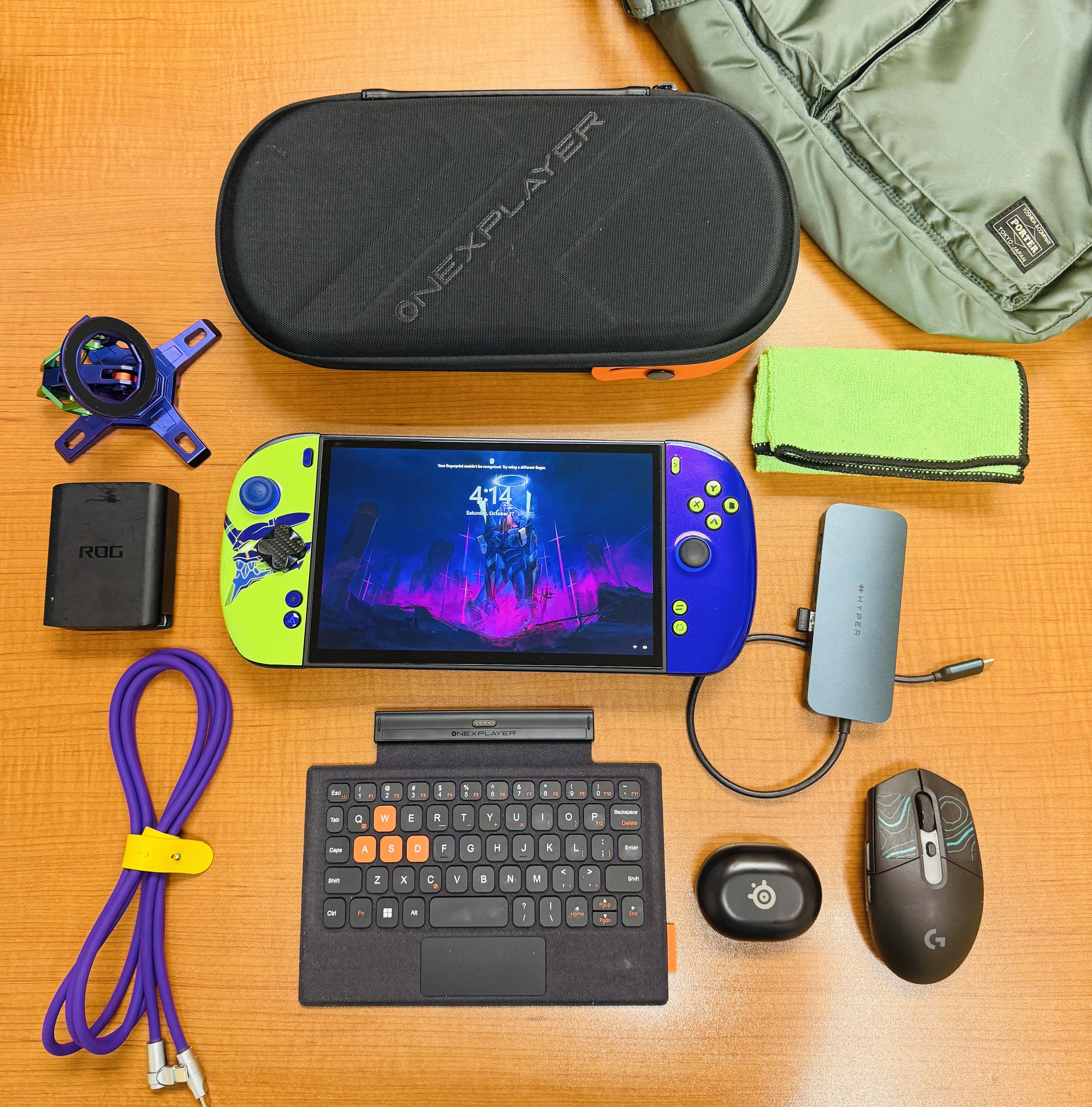
Intel OneXPlayer 3 Every Day Carry

Post image
8 Upvotes

Everything on this table is a product I’m happy to have in my setup, and am happy to answer any questions.

This handheld truly lives up to expectations, and exceeds them. Highly recommend!


r/OneXPlayer • • 10h ago

OXP3 vs RTX 5080 laptop on holiday

9 Upvotes

I brought my OXP3 32gb and my legion pro 7i 5080 (also with OLED) on a one week holiday in Indonesia to see which one I'd gravitate towards. I spent about 5 hrs gaming in total across a few evenings in the hotel room; mostly playing ff7 rebirth, galactic racer, pga2k25 and msfs 2024.

I spent 90% of my gaming time on the OXP3. I'll break down the specs and experience:

OXP3 experience:

The form factor is so fun and immersive. It's comfortable to use it sitting or lying down. I also plugged it into the hotel tv and gamed on it using the wireless controller adapter, which is a good accessory but battery life disappointing. Main takeaways:

Good:

1) While handheld, the machine is quiet, cool and pushing 50 fps+ in everything.

2) on the crappy hotel tv, it's annoying that OXP3 is not locked 60 because without vrr it can be jittery, and look like 30fps or worse.

3) playing 1080p on tv from the bed (8 feet) was still mostly a fantastic experience and the graphics held up.

4) the more I use the controller the more I love it. Great sticks and buttons.

5) quite comfortable especially if you put a pillow in your lap to prop it up and take weight off hands.

6) kick stand is helpful to have even in your lap or on bed, kind of as a balancing leg that takes weight off.

7) battery life is excellent with Intel efficiency (performance; 60fps) mode with tdp otherwise at 30watts.

8) also easy to use on a plane.

9) position of ports, fan intake and exhaust is sublime for handheld use. Excellent engineering decisions there. Especially the single large fan as it's so quiet.

Bad:

1) machine is a buggy mess; it wouldn't restart or shut down until i updated the OXP3 drivers, Intel drivers and windows. Just crap and annoying and so un console like.

2) lack of a physical keyboard is a pain when it comes to Wi-Fi passwords, optiscaler pop ups, typing in airports in msfs 2024. Constantly using touch screen and then wiping the screen. On screen keyboard is too slow to use.

3) on screen keyboard doesn't work properly when in game on msfs 2024, and windows touch keyboard doesn't pop up.

4) couldn't plug in TV HDMI adapter, power, wireless earbuds and controller dongle at the same time. Had to sacrifice power and run on battery.

5) finger print sensor fails 70% of time. So crap.

6) pain in the butt to constantly have to exit steam big picture mode to sort out Windows issues.

Gaming laptop experience:

Good:

1) insane performance. Playing everything 90 fps+ with pristine dlss graphics, and in the case of FF7 Rebirth with dlss 5 at 55% scaling (via optiscaler) with FG = 100fps. That's next beyond gen.

2) seemless; everything works perfectly, mouse, keyboard, Nvidia, Intel, windows, screen. All in harmony with zero bugs and easy navigation.

3) it's so overkill for hotel tv that it just looks disappointing on anything but its own monitor, given the capabilities. But of a harsh negative, but it's too much capability for that setup.

4) despite this, easy locked 60fps on non vrr screen.

5) insane productivity monster for holiday video editing.

6) great for checking work emails etc.

Bad:

1) once plugged in, it's not moving anywhere; needs to be on a desk so it doesn't suck in bed sheets or pants instead of air.

2) you have to sit in a chair to use it.

3) it weighs a ton and it is totally impractical to use on a plane; just too big.

4) while battery is great for portable work, at about 6hrs, it throttles enormously while gaming on battery and lasts about 1.5hrs. so gaming on battery just isn't practical.

5) even though the legion pro 7i 2025 has a sensational balanced mode with great cooling, it's still WAY louder than OXP3.

Conclusion:

1) OXP3 is FAR from a console experience even with steam big picture mode, which is what I have from windows startup. If there's ever max support for steam OS I'm in! But I doubt it will ever be good enough (I have a mini ssd for example)

2) gaming laptop is a total performance beast and a breeze to navigate, but form fact is just not FUN.

3) despite all of this, next time I'll definitely take the OXP3 only, and borrow my wife's Macbook for work. Legion can stay on my desk at home, where it continues to be an incredible work and gaming machine, and great for portable work.

Bonus:

If I had to have only one; laptop, of course, because of portable productivity / work. Can't beat the versatility of a laptop.

r/OneXPlayer • • 17h ago

Can anyone explain how to toggle "repeat key" on the OneXplayer 3?

3 Upvotes

Can anyone explain how the "repeat key" actually works?

Using a Onexplayer 3

I configured my m2 button with the "repeat key" function.

If I press it, all of my buttons now are in turbo/repeat mode untill I re-apply the config. I have not found a way to toggle the feature off.

The description of the button tells me this should only be happening while the button is held.

Does anyone know how I can either toggle the feature on/off or make it only work while held?

Thank you.


r/OneXPlayer • • 19h ago

Is the ONEXPLAYER 3 compatible with a pencil ?

2 Upvotes

Hello!

I wasn’t able to find any info on the new ONEXPLAYER 3. Does anyone known if it as pen support ?

Thank you in advance :))