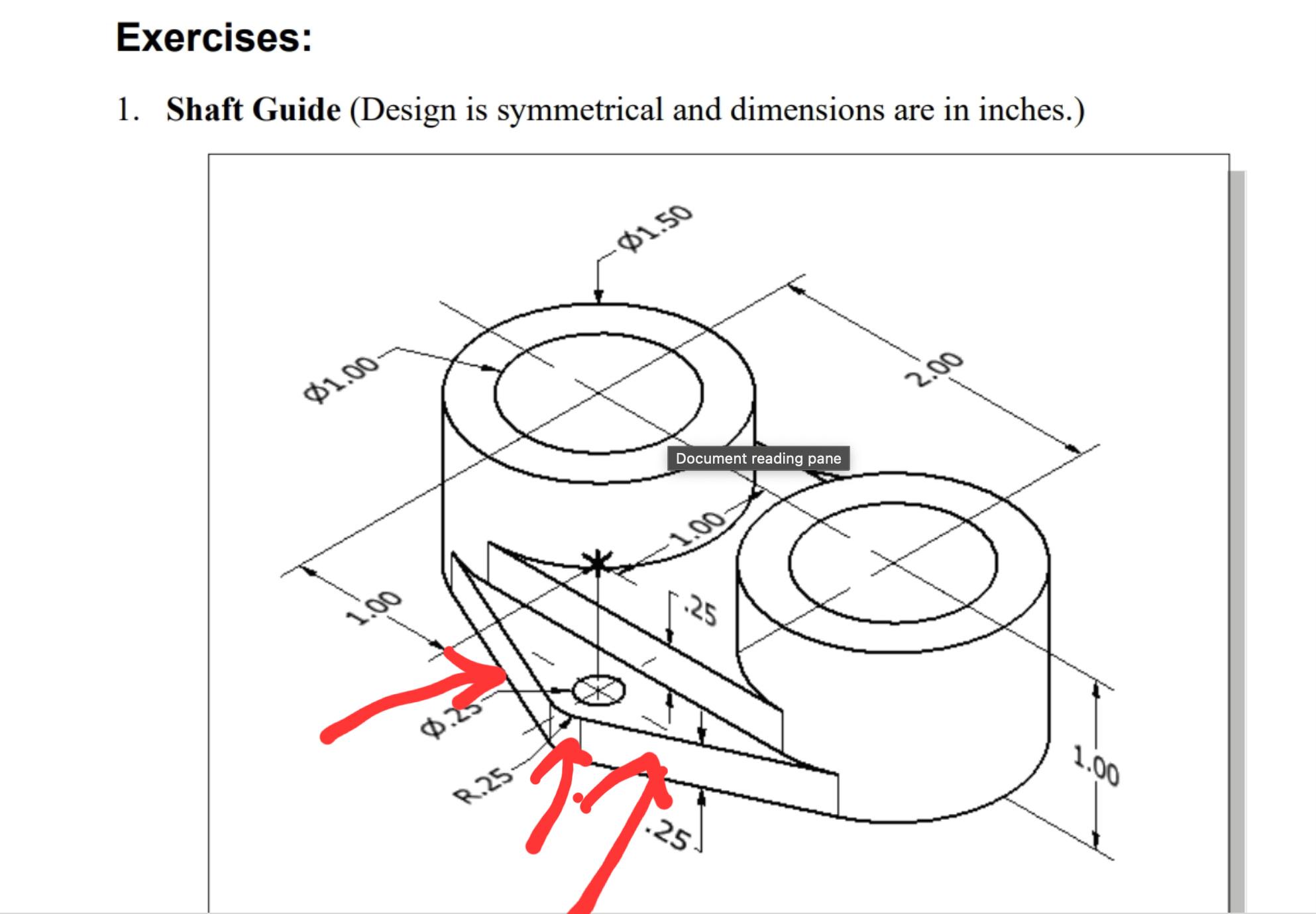
I don't know how long the diagonal parts are supposed to be and I don't know how long the outer semi circle (AKA curved line or whatever you wanna call it) are supposed to be. Any ideas?
I am currently designing a popet valve type, double acting, reversable, triple expantion steam engine, and i was wondering if the program was powerfull enough to show the model working under simulated flow.
Somebody directed me to this thread. In it the comment talks about running vcredist files, which i did not even find in the prereqs folder
I deleted that instalation entirel, starting anew. I started downloading 2025 version and it shows the same message.
It would be really nice if somebody could help me out or atleast point out where i can contact some kind of solidworks techicnal support, because ive been searching and the best i can find is forums which have not been of much help.
Im installing this as a student if it even matters
Hi everyone, im a beginner in solidworks and i recently started drawing a piping system in wich im planning to use bearings; Unfortunately I am having some issues on performing estrusion cut following a specific line, the patter function wont work because the curve isnt one contineus curve but lines and arcs combined;
It would be very gratefull for any suggestion :)
I’m developer of OneCommander file manager and a few users asked about showing PDM data directly (I hope do it without referencing the SOLIDWORKS/PDM SDKs).
I’ve already contacted SOLIDWORKS/resellers but ended up being passed between distributors without getting an evaluation arranged. A browser demo or sales presentation won’t cover this test.
I’m looking for approximately 30-day SOLIDWORKS PDM evaluation that I can run entirely on my own Windows machine: a local vault/server plus a licensed desktop client.
Does anyone have a direct contact at a reseller, or on the SOLIDWORKS PDM team, who could actually arrange this? PDM Standard is fine if it supports the test; Professional isn’t essential.
I have 2 rectangles on planes 1 & 2. I drew a sketch to guide the loft, but I am only able to make the loft follow one side of it. If I click the other side, the sketch just unselects. Other youtube videos did not have this issue.
Hello guys, I need to make an assembly for my university project with at least 10 parts. I am not able to decide what to make, if some suggestion from your side with some source can be provided i would appreciate.
My skills level are moderate in sense that I have done CSWA practice problems all
I am from mechanical engineering with passion for aeronautical engineering
The assembly must be of some industrial application
So I have a flat surface with a design. I use the split line feature to separate the design from the rest of the surface but when I try and export it as a 3mf or stl for 3D printing the surface is flat without the split lines. So I can’t color the design I have. Does anyone know how to easily export the file with the split lines in there for 3D printing?
I have SW but, it's the 2016 version. I have been bouncing between that and Fusion for a few years.
My boss basically told me this month that he would get any CAD software I want. I've been messing around with OnShape for a couple weeks. I mostly like it and I assume some of the minor issues I'm having with it can be customized to my liking bout haven't explored the menus much. The file system confused me a bit at first, but once I got that in my head, it's a lot like SolidWorks when designing parts, and a lot like Fusion for handling assemblies. The price is certainly attractive compared to SW (even though it's not my money, it's something I take into consideration) So, kinda leaning toward OnShape right now. However, it's a bit Plain-Jane, interface-wise. I do somewhat miss the "nifty" aspect of SW.
I design machined aluminum and sheet metal parts for light electronic assemblies. Some 3D printing. I don't do any simulation stuff and I'm going to be the only user, so I would be looking at SolidWorks standard.
It would also be nice if I could collaborate with our Altium user. Do I need SW Electrical for that?
It looks like they make you jump through a couple hoops to get a 30 day free trial of SolidWorks. So before I contact their sales dept., I thought I'd see if anyone here can tell me what has changed in the last ten years? Since I'm not utilizing some of the advanced features, maybe it makes sense to keep using 2016?
I have been experimenting with running solidworks on my laptop that has an arc b390 in it. Yes, I know it's not supported. If that is an issue for you then please move on.
I got it working with the registry tweak to use the GPU and not software opengl but after a few minutes the memory usage spikes to over 85%. That will trigger the solidworks nanny like the house is on fire. It also doesn't seem great but I have 32gb so maybe it's not the end times?
I've found a few other posts (not on Reddit) but no answers. Anyone have some great ideas? I would much rather use this laptop because it's really thin and light compared to my other laptop.
,regardless I am still able to continue instalation. However, shortly after I happen to encounter an error that terminates my instalation:
Internal error: The Windows Installer for this product component did not run as expected: INSTALL.
Contact Technical Support.
When contacting Technical Support about installation issues, you will need to provide the installation log files available in this directory. Use the button below to save your logs as a zip file for sending to your support representative.
I am new to SOLIDWORKS, so any help will be greatly appreciated!
Hey solidgangs! I have a question. I have a personal project where I designed a VAWT (wind turbine) and I want to optimize some parameters based on my actual measured wind speed (average wind speed/wind velocity) in our place. My problem is how can we get the RPM and torque of the turbine prior in doing the flow simulation. What are your suggestions or approach on this kind of project.
Hey everyone!
I’ve been quietly following this community for quite a while, and I just wanted to say thanks for all the great content, help, and support you guys share here. I thought it was about time to introduce myself and share some of my own work with you.
I’m a mechanical engineer and have been working with SolidWorks since 2008. I’ve pretty much taught myself everything over the years, from standard part modeling and sheet metal to weldments and surface modeling.
But my real passion is rendering, especially vehicles!
Both vehicles you see here are based on real vehicles that existed in the past. I modeled and rendered both of them entirely myself.
If you have any questions about my work or workflow, feel free to ask. I’ll do my best to answer them!
Looking forward to sharing more of my work with you all!
Edit: First of all, thanks for the great feedback. Since I was asked, here are the images directly from SolidWorks and Visualize. I can't add pictures to this post, so I had to make a second post.
I’m currently learning SOLIDWORKS, and I want to start learning GD&T (Geometric Dimensioning and Tolerancing) as well. I understand that GD&T is an important topic in manufacturing, engineering drawings, and quality inspection.
However, I’m a complete beginner when it comes to GD&T, and I’m not sure where to start.
Could you please recommend any good websites, YouTube channels, free courses, books, or practice materials that teach GD&T from scratch, step by step?
I would especially appreciate resources that explain the concepts with practical examples and engineering drawings, rather than just theory.
My goal is to understand GD&T properly and learn how to apply it to engineering drawings created in SOLIDWORKS.
Any suggestions, learning roadmaps, or personal experiences would be greatly appreciated.
Has anyone actually looked into reverse engineering the drivers for an consumer card so they work similar to an enterprise card?
I currently use a enterprise graphics card simply because Solidworks has a built-in "Enhanced Performance" which only works well with enterprise drivers.
From what I understand, the hardware is super similar, but NVIDIA just locks out certain features on the consumer side to force you into commercial cards. In theory, couldn't that be bypassed with custom or reverse-engineered drivers? Curious if anyone's gone down this rabbit hole.
Firstly, apologies if this breaks a rule. I read them, but saw nothing specifically against this.
We've been developing our CAD engine since 2010. Our flagship workflow was always easy design followed by a native SolidWorks export (fully featured .sldasm and .sldprt files). If some of you have worked with T-Slots, you may be familiar with it.
That being said, we've been tinkering with LumberCAD since about 2020, really got into it in 2022, and released the Beta today.
Does it come with everything SolidWorks does? No, obviously not.
However, it is an absurdly easy to use dimensional lumber configurator with heavily automated documentation and a pre-made catalog of products.
This question is probably better posed to the SketchUp community, but we would love to hear your feedback nonetheless.
One thing we're proud of is we already crash less than SolidWorks ;)
If you're interested in playing around with the open Beta, you can find it at https://lumbercad.com/
Mods, please message me if the link should be removed.
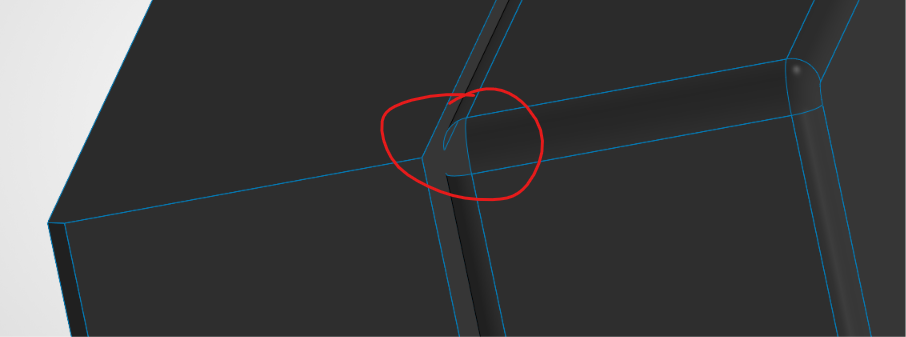
I got a STEP file from an OEM and converted it to a Solidworks 2026 file. However, there is a little bit of the surface missing that I think is causing all of the edges to be highlighted in blue. What's the best way to go about fixing this? I have tried a few of the surface modeling tools (extend, knit, trim) but everything has thrown errors for me.