Welcome to Quarter 2 2026! The moderators are here and grateful for everyone's participation and feedback.
Let's get right into it.
Previous Rules Changes
After review of many of the responsive, constructive, and thoughtful comments and mod mails regarding the most recent rules change, it's clear that we missed the mark on this one. AI is taking the world by storm, and applying such a universally "uninvolved" perspective, showcased by the rules we last implemented, is inconsistent with the subreddit's long-term goals.
Here are the next steps we want to implement to wrangle the shotgun of AI-created tools and software we've been flooded with since AI chatbots became prevalent:
New Project Megathread
A new megathread will be introduced each Friday.
This megathread will feature New Projects. Each Friday, the thread will replace itself, keeping the page fresh and easy to navigate. Notably, those who wish to share their new projects may make a top-level comment in this megathread any day of the week, but they must utilize this post.
AI-Compliance Auto Comment
The bot we implement will also feature a new mode in which most new posts will be automatically removed and a comment added. The OP will be required to reply to the bot stating how AI is involved, even if AI is not actively involved in the post. Upon responding to the bot, the post will be automatically approved.
AI Flairs
While moderating this has proven to be difficult, it is clear that AI-related flairs are desired. Unfortunately, we can only apply a single flair per post, and having an "AI" version for every existing flair would just become daunting and unwieldy.
Needless to say, we're going to refactor the flair system and are looking for insight on what the community wants in terms of flair.
We aim to keep at least a few different versions of flairs that indicate AI involvement, but with the top-level pinned bot comment giving insight into the AI involvement info, flairs involving AI may become unnecessary. But we still seek feedback from the community at large.
Conclusion
We hope this new stage in Post-AI r/selfhosted will work out better, but as always, we are open to feedback and try our best to work with the community to improve the experience here as best we can.
For now, we will be continuing to monitor things and assessing how this works for the benefit of the community.
This weekly thread is the new official home for sharing your new projects (younger than three months) with the community.
To keep the subreddit feed from being overwhelmed (particularly with the rapid influx of AI-generated projects) all new projects can only be posted here.
How this thread works:
A new thread will be posted every Friday.
You can post here ANY day of the week. You do not have to wait until Friday to share your new project.
Standalone new project posts will be removed and the author will be redirected to the current week's megathread.
To find past New Project Megathreads just use the search.
Posting a New Project
We recommend to use the following template (or include this information) in your top-level comment:
Description: (What does it do? What problem does it solve? What features are included? How is it beneficial for users who may try it?)
Deployment: (App must be released and available for users to download/try. App must have some minimal form of documentation explaining how to install or use your app. Is there a Docker image? Docker-compose example? How can I selfhost the app?)
AI Involvement: (Please be transparent.)
Please keep our rules on self promotion in mind as well.
OpenMW-Web is OpenMW (the open-source Morrowind engine) running entirely in a browser tab. Players install nothing. The part I think this sub will care about is the server, which I've spent the last couple of months building an admin dashboard for.
Getting it running is one command if you have Docker:
It pulls prebuilt images from GHCR, so nothing compiles on your box, and opens the setup wizard at localhost/admin. The wizard asks for an admin account, single player or multiplayer, how people sign in (passwords, Google, Discord, Microsoft or invite codes), where storage lives (local disk or any S3-compatible bucket) and how the server is reached. Give it a domain and Caddy sorts out HTTPS on its own. It also walks you through adding your game files.
After that it's all the dashboard: who's online and where, every account with its characters and saves, CPU, memory, network and disk, kicks, bans and reports, logs and an audit trail of what admins did. Mods upload as .zip or .7z with a drag-to-order load order and conflict warnings, and Tamriel Rebuilt has its own setup step. Updates are a button, and rolling back is one line in .env. No config files to hand-edit.
Multiplayer has also moved out of the experimental flag and into alpha: one shared world simulated on the server, so everyone sees the same NPCs and fights. The last few releases fixed a lot (teleporting enemies, rubber-banding, restarts kicking people), and 1.6.2 stops new areas freezing while they load.
It's alpha, so there are bugs. If you want to help:
I maintain Super Productivity, an MIT-licensed task manager and time tracker. It works offline, and you can self-host the web app and an optional sync backend.
My last update here was v18.16 in July. v19.2 is out now, so here's a catch-up on the changes since then.
For people running their own server
v19.2 adds ARM64 SuperSync server images alongside AMD64, versioned release images, configurable trusted proxy ranges, and fixes for fresh deployments. SuperSync is the optional sync backend, separate from hosting the web app.
SuperSync is still beta, and self-hosting support is limited. The documented Compose stack includes PostgreSQL and Caddy and needs SMTP for account emails. You don't need a server or an account to use the app locally.
What changed in the app
Notes without switching modes: live Markdown editing arrived in v19.0.1.
Less task-by-task housekeeping: multi-select and bulk actions arrived with v19, followed by keyboard navigation in the planner and boards. In v19.2, you can drag selected tasks between sections and projects, and multi-select in the mobile planner.
Integrations: v19.1 added two-way Trello card sync and support for multiple Google Calendar accounts.
Priorities and search: v19.2 adds numeric task priorities with icon presets, plus project and tag search.
Recovery and reliability: earlier releases added local recovery points and full worklog export. v19.2 fixes sync cases that could lose tracked time or overwrite concurrent task edits, plus incorrect success reporting for failed desktop backups.
Two upgrade changes to know about: v19 removed User Profiles; v19.2 moved Redmine and Nextcloud Deck integrations into plugins.
There have been a few reports of old Plex servers getting popped by Plex2Shell in the last few days (miner + proxy). Mine got hit too, but it dropped a DDoS bot instead.
Internet kept dropping Sunday night/Monday morning. Plex was being told to flood other people and maxed out our upload every time. Our upload is pretty poor, so it was obvious. With better upload you may not notice at all.
I was on 1.43.0. I run staged updates, get ntfy alerts for new images, and Plex was deliberately held. In May 1.43.1 broke direct play on our Samsung Frame, Plex acknowledged the bug, so I pinned VERSION= to the last good build with a weekly reminder to retest. The reminder only checked whether the Samsung bug was fixed. It never flagged that 1.43.3 was a security fix, so the hold kept me on a vulnerable version.
If you hold back any app for a bug, make sure security releases still get your attention.
FYI:
- in from 94.154.43.88 on 32400, then called back to it on 8952
- /tmp/.pxb (its own curl/wget), /tmp/.px_7c1e
- bot at /tmp/.spid (self-deletes, shows as "cron"), copy at /var/tmp/kworker + kworker.sh
- C2 176.65.149.82:48101, backup hand.genddos.st
- plain text orders like `!ATK 179 udpplain 80 <ip> 53 len=1400`
- sha256 a654ffc9ea1d3af1cb07feeefe8ee078a0faaaf60b31aa20cfbe082d6c22696c
Look for a Plex child process called "cron", junk in /tmp or /var/tmp in the container, or TranscoderH264Options in Preferences.xml that's present but empty. The hunt script at github.com/code-zm/plex2shell is worth running.
Fixed with 1.43.4, a container rebuild and blocking the IPs. Change your Plex password too, it steals the owner token.
My rack cost €1,000 in total, all used hardware from eBay Germany. 2017 repurposed office PC running proxmox and a used Facebook marketplace build hosting an AMD RX 6900 XT with 16GB of VRAM bare metal, no virtualization.
It runs my home network services and supports production apps used on iOS, Android and the web. Proxmox handles VMs and LXC containers, with Docker for application services. The setup includes OPNsense, Pi-hole, shared storage, backups, Immich, a mail archive, and a small Kubernetes cluster with Gitea and a container registry.
The GPU runs on a separate bare-metal machine. Text inference uses llama.cpp. The applications cover mobile assistants, book production, image and wallpaper generation, music generation and mastering, and an AI news service, all with the assistance of a diffuser forma image and ACE for audio. Most of the app backends live on the Proxmox side and call the inference services over the LAN.
The interesting part has been sharing the resources. Model weights fitting in VRAM is only the start: context, concurrent requests and image generation also need room. Some workloads coexist; heavier generation jobs take turns. Selected services have CPU fallbacks when the GPU endpoint is unavailable.
Public apps use Cloudflare tunnels. Monitoring and remote access are part of the setup too, with a separate Raspberry Pi connected to the hypervisor’s serial console for recovery when normal management access fails.
I built much of the application layer with AI-assisted coding. Keeping it useful for actual users has meant working on queues, workload profiles, health checks and fallbacks as much as the apps themselves.
Are you guys still buying big, chunky enterprise servers for self-hosting, or do you prefer used office PCs with a five- or six-year-old consumer GPU for inference?
For those who chose enterprise hardware, what made it worth it for your services: RAM capacity, drive bays, PCIe expansion, remote management, or something else?
I am running a small homelab and selfhosts several things, including anime, manga, minecraft servers, etc.
My next thing to check off is git. Now i have already looked into forgejo several times, but i have never actually made the switch because of several reasons i list below. I want a second opinion on the matter and was wondering what you guys do and what you think is best in my situation.
My situation
I am a solo develpoer (hobbyist) who develops open source projects for fun, but i have never actually gotten a star, issue, pr or discussion opened on any of them because i dont really advertise my projects.
I am also skeptical about mirroring to github, while it solves most cons it also removes most pros, and makes it even more confusing for me, if i were to push code to forgejo with refrences to prs that are only on github.
Pros/Cons ( that i have thought of )
Pros:
privacy, not published to microsoft servers
selfhostable CI without limits
using open source software instead of githubs proprietary platform
moving away from github, microslop, its outages and ai
Cons:
Discoverability & engagement - people will need to create a user to contribute etc, which not many people want to, ive never gotten anyone who has done anything to my projects though so im not sure
Portfolio - A github page is widely recognized and a github with consistent activity for years would be good in a portfolio/resume, whilst a selfhosted git would not be as impressive or recognized by non-tech people. While im way too young to get tech jobs yet, building a portfolio for the future is important.
My servers limitations. I would be able to allocate maybe 20gb to the repos, which is plenty in my experience, i dont know how heavy runners can be (i know forgejo itself is relatively light), and i would only be able to give it a total of around 3-4gb ram and 1-2 cores.
Some questions
Would you think github is right in my situation or can i migrate to forgejo, or should i do something completely different?
Have you been in a similar situation, and what did you do?
Did i miss any pros/cons that would make me more probably to migrate / not migrate?
I apologize is this is a repeated question. I did not find a helpful (to me) answer yet...
I "discovered" the magic of self-hosting some weeks ago and am in the process of creating more and more services on my small homelab. I'm running Docker on Ubuntu server on a small Dell mini PC. I am quite new-ish to Linux and very new to Docker as a concept. I work as a Windows Sys admin by day.
So, naturally, before hosting any really important data myself, I am trying to learn how to do backups. I had hoped to find a "ready to use" solution but so far was not successful.
Did I understand it correctly that all the data worthy of a backup are NOT inside of the containers but in my Compose files or the volumes mounted into the containers?
So my next step would be to create a backup mechanism myself. This seems... daunting.
I think these might be the necessary steps:
iterate through all my stacks
stop all containers inside each stack so no file is in active use
backup all necessary files in TAR.GZ files to a temp directory
Docker compose files with their .env files
all volumes used in that stack
move that TAR.GZ file to my NAS
remove older backups there
re-start the containers in the current stack
Do I really have to create such a solution myself? Surely I am not the first person in need of a backup solution... Can you nudge me into the right direction so I do not re-invent the wheel?
I just want to get rid of sponsors and ads on YouTube on my tv and I am wondering if I can use a rassberry pi or some mini pc for a stream box and what os’s are used for something similar
Hey, I'm not a developer and not really in this space at all, but I don't know where else to post this, I hope that's okay. I'm building my own business from scratch, so new to the game.
I was trying to find an open source schedular and of course was researching Cal.com (before I found out they closed source a few months ago). Which is when I stumbled across Cal.id. It seems to be almost identical to Cal.com but it owned by OneHash. They clearly took the code from when Cal.com was open source, or took it from cal.diy, I don't know. Anyway the reason I chose Cal ID was mainly because they offer Multi Slot bookings (on a paid tier) and Cal.com doesn't. Also some other small differences that cal.com was lacking from what I wanted.
Since I've started using Cal ID, I've noticed there are a lot of bugs. The tech support team was helpful, but obviously some are actual bugs that need fixing on system level, and it's exhausting to have to run into one bug after the other. I'm aware they're very new so I have to take this into account. However I can't find much of a footprint online about them. Hardly anyone is talking about Cal ID, which I find very surprising as people love cal.com. So I'm starting to wonder if I made a mistake by signing up so fast (already paid for a year). I also saw that OneHash has really bad reviews.
I've given up on finding something that's open source and has what I want, but if Cal ID really is such a nuisance, I might try to get a refund somehow and go back to cal.com. I appreciate the workflow of early stage platforms, but as a small independent one-person business (coach), I don't have the capacity to play along patiently, I need something that works now. I am rather tech savvy but definitely not to the degree or speed that would be necessary. The bugs are negligible for now, but when I start growing and have more clients, I need something solid. So if someone has compared the two and has some good insights I'd be very grateful!
Has anyone even heard of Cal ID? Used it? Compared it?
Why is there no online footprint?
Does anyone know more, and can tell me if this is just the way things go with start-up platforms or what is going on here?
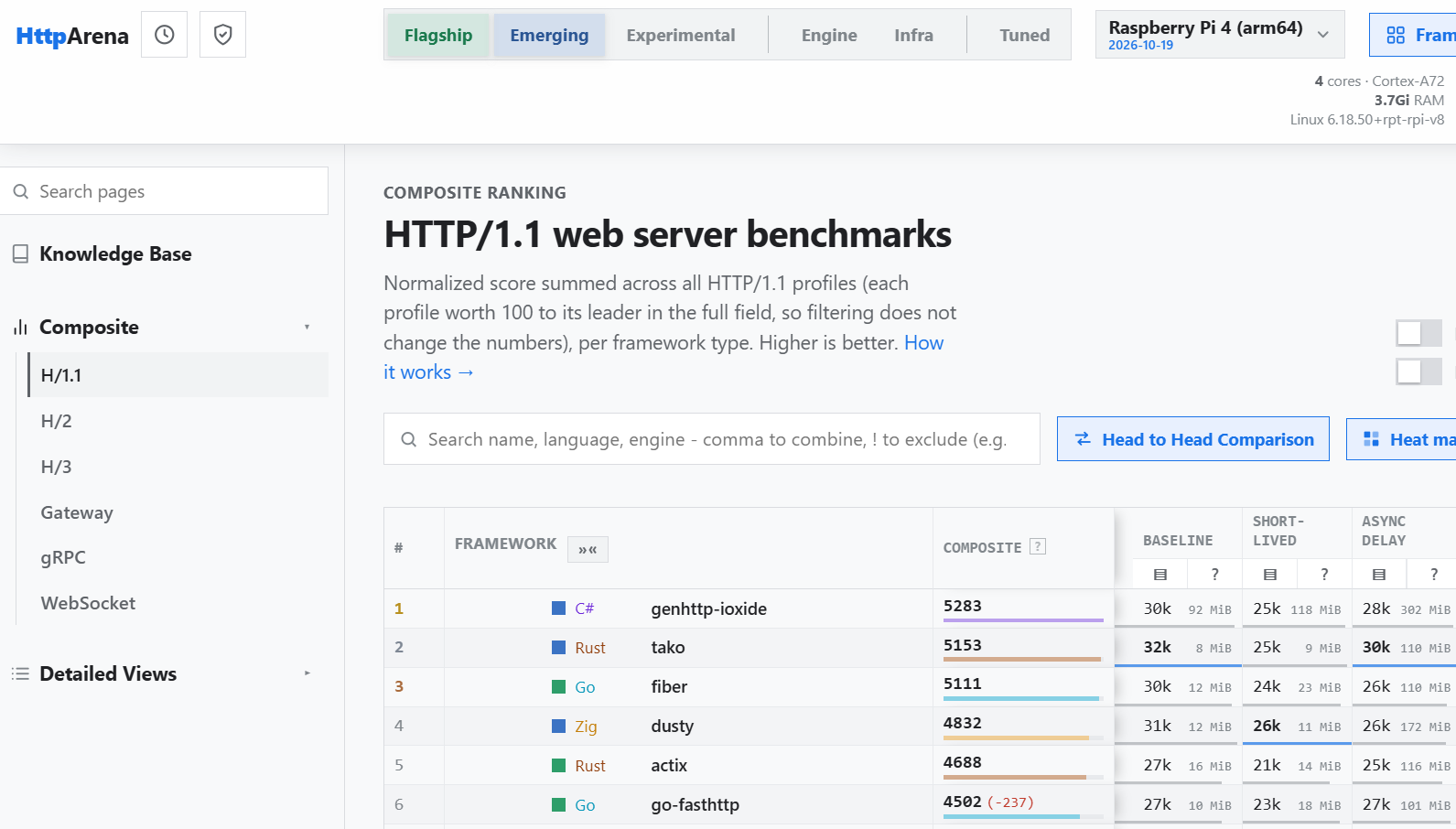
Usually we only see big x64 servers on such benchmarks (e.g. Techempower FrameworkBenchmarks) but it looks like someone did run the HTTP Arena test suite on a Raspberry Pi 4B, with some interesting results, find them here: HTTP Arena (RPI)
Rust, Go and Zig on top is expected, but there is also a C# framework. For lots of cases you may only receive a few requests an hour so this does not matter, but some frameworks serving only 50 requests per second through TLS is quite devastating.
Doska is a kanban board web and desktop app that supports offline file storage (folders with .md files) or self-hosting a sync server. When there’s a sync server, collaboration features are also supported.
The self-hosted setup includes versioned Docker containers for the web server and the sync server.
It looks good on mobile (PWA), and I’ve put a lot of work into making it fast, responsive and pleasant to use.
There’s no login gate or any other kind of gate: it’s fully MIT open source.
Are there any cloud based-hosting options you'd recommend as a way to get in to self-hosting?
I'm looking for something worth checking out that could help me learn and build with self-hosting in mind. I don't have any plans to release them publicly or make money off them.
For context, right now, I'm using Vercel and Firebase for micro apps made just for myself and my family. It's nothing fancy, but it gets the job done and lets us access everything remotely.
I'd like to move to self-hosting in the future, but buying the hardware just isn't in my budget at the moment.
I tried glance which has a community built version of this but its not always working and not actively maintained. I dont have the skills to fix it. Are there any other home page services that have this?
So i got three hosts, i got containers running on all of them. Spinned them up all by a docker compose file. Where i pinned a version (or about too, i just started and some are still pinned to latest (yeah sorry)).
How do i get notified that a container could have an update?
Are there tools which possibilities like:
- auto update for specific services (not by default)
- auto update on minor and patch version bumps?
- notify when an update is available
- via UI update container/docker-compose file?
How do you guys handle it? Or are some of you doing it manually?
Warpgate is a FOSS bastion-style PAM that needs neither a client app nor a server-side agent. It's an alternative to Teleport/StrongDM/Hashicorp Boundary:https://warpgate.null.page/
After a turbulent month of development I'm proud to publish Warpgate 0.30 - adding a few of the most requested features
* Vault/OpenBao support as secrest stores - integrated into target options (reference passwords and private keys)
* Short-lived SSH certificate authentication for targets - issued by Vault/OpenBao
This allows you to decouple target credential management from Warpgate itself and rotate secrets centrally.
A UPS can only last so long and if there is an hours long power outage, I can't keep my frigate server, poe switch on that long. Is a generator the only option?
I have my setup, its just Debian in CLI that i ssh into.
I want to transfer this setup, exactly, files and all, to a new machine(machine b), without transplanting the hard drive, as this machine is being repurposed (machine a).
What's the cleanest way for me to get machine a with ALL its files, essentially a copy of its drive, to machine b with its fresh clean drive.
I can think of a few different ways, but reddit always always has some new niche cool way to surprise me and makes my solutions look like a bodge job lol.
Hey folks! I wanted to share an epiphany I had during the last 9 months of building a personal self-hosted project for music library management and personal streaming.
During the summer, I added Iroh as a replacement of having to deal with tailscale or wireguard to the app suite (with all the user complexity that requires). It took me quite some time to implement it correctly and build some custom modules here and there. But in the end, I had this amazing moment of realizing that with this networking layer spreading, all at the app level instead of at server level, plus local LLMs pushing forward, the number of personal, self-hosted, customized apps, both paid and open-source, will skyrocket. Removing the networking setup complexity, plus, customization complexity, is just key for self-hosting into the masses.
The addition of easy local intelligence (not yet here) to these self-hosted apps could be the final tipping point, allowing for a variety of non-technical, easy-to-set-up "Personal Home Hubs" that anyone could have.
The user experience of self-hosting, thanks to these two vectors, Iroh networking and AI customization, could improve so dramatically that I think we'll soon see a wave of amazing, personal apps running on our "home hubs" that are as easy to set up as installing a simple app.
I use both Plex and Jellyfin. And creating playlists has always been a struggle for me.
I recently found Linearr and it’s great for tv shows. It solves problems I’ve had with sequencing shows. For example I have a playlist for tv that contains 8 different shows. It randomly plays an episode from one of the shows but makes sure each episode for that given show is played in air date order.
Music is my Achilles heel.
My music library is very complex. I have pop, rock, classic rock, religious, classical, opera, Christmas, ska and who knows what else.
Creating a playlist is such a pain. And using shuffle is a terrible solution. Ever get an opera aria in the midst of classic rock? How about a hymn in the middle of heavy metal?
Shuffle doesn’t seem to stick to the playlist or genre in my experience.
Someone suggested creating multiple libraries for different types of music. That didn’t seem to help me.
If Linearr could handle music, that’d be great.
Is there something similar to Linearr that does music?
Other than Plex and Jellyfin is there a good app (server and iOS) that just handles music and my large library?
Hi everyone, I just wanted to run my arr stack through here and make sure there's nothing crazy that I'm missing. I currently have Radarr and Sonarr set up with Prowlarr behind them to share information. My indexers include altHUB, NZBgeek, and NzbPlanet. My only download client is NZBget and my news servers are Frugual Usenet and NewsDemon, which I understand have different backbones.
Currently for finding movies and shows I haven't had too much trouble, but I do have trouble finding random episodes or having mismatched episodes of random anime shows so I was wondering if I have good coverage for that or if there might be any particular indexers currently available that I should consider? I also was wondering if it's worth having more than one download client - my use case is just self hosting for me and my family so there'll never be even a dozen people trying to download and I think after the first couple months of filling out the server then downloads will slow considerably. I do have problems with NZBget constantly having to repair files for what feels like longer than it takes to download but I'm not sure if that's an NZBget problem or a news server problem (I literally just added NewsDemon so I haven't tried it out yet).
So basically my questions are, do I have good coverage with my current set up or should I make any changes, and is it worth changing or adding the download client part of the set up? Also should I set up the whole recyclarr thing?
EDIT: Somehow completely forgot to add that if I can use something with BookOrbit and something for games as well then that'd be awesome. Currently I am having trouble with book coverage so if there's anything more specific for that use case that'd be awesome.
Since this is my first post in this community, or at least the first time I'm submitting a project I've worked on here, I wanted to give you a brief introduction of myself so that you can make an informed decision about whether this project is right for you. I've already included a brief project history below, but I feel it's worth expanding on my personal history considering my AI disclosure and the prevalence of new projects by new authors.
My history in short: ~15 years of programming experience, only ~5 years of "professional" experience. My years working professionally were mostly spent on backend jobs and projects. My personal projects that I have created in the 10+ years since then have been mostly front end. If you are a fan of the Vermintide video game series, you may be familiar with one of my other projects: ranalds.gift. You can check my GitHub for other community based projects I've created.
All this to say: I'm sticking around, and I provide as much support as I can. The way I've approached the coding side of the project is drastically different to my past projects, but I still always listen to the community and try to ensure they have any functionality that is desired and valuable.
If you do give the plugin a try, or you have any thoughts about anything in general, please do let me know in the comments! I'm especially excited to hear what you think of this project if you haven't heard of it before.
Alright sorry for the ramble, now... More rambling... You can just scroll and look at the pictures :)
Plugin Overview
‾‾‾‾‾‾‾‾‾‾‾‾‾‾‾‾‾‾‾‾‾‾‾‾‾‾‾‾‾‾‾‾‾‾‾‾
If you aren't familiar with KefinTweaks, here's a quick rundown to help you decide if it's something you might be interested in:
You or your users primarily interact with Jellyfin from the official Jellyfin apps or a web browser
You care about massive quality of life improvements
KefinTweaks is an all-in-one solution for UI and UX improvements of Jellyfin. All UI elements are properly styled for any existing or future Jellyfin skins, and all of the features are designed to be compatible with any other plugins which modify the Jellyfin UI.
Unlike most plugins, KefinTweaks is a front end plugin, and as such it does not modify Jellyfin server functionality in any way. KefinTweaks lives entirely in the client and requests data from the server to populate its client cache or when necessary to load item data. I feel that the Jellyfin server already provides basically everything we need, we just want the clients to better take advantage of those features.
Because of the nature of the plugin, you can install, update, or uninstall the plugin without restarting your Jellyfin server. This means it's a breeze to enable it for a few moments to try some new features, or to disable it at any time quickly from the Plugin Settings. No server restart necessary, just refresh your page and you're good to go.
Plugin History
‾‾‾‾‾‾‾‾‾‾‾‾‾‾‾‾‾‾‾‾‾‾‾‾‾‾‾‾‾‾‾‾‾‾‾‾
In case you don't know the history of KefinTweaks: It began as a project that included less than 10 JS files which fulfilled needs specific to my server and my users. Since then, with the support of the community, I've continued to grow the project to meet not only my own needs, but the needs of all Jellyfin users and server admins. This plugin is designed to test the limits of what is truly possible with a front end plugin, and is meant to inspire future contributions in the front end plugin space.
I can't stress how meaningful the endless support and feedback I receive from you all is to me, it's a fantastic source of motivation and I am sincerely grateful for this. With your help, we have been able to level up the plugin well beyond my initial expectations for this project. If you come in to share bugs, if you report issues on GitHub, if you contribute code to the project, if you share your ideas in the discord channel, or you engage with the Jellyfin community in any way...thank you! We want to build a healthy, happy and friendly community, and you all make that possible.
Have you ever wanted to be able to fully customize nearly every aspect of your Home Screen? Be able to set it up for all users in a particular way, with the ability for them to make changes to their liking? That's what the Enhanced Home Screen does. So much has been added here that it won't even be possible to give a clear overview of everything that is possible with the new features. I'll do my best to list out everything, but you can always ask me on Discord if you want to know how to create something specific that you can't quite figure out. It's probably achievable.
New sections available in KefinTweaks
Every native Jellyfin section
More Live TV sections
Browse by Studio
Resume Playlists & Collections
Browse by Playlists & Collections
Thematic Picks (5+ Thematic Collections)
Many TV based Discovery sections
Home Category Navigation
Adds navigation controls to navigate between Home / Discovery / Pinned or any custom Category
Start discovering content without scrolling through the entire home screen
Pinned Content
Pin specific items to your home screen
Choose a name for the section you want to pin the item to
Pin Children items to your home screen
Pick a Parent item: Studio, Genre, Series, Person, etc
Personalized Discovery Sections
Personalized dynamic recommendations based on your watch history, favorites, watchlist, etc
Suggested content from popular Genres, Studios, People
Custom user created static discovery sections (dynamic user created sections coming soon!)
Section Customization
Pick the Artwork
Support for every Jellyfin artwork type
14 border styles
Custom border color
Customize the footer text
12 fonts
Font size
Font color
Text capitalization options
Horizontal and vertical positioning (text overlay)
Switch between Row and Grid view
Spotlight Section Variations
Pick the Layout
Borderless
Border
Pick the size
Normal
Large
Full
Cycle your backdrops
Decide how many backdrops appear for an item before advancing slides
Tile your backdrops
Up to 3 backdrops side by side
Slide animations
Enable or disable animations
Pick your preferred animation for each backdrop tile
Section Editor: Wizard
Use pre-defined templates to easily create new sections
Sections created by the Wizard can still be fully edited in the Advanced Editor later
Section Editor: Advanced
Create any custom section where the limits are only what Jellyfin can handle
Define multiple queries for a section
Sort each query individually
Choose a post-process items strategy: Merge / Separate / Random
Choose a post-process sorting strategy
Merged mode results are merged before post processing
Separate mode adds a "Query Picker" to the section to switch between the defined queries
Random mode chooses one query from the list at random every time the section loads
Limited only by your creativity, you can create almost any section you like:
Top rated Series Premiere episodes from the last 365 days
Lowest rated Series that aired for more than a decade
Movies that start with the letter B and have a rating above 7
Movies released by Universal Pictures before 1995 starring Keith David
Statistics Overhaul
‾‾‾‾‾‾‾‾‾‾‾‾‾‾‾‾‾‾‾‾‾‾‾‾‾‾‾‾‾‾‾‾‾‾‾‾
The stats page now provides more insightful data related to your watch history including Watch Streaks, Binge Sessions and Playback History charts.
New Features
‾‾‾‾‾‾‾‾‾‾‾‾‾‾‾‾‾‾‾‾‾‾‾‾‾‾‾‾‾‾‾‾‾‾‾‾
Here is a summary of new KefinTweaks features or relevant changes to existing ones. For a full overview of the entire project, see the README on the GitHub page.
Thumbnail Scrubber
‾‾‾‾‾‾‾‾‾‾‾‾‾‾‾‾‾‾‾‾‾‾‾‾‾‾‾‾‾‾‾‾‾‾‾‾
Tired of Youtube hover previews and the seekbar functionality to quickly seek through a video? Well, wake up! We brought it to Jellyfin.
Adds a seekbar and "scrubbing" functionality when hovering a card similar to Youtube
Optionally enable Video Previews on Hover
Video Previews fallback to Trickplay when a static stream can't be completed
This feature is designed to be used by people who are watching something together on the same device and want the Watched status and progress to be synced to each of their individual accounts. This could be watching together in your living room, in the sauna, or even while you travel to the moon in your preferred spacecraft.
Authenticate the user accounts you want to sync progress with. If you have active users in your Watch Together group, you will be reminded at the beginning of playback if you'd like to continue syncing with any of them.
Checkout how it works! The UI has been improved since this video, but the functionality remains.
Every Jellyfin admin cuts their teeth by manually configuring each of their freshly created user accounts with their preferred defaults. It's a time-honored tradition, but what do I know about tradition?
Create User Templates
Pick a default User Template
New Users default to the chosen Template with the ability to select a different one instead
Bulk Update existing users with the settings from any of your User Templates
A simple feature for a simple person. So simple a screenshot will contribute no additional context.
Returns the Hamburger Menu to the top left corner on Desktop layouts in the default Modern UI
Custom Pages
‾‾‾‾‾‾‾‾‾‾‾‾‾‾‾‾‾‾‾‾‾‾‾‾‾‾‾‾‾‾‾‾‾‾‾‾
This is an internal feature that is leveraged by existing KefinTweaks features like the Watchlist and Games, but can be used for more Custom Pages in the future. This removes the CustomTabs requirement for the Watchlist tab. Existing installations with CustomTabs continue to use that.
Improvements
Infinite Scroll
‾‾‾‾‾‾‾‾‾‾‾‾‾‾‾‾‾‾‾‾‾‾‾‾‾‾‾‾‾‾‾‾‾‾‾‾
Fixed an issue preventing Infinite Scroll on TV and Movies libraries from working
Items are now rendered with the correct card format based on the existing items on the page
Watchlist, Series Episodes, Enhanced Search
‾‾‾‾‾‾‾‾‾‾‾‾‾‾‾‾‾‾‾‾‾‾‾‾‾‾‾‾‾‾‾‾‾‾‾‾
Sections are now rendered progressively, just like they are on the Home Screen
TV Display Mode Support
‾‾‾‾‾‾‾‾‾‾‾‾‾‾‾‾‾‾‾‾‾‾‾‾‾‾‾‾‾‾‾‾‾‾‾‾
KefinTweaks sections now properly support navigation in TV mode with a controller/keyboard
Navigation on the Home Screen across regular and spotlight sections is greatly improved
Exactly one year ago, I posted my project here when it was still called AltSendme. It was a small, early-stage project with around 50 GitHub stars. The support and encouragement I received from this community genuinely motivated me to keep building it.
Since then, the project has grown to almost 10,000 GitHub stars, and I've renamed it DashBeam. It's been quite a journey, and I wanted to come back and share what's changed.
DashBeam is a free, open-source, peer-to-peer file transfer application built on Iroh. The idea is simple: transfer files between your devices without uploading them to a cloud storage service first.
A few things I've added since my original post:
Android app: DashBeam is now available on the Google Play Store, so you can transfer files between your phone and other devices.
Self-hosted relay infrastructure: You can run your own Iroh relay on a VPS using Docker Compose or flydotio, configure it in DashBeam, and even enable access controls. Self-hosting guide
Nearby device discovery and pairing: Discover and pair devices on your local network for a more seamless transfer experience.
Web app: Don't want to download or install anything? You can use DashBeam directly in your browser.
Portable versions: Prefer not to install software? Portable builds are available for supported desktop platforms, too.
For some real-world numbers, we've tested transfers of up to 452 GB in a single transfer, with peak speeds reaching 125 MB/s under suitable network conditions.
The project is still fully open source under AGPL-3.0, and it doesn't require accounts or include usage tracking or ads.
I'm still actively developing it, and there's plenty left to improve. If you remember the original AltSendme post, thank you for being part of the journey. And if you're discovering it for the first time, I'd genuinely love to hear what you think, especially from people running their own infrastructure.
I’ve been trying to self host my own doc and spreadsheet sharing with decent mobile apps. I keep stumbling upon Nextcloud for this. I’ve had it set up for 6 months and the mobile app just keep breaking. It’s been very unreliable and I want to replace it with something else.
I share these documents with multiple people and really do like the collaboration features that let multiple people edit at the same time. However, I can give this up for something that is much more consistent. I just need to have shareable files that other people can edit.
I need it to have reliable, working mobile apps. What are some good options?