r/tui • u/elvis591 • 4h ago
I turned my Home Screen into a terminal
gallery
12
Upvotes
r/tui • u/Zanoshky • 22h ago
I wanted my phone to feel like a terminal, so I made Phosphor, an Android launcher where the whole home screen is one character grid.
How it works
Using it
It is a paid app (pay once, no ads, no analytics, no account), and I am the developer.
Play: https://play.google.com/store/apps/details?id=com.zanoshky.phosphor
Live demo of the grid in the browser: https://phosphor.zanoski.com
Questions about the rendering are welcome.
r/tui • u/RogerioJunior31 • 6h ago
Hi, Everyone!
I've been spending way too much time jumping between Claude Code, Codex, OpenCode, and a bunch of other coding agents lately.
At some point, I realized I was spending almost as much time managing sessions, configs, and skills as actually using the agents lol.
Since I basically live in the terminal and love lazygit, I figured... why not build something similar for AI coding agents?
So I made lazyagents :)
It's a TUI written in Go that brings sessions, skills, usage, and agent configurations into one place. It supports Claude Code, Codex, Gemini CLI, OpenCode, and a few others.
The idea isn't to replace any of these tools. I just wanted a nicer way to work with all of them without constantly digging through directories and switching between terminals.
It's open source, still evolving, and there's a bunch of stuff I want to improve.
Anyway, figured some fellow terminal nerds might enjoy it!
Would love some feedback, especially on the UI, navigation, and overall experience. If you've got ideas for making it feel more at home in the terminal, I'm all ears.
GitHub: https://github.com/rogeriojunior31/lazyagents
Docs: https://rogeriojunior31.github.io/docs/lazyagents/
r/tui • u/Positive-Video4050 • 7h ago
Instant search, playlists, local files, themes, and a data-rain spectrum that follows the music.
macOS · Linux · Android TV · phones. Free and open source.
r/tui • u/serber-info • 8h ago
Hey everyone! 👋🏻
I wanted a simple way to browse images directly in my Kitty terminal without opening a file manager, so I built lsi.
It's a free and open-source CLI tool written in Rust that works similarly to ls, but displays actual image thumbnails directly in the terminal using the Kitty Graphics Protocol.
It supports:
Installation:
Arch Linux / CachyOS (AUR):
paru -S lsi-bin
Debian / Ubuntu: .deb package available in GitHub Releases.
A precompiled static binary is also available.
GitHub (source code): https://github.com/serber-info/kitty-lsi
Release v0.2.0: https://github.com/serber-info/kitty-lsi/releases/tag/v0.2.0
I originally made this for my own workflow, but figured other Kitty users might find it useful too, so I'm sharing it here.
That's pretty much it. Enjoy!
r/tui • u/markom_1 • 11h ago

As the README of this project says:
Sometimes your system needs a little therapy. So here it is: a BLAZINGLY FAST terminal log viewer. Open a multi-GB log at once, move with vim keys, and narrow it down with grep tabs, search, bookmarks and highlights.
Well, that's it. It's simply a TUI tool for browsing large files. Especially application log files - to determine what happened, etc.
You can find the details in the Git repository: https://github.com/M-Komorek/therapist/
r/tui • u/Artistic_Milk_6616 • 11h ago
r/tui • u/Kicking-Cars • 9h ago
r/tui • u/bloopniy • 11h ago
Main features:
- counting and saving statistics
- simple test launch
Written in C++ without third-party dependencies. I would be grateful to everyone who tries and evaluates this project.
r/tui • u/SnooTomatoes9240 • 1d ago
A quick follow-up to my post from two weeks ago. I've been working on terrahour, adding improvements and polishing things.
Thanks to everyone who tried it!
Hi! Terrascope is an open-source terminal map with live weather, aircraft, radar, earthquakes, and day/night views. It uses Unicode Braille characters to render the map right in your terminal.
I’d love to hear what you think, especially about the terminal rendering and which layers you’d find most useful.
r/tui • u/Majestic_Mongoose488 • 2d ago
Enable HLS to view with audio, or disable this notification
I live in tmux and nvim, and I never found a database client that felt like home there, so I built the one I wanted: sqlmux.
Space as the leader (Space % splits, Space c opens a window, Space s lists sessions), and the layout comes back when you restart.:s), checked against nvim's behavior with diff tests. Tables and the tree move with hjkl, gg, G, /.J = "5j" style), with every key rebindable.I've been using it every day for a few weeks, and as a tmux + nvim user it fits me well. I don't know if it will click for anyone else, so sorry if this is noise here.
Full disclosure: sqlmux was built in collaboration with AI agents (Claude Code). I designed it, reviewed the work and tested it in daily use; the agents wrote most of the code. It's a big project I'd wanted to do for a long time, and without AI I would probably never have dared to start 😁
Install: brew install kackerx/tap/sqlmux, npm i -g sqlmux, or go install github.com/kackerx/sqlmux/cmd/sqlmux@latest. Try it on a file with sqlmux ./app.db.
r/tui • u/Technical_Chip5906 • 19h ago
from quiet a time i watching chat-gpt's animation it shows during the period betwen image generation input and output...
it was intresting to watch - then when i zoom abit i found it's are circles getting small and big to generate patterns... i try find same in ascii characters... all i found was three dots one bigger than another... later i used them to create shades and build a rendering engine arround it to make more kind of animation in same paradigm...
i say it: DIVAE — Dot-Induced Virtual Art Engine
it's in cpp and support 24bit colors, no external library not even sys/ioctl or unistd.h... it;s totaly bare engine
feel free to feedback, github link of repo is here if you want to use it freely:
r/tui • u/adamcbrewer • 1d ago
Enable HLS to view with audio, or disable this notification
I’ve just open sourced Mapbox TUI. Think Google Maps, but for terminals and AI agents. Because I love maps and terminals look rad.
It wraps Mapbox for place searches and road routing. You can load GPS recordings (.gpx, .fit, et al), compare routes and replay a journey, all from the terminal. Imported files work offline too if you don't wish to use Mapbox.
It has a local MCP server, which gives AI agents a way to use it directly. So you can ask an agent to inspect a recorded ride, summarise its distance and elevation, or draw you a text map. No browser or desktop required, meaning this can be done on a remote machine, headless, AFK.
Under the hood, it’s written in Go with Bubble Tea (a toolkit for building terminal interfaces). The idea is to make mapping useful on servers and other machines without a desktop, whether you’re using it yourself or letting an agent do the digging.
It's open source (MIT) and worth a look. Feedback and bug reports welcome, especially if you manage to get lost.
r/tui • u/No-Friend9248 • 1d ago
Enable HLS to view with audio, or disable this notification
here’s a demo for my project of putting Claude Code on DS terminal . fully open source
https://github.com/logancarrillo/ds-claude-terminal
r/tui • u/South-Scarcity3164 • 1d ago
Hey everyone! I wanted a lightweight, distraction-free typing trainer right inside the terminal without clunky ASCII boxes, so I built **ttype**.
### Highlights
- 🪟 **True transparent minimalism:** Zero clutter. Inherits your terminal's background transparency and native color palette (`auto (term)`, catppuccin, tokyo night,
nord, etc.).
- 📜 **Single-line conveyor tape:** Smooth-scrolling text stream with soft fade animations.
- 🔊 **Procedural switch audio:** Built-in mechanical typewriter key clicks and carriage bell sounds (toggleable in settings, no external audio files).
- 🎯 **Modes:** English, Russian (with duplicate word prevention), code syntax (Rust), and classic quotes.
- 📈 **Stats & Sparkline:** Live WPM, CPM, accuracy, hardcore sudden-death mode, and a WPM sparkline graph (` ▂▃▅▆▇█`) on results.
- ⚙️ **CLI flags:** Quick launch into specific modes like `ttype -m code` or `ttype -m quotes -t 30`.
### Quick install:
```bash
curl -sSL https://raw.githubusercontent.com/laguser/ttype/main/install.sh | bash
Source & repository: https://github.com/laguser/ttype
Feedback and ideas are very welcome!
r/tui • u/alliepresent • 2d ago
I've been writing software for over 40 years, going all the way back to working on the original SimCity development team. You'd think I'd have found another hobby by now. :)
Lately I've fallen back in love with terminal applications. I wanted TUIs that weren't just functional, but genuinely enjoyable to use every day. So I started building them.
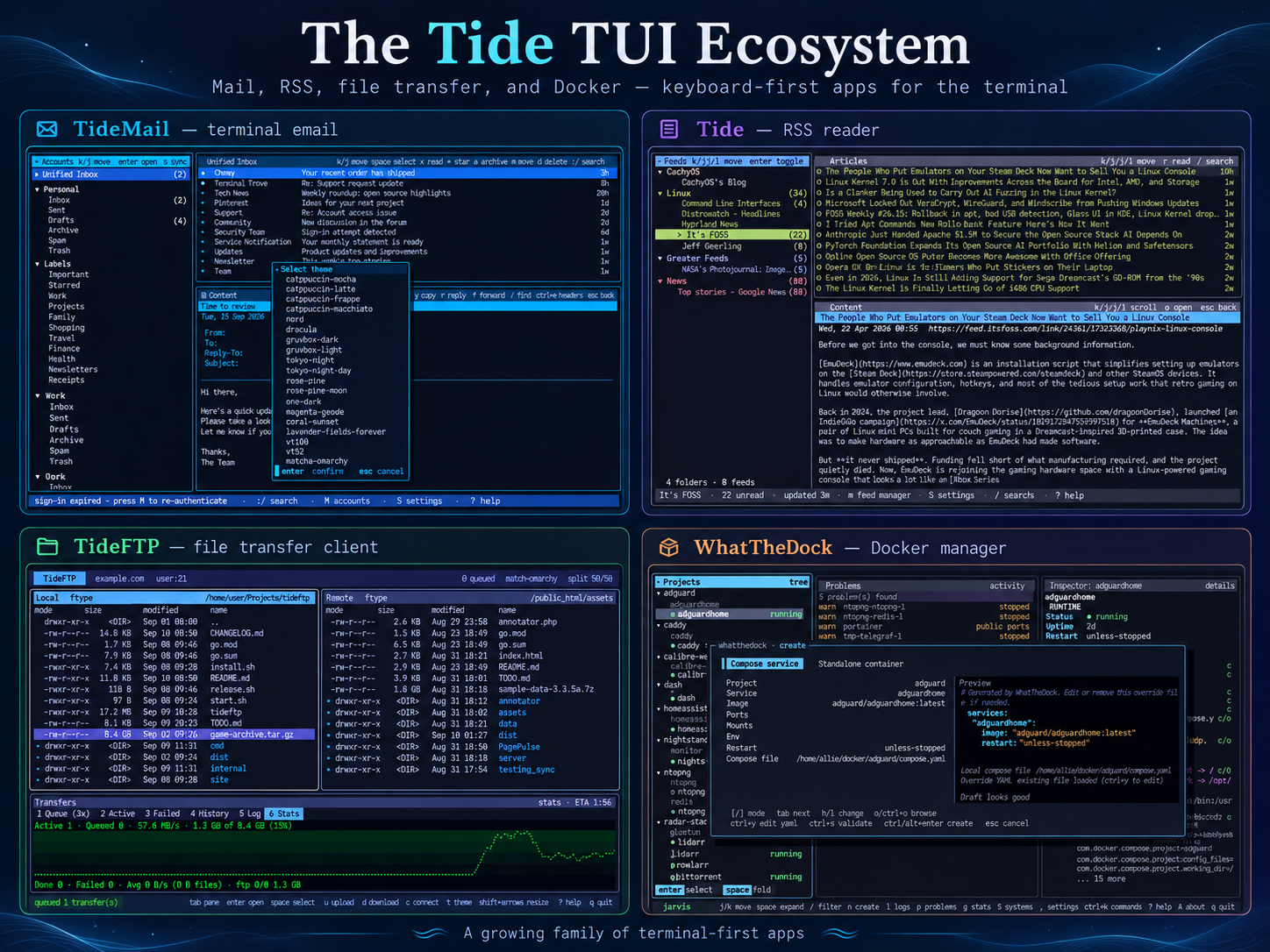
That turned into a little ecosystem of four apps:
TideMail — A full-featured email client with multiple accounts, themes, plugins, and a lot of attention to the little details.
Tide — An RSS reader with a beautiful three-pane interface, feed management, and optional AI summaries.
TideFTP — FTP/SFTP/FTPS with dual panes, transfer queues, and progress graphs. It just became fully scriptable, with lftp-class capabilities for automation, syncing, and batch transfers.
WhatTheDock — Docker and Compose management without leaving your terminal. Local and remote hosts, logs, container management, and more. Copy/paste containers. They share a common design philosophy: keyboard-first, themeable, fast, and built to feel like real applications rather than command-line utilities with menus bolted on. This one is better being tested in a non-production environment.
All four are open source, and I'm actively developing them.
After four decades, building software is still just as much fun as it was in the SimCity days.
I'd love for some fellow TUI enthusiasts to give them a spin. Feedback, bug reports, ideas, and GitHub stars are always appreciated! https://github.com/allisonhere -allie
r/tui • u/Minimum_Hour519 • 1d ago
r/tui • u/Key_Recognition_8112 • 1d ago
There are important features for working with your drives, including a tui built-in drive crawler, a file map overview and performance optimizations. See the README, use s to scan and h for help.
repo: https://github.com/web3cryptowallet/drive-py
- TUI: Make prompt_toolkit the main `drive-tui.py`, with `run.sh` and `run-megadisks.sh` launchers using uv
- TUI: Accept a startup directory such as `./drive-tui.py ~` or `./run.sh ~/mypath`, including paths with spaces and configured drive aliases
- REFACTOR: Preserve the former Textual application, views, theme, launchers, and dependent tests in `texual.removed/`
- LIVE MAP: Press `s` to scan the current VFS directory and display file-status buckets with live progress, path counts and throughput
- LIVE MAP: Show hashing speed during large files from bytes read/hashed over the last second, updating about every 0.1s; scale MB/s through PB/s and retain five-second paths/s and cumulative totals
- LIVE MAP: Show expert selected bucket count (queued plus processing), active-mode elapsed time and total processing time spent on the map; retain per-mode times across reopening and append `mode / total` at the end of the `Lite / Medium / Heavy` controls line, without a separate timing row as `M:SS` or `H:MM:SS` (hours continue beyond 24)
- LIVE MAP: Add independent lite discovery, medium metadata checks and heavy checksum verification; run lite → medium → heavy once on opening, with per-mode pause/resume and cursor-start controls
- LIVE MAP: Support packing by file count or size, fixed/scroll layouts, bucket limits, an end-follow cursor, status filters, paginated file details and horizontal scrolling
- LIVE MAP: Add normal/expert heavy scheduling; expert selects random sequences of 1–20 eligible buckets, marks queued work blue and processes it in FIFO order with immediate refill when empty
- LIVE MAP: Use `[` / `]` to cycle directory scopes, highlight matching file-path prefixes in gold and preview matching buckets over pinned colors; `f` pins colors, `c` clears pins and `d` clears scope and pins
- LIVE MAP: Save maps, controls and resume positions per directory; promote checksum-verified new files into the VFS catalog while retaining imported baselines
- TUI: Add context help with `h`, keep left-aligned Size and Dups visible beside clipped names, retain the vertical scrollbar and preserve file-status colors under selection
- TUI: Let `q` quit from every view, including help, Actions and scanner inputs
- TUI: Use **Shift+R** in the main view to clear the current directory's saved map and resume positions while retaining file records and checksums
- STORAGE: Skip unchanged scanner record writes across memory, SQLite, and Redis adapters
- PERFORMANCE: Move expert map projection and mode/order transitions off the UI thread; reduce SQLite processing overhead by grouping metadata writes and skipping empty expert checkpoints
r/tui • u/PeterLeistner • 1d ago