




r/Filmmakers • u/ClingingVineFilms • 9h ago
Film 20 days to film a movie. Day 2.
Enable HLS to view with audio, or disable this notification
70
Upvotes
r/Filmmakers • u/C47man • Jun 09 '25
Thank you all for participating in the poll! Here are the results. To accurately gauge everyone's collective acceptance vs rejection for each, I've tallied the total votes among all choices as pro/anti for each category. So for example, a vote for 'no changes' would be a -1 to Gen AI, AI Tools, AI Comms, and AI Discussion. A vote for 'Ban GenAI + AI Tools' would be a +1 to GenAI and AI Tools, and a -1 to AI Comms and AI Discussion, etc. So here are the results for each category of AI. Keep in mind that a higher number indicates a stronger group decision to ban the content:
From the results it is clear that sub overwhelmingly approve a complete ban on all generative AI. However, people are more or less fine with allowing discussion of AI, and are fairly mixed on the topic of AI Tools and Communication. So here is the new rule for all things AI:
-------
Rule 6. You may not post work containing Generative AI elements (Midjourney, Neo, Dall-E, etc.). You may use and demonstrate the use of AI assisted tools (ie magic masking, upscalers, audio cleanup etc.) so long as they are used in service of human-generated artwork. AI Communication, like post bodies or comments composed using ChatGPT are allowed only in very reasonable cases, such as the need for someone to translate their thoughts into another language. Abuse of AI assisted communication will result in the removal of the offending post/comment.
r/Filmmakers • u/C47man • Dec 03 '17
Below I have collected answers and guidance for some of the sub's most common topics and questions. This is all content I have personally written either specifically for this post or in comments to other posters in the past. This is however not a me-show! If anybody thinks a section should be added, edited, or otherwise revised then message the moderators! Specifically, I could use help in writing a section for audio gear, as I am a camera/lighting nerd.
Topics Covered In This Post:
1. Should I Pursue Filmmaking / Should I Go To Film School?
2. What Camera Should I Buy?
3. What Lens Should I Buy?
4. How Do I Learn Lighting?
5. What Editing Program Should I Use?
This is a very complex topic, so it will rely heavily on you as a person. Find below a guide to help you identify what you need to think about and consider when making this decision.
Alright, real talk. If you want to make movies, you'll at least have a few ideas kicking around in your head. Successful creatives like writers and directors have an internal compunction to create something. They get ideas that stick in the head and compel them to translate them into the real world. Do you want to make films, or do you want to be seen as a filmmaker? Those are two extremely different things, and you need to be honest with yourself about which category you fall into. If you like the idea of being called a filmmaker, but you don't actually have any interest in making films, then now is the time to jump ship. I have many friends from film school who were just into it because they didn't want "real jobs", and they liked the idea of working on flashy movies. They made some cool projects, but they didn't have that internal drive to create. They saw filmmaking as a task, not an opportunity. None of them have achieved anything of note and most of them are out of the industry now with college debt but no relevant degree. If, when you walk onto a set you are overwhelmed with excitement and anxiety, then you'll be fine. If you walk onto a set and feel foreboding and anxiety, it's probably not right for you. Filmmaking should be fun. If it isn't, you'll never make it.
Are you planning on a film production program, or a film studies program? A studies program isn't meant to give you the tools or experience necessary to actually make films from a craft-standpoint. It is meant to give you the analytical and critical skills necessary to dissect films and understand what works and what doesn't. A would-be director or DP will benefit from a program that mixes these two, with an emphasis on production.
Does your prospective school have a film club? The school I went to had a filmmakers' club where we would all go out and make movies every semester. If your school has a similar club then I highly recommend jumping into it. I made 4 films for my classes, and shot 8 films. In the filmmaker club at my school I was able to shoot 20 films. It vastly increased my experience and I was able to get a lot of the growing pains of learning a craft out of the way while still in school.
How are your classes? Are they challenging and insightful? Are you memorizing dates, names, and ideas, or are you talking about philosophies, formative experiences, cultural influences, and milestone achievements? You're paying a huge sum of money, more than you'll make for a decade or so after graduation, so you better be getting something out of it.
Film school is always a risky prospect. You have three decisive advantages from attending school:
Those three items are the only advantages of film school. It doesn't matter if you get to use fancy cameras in class or anything like that, because I guarantee you that for the price of your tuition you could've rented that gear and made your own stuff. The downsides, as you may have guessed, are:
Seriously. Film school is insanely expensive, especially for an industry where you really don't make any exceptional money until you get established (and that can take a decade or more).
So there's a few things you need to sort out:
Don't worry about lacking experience or a degree. It is easy to break into the industry if you have two qualities:
In LA we often bring unpaid interns onto set to get them experience and possibly hire them in the future. Those two categories are what they are judged on. If they have to be told twice how to do something, that's a bad sign. If they approach the work with disdain, that's also a bad sign. I can name a few people who walked in out of the blue, asked for a job, and became professional filmmakers within a year. One kid was 18 years old and had just driven to LA from his home to learn filmmaking because he couldn't afford college. Last I saw he has a successful YouTube channel with nature documentaries on it and knows his way around most camera and grip equipment. He succeeded because he smiled and joked with everyone he met, and because once you taught him something he was good to go. Those are the qualities that will take you far in life (and I'm not just talking about film).
So how do you break in?
Alright, enough talking! You need to decide now if you're still going to be a filmmaker or if you're going to instead major in something safer (like business). It's a tough decision, we get it, but you're an adult now and this is what that means. You're in command of your destiny, and you can't trust anyone but yourself to make that decision for you.
Once you decide, own it. If you choose film, then take everything I said above into consideration. There's one essential thing you need to do though: create. Go outside right fucking now and make a movie. Use your phone. That iphone or galaxy s7 or whatever has better video quality than the crap I used in film school. Don't sweat the gear or the mistakes. Don't compare yourself to others. Just make something, and watch it. See what you like and what you don't like, and adjust on your next project! Now is the time for you to do this, to learn what it feels like to make a movie.
The answer depends mostly on your budget and your intended use. You'll also want to become familiar with some basic camera terms because it will allow you to efficiently evaluate the merits of one option vs another. Find below a basic list of terms you should become familiar with when making your first (or second, or third!) camera purchase:
This list will be changing as new models emerge, but for now here is a short list of the cameras to look at when getting started:
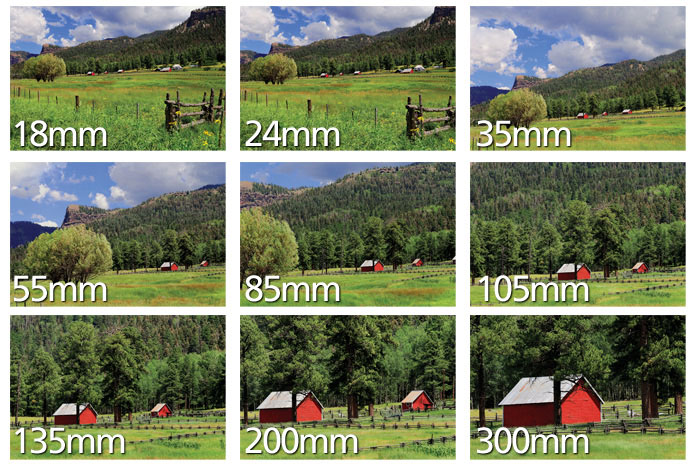
Much like with deciding on a camera, lens choice is all about your budget and your needs. Below are the relevant specs to use as points of comparison for lenses.
This is all about speed vs quality vs budget. A zoom lens is a lens whose *focal length can be changed by turning a ring on the lens barrel. A prime lens has a fixed focal length. Primes tend to be cheaper, faster, and sharper. However, buying a full set of primes can be more expensive than buying a zoom lens that would cover the same focal length range. Using primes on set in fast-paced environments can slow you down prohibitively. You'll often see news, documentary, and event cameras using zooms instead of primes. Some zoom lenses are as high-quality as prime lenses, and some people refer to them as 'variable prime' lenses. This is mostly a marketing tool and has no hard basis in science though. As you might expect, these high quality zooms tend to be very expensive.
Below are the most popular lenses for 'cinematic' filming at low budgets:
Lenses below these average prices are mostly a crapshoot in terms of quality vs $, and you'll likely be best off using your camera's kit lens until you can afford to move up to one of the lenses or lens series listed above.
Alright, so you're biting off a big chunk here if you've never done lighting before. But it is doable and (most importantly) fun!
First off, fuck three-point lighting. So many people misunderstand what that system is supposed to teach you, so let's just skip it entirely. Light has three properties. They are:
Alright, so there are your three properties of light. Now, how do you light a thing? Easy! Put light where you want it, and take it away from where you don't want it! Shut up! I know you just said "I don't know where I want it", so I'm going to stop you right there. Yes you do. I know you do because you can look at a picture and know if the lighting is good or not. You can recognize good lighting. Everybody can. The difference between knowing good lighting and making good lighting is simply in the execution.
Do an experiment. Get a lightbulb. Tungsten if you're oldschool, LED if you're new school, or CFL if you like mercury gas. plug it into something portable and movable, and have a friend, girlfriend, boyfriend, neighbor, creepy-but-realistic doll, etc. sit down in a chair. Turn off all the lights in the room and move that bare bulb around your victim subject's head. Note how the light falling on them changes as the light bulb moves around them. This is lighting, done live! Get yourself some diffusion. Either buy some overpriced or make some of your own (wax paper, regular paper, translucent shower curtains, white undershirts, etc.). Try softening the light, and see how that affects the subject's head. If you practice around with this enough you'll get an idea for how light looks when it comes from various directions. Three point lighting (well, all lighting) works on this fundamental basis, but so many 'how to light' tutorials skip over it. Start at the bottom and work your way up!
Ok, so cool. Now you know how light works, and sort of where to put it to make a person look a certain way. Now you can get creative by combining multiple lights. A very common look is to use soft light to primarily illuminate a person (the 'key) while using a harder (but sometimes still somewhat soft) light to do an edge or rim light. Here's a shot from a sweet movie that uses a soft key light, a good amount of ambient ('errywhere) light, and a hard backlight. Here they are lit ambiently, but still have an edge light coming from behind them and to the right. You can tell by the quality of the light that this edge was probably very soft. We can go on for hours, but if you just watch movies and look at shadows, bright spots, etc. you'll be able to pick out lighting locations and qualities fairly easily since you've been practicing with your light bulb!
Honestly, your greenscreen will depend more on your technical abilities in After Effects (or whichever program) than it will on your lighting. I'm a DP and I'm admitting that. A good key-guy (Keyist? Keyer?) can pull something clean out of a mediocre-ly lit greenscreen (like the ones in your example) but a bad key-guy will still struggle with a perfectly lit one. I can't help you much here, as I am only a mediocre key-guy, but I can at least give you advice on how to light for it!
Here's what you're looking for when lighting a greenscreen:
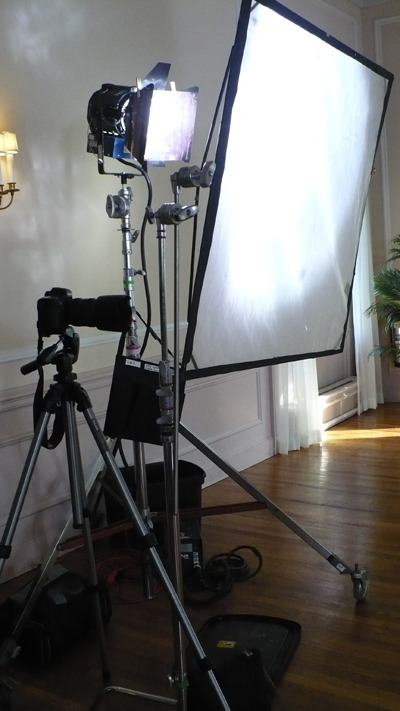
OK! So now you know sort of how to light a green screen and how to light a person. So now, what lights do you need? Well, really, you just need any lights. If you're on a budget, don't be afraid to get some work lights from home depot or picking up some off brand stuff on craigslist. By far the most important influence on the quality of your images will be where and how you use the lights rather than what types or brands of lights you are using. I cannot stress this enough. How you use it will blow what you use out of the water. Get as many different types of lights as you can for the money you have. That way you can do lots of sources, which can make for more intricate or nuanced lighting setups. I know you still want some hard recommendations, so I'll tell you this: Get china balls (china lanterns. Paper lanterns whatever the fuck we're supposed to call these now). They are wonderful soft lights, and if you need a hard light you can just take the lantern off and shine with the bare bulb! For bulbs, grab some 200W and 500W globes. You can check B&H, Barbizon, Amazon, and probably lots of other places for these. Make sure you grab some high quality socket-and-wire sets too. You can find them at the same places. For brighter lights, like I said home depot construction lights are nice. You can also by PAR lamps relatively cheap. Try grabbing a few Par Cans. They're super useful and stupidly cheap. Don't forget to budget for some light stands as well, and maybe C-clamps and the like for rigging to things. I don't know what on earth you're shooting so it is hard to give you a grip list, but I'm sure you can figure that kind of stuff out without too much of a hassle.
Great question! There are several popular editing programs available for use.
Your choices are essentially limited to Davinci Resolve (Non-Studio) and Hitfilm Express. My personal recommendation is Davinci Resolve. This is the industry standard color-grading software (and its editing features have been developed so well that its actually becoming the industry standard editing program as well), and you will have free access to many of its powerful tools. The Studio version costs a few hundred dollars and unlocks multiple features (like noise reduction) without forcing you to learn a new program.
r/Filmmakers • u/ClingingVineFilms • 9h ago
Enable HLS to view with audio, or disable this notification
r/Filmmakers • u/kfor1996 • 7h ago
As a film director what was the worst thing your actor said to you that still hurts you to this very day?
r/Filmmakers • u/errorplex • 48m ago
I was DP/shooting a short film shoot in a restaurant and no meal break was scheduled or accounted for. All I could think of was getting some food in me after 9 hours of working my ass off for a friend's project. I guess prod assumed we would eat once wrapped, but we went long.
It was the first time I had filled 2 cards on a shoot with my Pyxis 12k, and wasn't paying close attention after I hit record to realize . My AC was also burned out and hadn't eaten in over 10 hours, since he had to travel.
By the time the shoot ended, the kitchen was closed, so dir/producer said sorry and gave us each extra 20 to buy our own food once we were wrapped.
Obviously I should have been paying closer attention,and learned a lesson, but at the time all I could think about was getting some food in me. I barely took time to even drink during the day.
Production saw the footage and emailed to ask where the missing insert setup was and I defended my mistake by saying we hadn't been fed and didn't realize the cards filled.
Obviously it was my error, one I won't make again, but should I feel bad about loosing an important insert shot?
I believe the restaurant will let us shoot it again, since it's a closeup on an object, or can be shot in another location. Should I still charge something for the pickup, or do it for free since it was my mistake? I provided all my camera, lighting and sound, for a rate that I would charge with no gear.
r/Filmmakers • u/ClingingVineFilms • 1d ago
Enable HLS to view with audio, or disable this notification
r/Filmmakers • u/Salty-Relief • 2h ago
I posted on here about 3 years ago when I was previously "about to make a feature". As many here probably know, things happen, money didn't happen, and that project fell apart.
Well, I'm back, and this time it's ACTUALLY happening. We start shooting in 1 week!
I got tired of trying to convince investors to fund a project, so I pooled a micro budget from my savings along with support from my wife and a close friend to make my first feature film, which stars Whitney Moore and Laura Bailey of Critical Role! I am directing it from an original script that I wrote.
It's a contained horror film called "The Devil Downstairs". Logline: A struggling artist rents out her basement to an elderly tenant for quick cash—but after the tenant’s sudden death, she starts to believe something else has moved in.
Follow the link(s) to find our film's Instagram page and follow us to stay up to date with our journey to create this cool, creepy movie!
This is a completely independent film. It is self-funded and crewed by my friends and colleagues whom I've worked with over the past 20 years. We've built a profit-sharing system within the project's layout so that if it's a success, everyone involved wins. We start filming in Los Angeles at the end of the month and will be wrapped by Thanksgiving (15 days total in that stretch). We'll be submitting to festivals next year and, from there, figuring out how to get this project out for the world to see!
I'll come back to post on here as often as I can, but for the quickest updates, please follow our Instagram Page.
Hit me with any questions or comments along the way!
I'm thrilled to finally be doing this. I have an incredible support system in my crew and cast, and we're all psyched to be putting something awesome out into the world. Can't wait to share it with you all!
r/Filmmakers • u/Kalspiewak • 5h ago
After one year, it's finally out. I directed this music video August of last year to DRKMTS' track Promises. A class little song that's been sitting awaiting a label to release it. The video is starring scottish actor Doug Russell (Adolescence, The Batman, Knights of the Seven Kingdom).
I knew immediately I didn't want somone who was young or slick to be in the video, but an unusual protagonist. So I reached out to Doug who was nearing 60 and had no previous dance experience. When I approached him, he was super down to give it a shot, depsite never danced or been in a vide like this in his life.
We had half a day with choreographer Hannah Collins to work out the dance, then 2 shoot days on location. The intention was to make the movement feel personal to him, and to the story of his character, with room for it to be imperfect. He’s playing a man caught up in memories and repeating a ritual beneath the city, so the performance needed to feel like something he was doing for himself
We shot in an underpass in Glasgow. I prioritised one location so we could concentrate on the performance, choreography and how the camera moved around him - Shoutout to DoP Alan C Mclaughlin
Glad to finally be able to share it. Would be interested to hear what you make of the casting and how the performance comes across. Happy to talk through the shoot as well.
Cheers!
r/Filmmakers • u/OneTakeJake505 • 22h ago
Enable HLS to view with audio, or disable this notification
Behind the scenes of our latest 48 film 'Possession'
Recently directed a 48 hour film project in Cleveland using the ARRI Mini and a Ronin 4D! Always amazing what our team can accomplish in such a short time.
If the mods allow, I'll be happy to post the final film after it premieres on the 28th 😁
r/Filmmakers • u/BunyipPouch • 7h ago
I organized an AMA/Q&A with Dave Koz and Mickey Duzyj, subject and director of the new doc SMOOTH WORLD, about the world of Jazz. Dave is a 9-time Grammy nominated saxophonist.
It's live here now in r/movies for anyone interested in asking a question:
https://www.reddit.com/r/movies/comments/1x8cgzk/hi_reddit_im_saxophonist_dave_koz_9_grammy/
They will be back at 4:30 PM ET on Tuesday 10/20 to answer questions. I recommend asking in advance. Please ask there, not here. All questions are much appreciated!
Trailer: https://vimeo.com/1225286270
Synopsis: Exiled from radio for being lame, the world of smooth jazz has secretly thrived as an underground paradise for senior citizens. Now, as the last smoothies face extinction, they band together to find a new leader who can save their beloved Smooth World.
Thank you :)
r/Filmmakers • u/Ar0n • 5h ago
I’m trying to find an old YouTube creator and a series of vlogs I used to follow around 2010-2014. Can’t seem to find any trace of these videos.
He was a guy who was trying to get an independent animated Christmas/holiday movie made. I think his nickname or channel name was something like Independent Movie Guy, but I’m not positive about the exact name.
Here’s what I remember:
He made regular video updates documenting his journey to get the movie made over a period of years.
He had written the script while in film school, and I remember his professors being encouraging about it.
He went through a lot of ups and downs trying to get funding and a studio attached to the project.
He attended film festivals and industry events to meet people and pitch the project, and he built up a following through his updates.
His videos often ended with an echoed audio clip of him saying something like “I’m just trying to make my movie, man.”
Years later, he uploaded what I remember as a very short (possibly under two minutes) digital 3D animated test for the movie.
The weirdest part is that I remember following this guy for years, but now I can’t find his channel, his name, or even much evidence that the series existed.
Does anyone remember this creator, his channel name, the movie’s title, or any articles/videos that mentioned him? Even a partial lead would be hugely appreciated!
r/Filmmakers • u/OkTwo3116 • 3h ago
Hi all,
I've been an actor, comedian, writer for 21 years (I've written on a few shows and acted in dozens), so I have a good overall understanding of the industry. I've written and directed quite a few short films and the hardest part is always getting a crew together...
So I wrote a short film with one location, 3 actors, and I want to just shoot it myself on my iPhone. I'd like to point out that I have a deep respect for the craft of DPing, but due to not having much income and wanting to create more content, the idea of just saying screw it and shooting it myself has gone from a half joke to "why not?". I don't plan on making this short film my masterpiece or expecting to win an academy award...
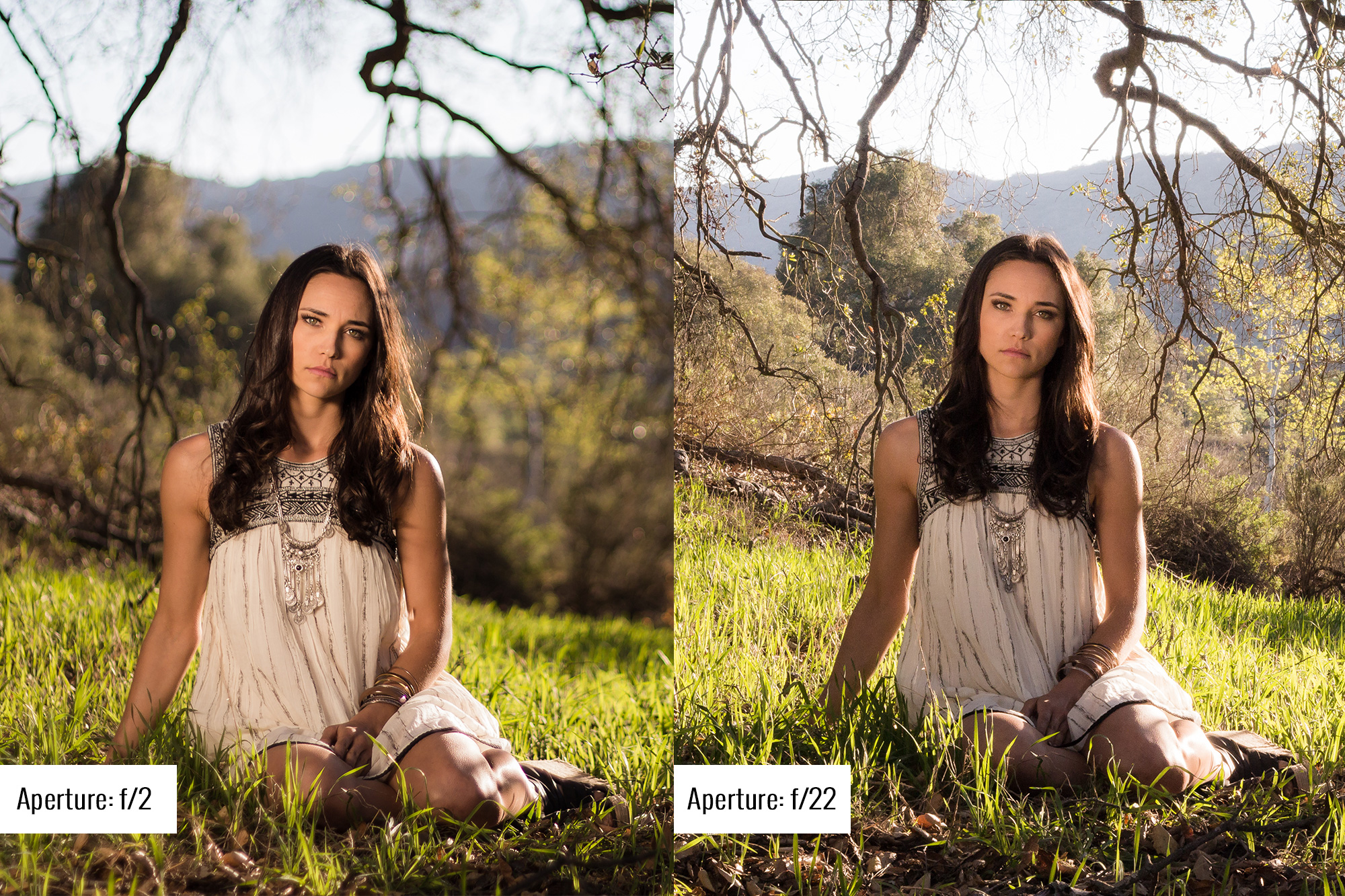
With all of this said, I have no knowledge of the technical part of cinematography. Does anyone have a resource for beginners? Like a youtube channel, an online course, etc. where I can learn the basics from aperture settings, to f/stops, and beyond?
I plan on using whatever budget I have on paying for audio, post, location, and meals.
Any other tips or pitfalls you can help me avoid would also be welcomed!
Thank you in advance.
r/Filmmakers • u/FluffyDoomPatrol • 8h ago
Hi,
I have a question that has been bugging me, before DCPs and digital post production, how did films reuse shots?
I’m watching an old miniseries called Centennial, it’s very good, I usually watch it alongside Deadwood. The series was made in the 70s, so shot and presumably edited on film, but often the same footage is repeated. Each episode begins with a recap and then some episodes have extended flashbacks.
My understanding is, editors would work on a copy of the negative, cut it, then once all of the decisions were made, the negative would be cut in a clean room.
However if a shot is repeated, there is still only one physical occurrence of it on the negative. So how was that duplicated?
I’d know a copy can be made at the lab, but that causes generational loss, I’m not noticing that here.
I know some of the Star Trek films reused the same shots. Mostly special effects, so probably a larger neg like vista vision and they’d just go back to the source, but I think a few stunts were reused also so there would only be the 35mm copy that was used previously.
Also, how did TV show openings handle this? I remember the opening credits of MASH always looked rather worn (and once I’m sure I saw writing as if someone had used a chinagraph pencil on the film), but other shows don’t seem to have this (Star Trek for example).
How was this sort of thing managed?
r/Filmmakers • u/Numerous-Flow7261 • 3h ago
Yo so I'm planning to make a Mafia Series, Crime is kinda my playground when it comes to filmmaking and it's the genre I love the most. I plan to do a twist where the main character loses a loved one and eventually meets a guy, becoming good friends with him. The guy tells the main character to enact revenge on the murder and take what's rightfully is, and eventually it's revealed this guy is a figment of his imagination trying to cope with the loved ones murder [I guess kinda like Fight Club but not really]. So I wanna put a song over the reveal at the end of an episode and I'd love to hear some suggestions on what would go along with it well lyrically and musically. I think Lithium by Nirvana would be a very cool pick myself but I'm curious
r/Filmmakers • u/DoraDura0 • 40m ago
23M, I’m looking for someone who’s at least 20 and just obsessed with cinema, all I need. Maybe you are that guy or know someone who is.
I have a crazy movie-related plan, but I'll tell about it once we know each other a little better.
You’re in?
r/Filmmakers • u/kingdeadpool200 • 11h ago
r/Filmmakers • u/Defiant-Repeat4873 • 2h ago
I’m an independent filmmaker in Los Angeles, working on an interview project. The first episode is finished, and the second is in production. I already have a technical team, but I’m looking for creative people to work with me on developing ideas, brainstorming, exploring new concepts and formats, and figuring out how to turn ambitious ideas into successful projects. I’m interested in people with a creative producer mindset — people who are ambitious, proactive, full of ideas, and willing to put in the hard work to build something meaningful. My long-term interests include documentaries, science and educational content, and TV-style shows. The challenge is that I have a very limited budget. How can I attract people like this at an early stage? Is it realistic to find people who share the ambition and want to build something together before there’s much money involved? And what are some fair ways to compensate creative collaborators when the budget is minimal? I’d appreciate advice from people with experience in independent filmmaking, creative producing, or building media projects. I’m also open to connecting with like-minded people in LA who are excited about creating something ambitious together.
r/Filmmakers • u/shagbag • 6h ago
Camera images:
Timestamp:
Includes:
Sony Venice 6K + hard carrying case
DVF-EL200 viewfinder
Tilta Cage
Tilta Battery Plate
AXS-A1TS48 1 TB memory card
AXS-AR1 memory card reader + soft carrying case
--
Price: $25k via PayPal F&F, Venmo, etc.
r/Filmmakers • u/bratislatouf • 2h ago
*No dialogue, but English subtitles are still available ("hello").
Hi all,
I am continuing my speedrunning filmmaking challenge with this horror short, which I shot yesterday and edited at lunch while my son was sleeping.
It was fun to shoot, and I really enjoyed watching this one today (especially since I am not in it).
Feel free to tell me what you think.
Love you
r/Filmmakers • u/Personal-Double-6710 • 2h ago
Is there a term for when Scene A shows characters speculating about a suspect, and right after in Scene B, they show a random character doing something totally normal and even though it’s not explicitly stated yet, you just know it’s the culprit?
I used to think it was just a coincidence, but it happens in so many shows and movies, i find it so satisfying 😭
(It’s even better when you know for sure who is the suspect 😋)
r/Filmmakers • u/mengles20 • 2h ago
Doom Squad is my first short film. It’s an 11-minute dark comedy about a men’s support group confronting loneliness, masculinity, and an unexpected crisis that throws the meeting into disarray.
I wrote, directed, and starred in the film, which premiered at the Flagstaff International Film Festival and won Best Comedy.
As a first-time filmmaker, I’d love to hear what other filmmakers think- particularly about the directing, performances, and how the film balances comedy with its more sincere moments.
r/Filmmakers • u/starkiller6977 • 9h ago
Submission statement: Work in progress from our medieval fantasy project BLADES of BAVARIA - filmed a while ago in the forest with a really skilled sword master. Now, experimenting with foley fx and some temp-music. Using the BMPCC4K and some vintage lenses... yadda yadda.
The bigger issue with this sequence that I quite like: It will most likely not fit into the final cut - whenever that will be done.
r/Filmmakers • u/fedup305 • 7h ago
I'm curious to get some feedback from fellow videographers, editors, and production company owners on what you'd realistically charge for a project like this in the Miami/South Florida market.
The client is a large, established, well-funded nonprofit organization, not a small grassroots operation. They're looking to produce a polished, interview-driven brand storytelling video with multiple deliverables and a pretty tight turnaround.
Here's the scope:
Pre-production
Production
Post-production and deliverables
Timeline
Why I'm asking
I recently submitted a proposal for this project but wasn't selected. After receiving some feedback from the client, I learned there was a significant difference between my quote and the winning proposal.
It got me wondering whether my pricing expectations are out of step with the current market or whether different production companies are approaching projects like this very differently.
My question: What would you realistically quote for this entire project in the South Florida market?
I'm particularly interested in hearing from people who regularly handle corporate, nonprofit, documentary-style, or interview-driven productions.
Would you approach this with a two-person crew or handle it solo? How many hours would you realistically budget for post-production, especially considering the archival footage, motion graphics, revisions, and multiple deliverables?
I'm intentionally leaving out the actual bid amounts because I'd like to get unbiased feedback on what others would charge based on the scope alone.
Appreciate any insight!
r/Filmmakers • u/Classic-Witness-4142 • 11h ago
I had a genre short screen at a festival last week that wasn’t genre-centric and we ended up in a totally chaotic screening block that was a mix of experimental, drama, horror and comedy.
There was absolutely no flow from one film to the next - it went from a drama about grief to a splatter film and I was just sat there laughing at the continual mood whiplash.
It was an interesting experience as I’m programmed in genre blocks 99% of the time, but from a curation perspective I found it totally baffling. Would love to hear others’ experiences like this.
r/Filmmakers • u/viniprod • 8h ago
I made a FREE False Color LUT for Sony Cameras!
Download it HERE:
https://drive.google.com/drive/folders/1LScILty5TmV_HVoJXroJ3KIpvrARRkIm?usp=sharing
Feel free to follow along with the video to learn how this can be added to your Sony camera and also help you get perfect exposure every time!
Note: This False Color LUT is made to be used with S-Gamut3.Cine/S-log3
Plase make sure to use to correct LUT for the device:
CAMERA LUT: Beta_False_Color_Slog3_Vini_ Lut.cube
DAVINCI LUT: Beta_False_Color_Rec709_Vini_Lut.cube
Thanks in advance for watching!
